Texture pack review
Xray (Spectator)
Xray (Spectator) latest build for Minecraft 1.17
This pack modifies block visibility specifically for spectator mode, allowing users to spot ore veins through stone and deepslate without interfering with standard survival gameplay.
Overview
In-depth
Xray (Spectator) is a focused texture pack that alters block visibility for players using spectator mode, making ore veins and certain blocks much easier to spot through stone and deepslate. Created by AlphaLeoli, this pack is built for Minecraft Vanilla and concentrates on clarity in spectator mode rather than changing survival sightlines. It keeps the visual style minimal so players can quickly identify target blocks without adding extra visual clutter.
The pack does not alter mobs or UI elements, it targets only block textures and translucency to produce a high-contrast view when flying in spectator. That design choice helps content creators and map authors who need clear visuals for demonstrations, recording, or world analysis. Because it only affects textures, it remains lightweight on settings and does not require shaders.
Players should note that Xray (Spectator) is intended for use in spectator mode, and it changes how blocks render when that gamemode is active. It is not intended to give advantages in normal survival gameplay, and it was designed to avoid interfering with standard block visibility outside spectator. The pack lists broad compatibility across recent Minecraft releases, and texture packs often continue to work with nearby versions even if they were not specifically built for them.
Who this is for
Use Xray (Spectator) if you need a simple, reliable way to inspect a world without changing game mechanics. The pack is useful for server administrators checking generation, builders reviewing underground structure placement, and creators preparing footage. For other types of visual changes, see more options on our texture pack browse page, or check the pvp category for similar minimal and utility focused packs.
Gallery
Screenshots
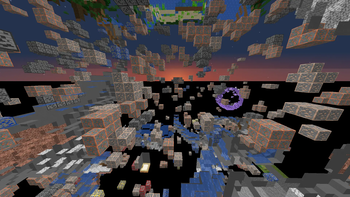
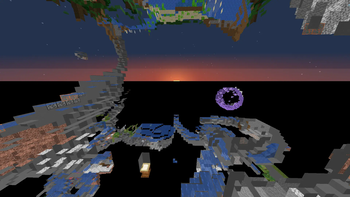
Xray (Spectator) in game, captured across biomes and lighting conditions.
What you get
Why Xray (Spectator)?
Clear ore visibility
Makes ore veins and stone variations much easier to notice while flying in spectator mode for quick world inspection.
Minimal visual change
Alters only block textures and translucency, preserving the rest of the game visuals and preventing distraction.
Vanilla compatible
Designed for Minecraft Vanilla, so it works without additional mods and keeps setup simple for most players.
Lightweight
Texture changes are focused and small in scope, which reduces load on the game and minimizes potential lag.
Good for creators
Helps content creators and map makers capture clear footage or screenshots of underground features.
Non intrusive
Does not modify mobs, UI, or game mechanics, limiting its impact to spectator mode block rendering only.
Downloads
Get Xray (Spectator)
The 5 most recent Xray (Spectator) builds, direct mirror links, no ad redirects.
Install
How to install Xray (Spectator)
Vanilla route
- 1Download the pack zip from the creator or a trusted host.
- 2Open Minecraft, go to Options, then Resource Packs.
- 3Click Open Pack Folder and move the zip into that folder.
- 4Return to Minecraft and enable the Xray (Spectator) pack from the list.
- 5Restart Minecraft if textures do not apply immediately.
Modded route (Minecraft Vanilla)
- 1Install Fabric or Forge if you run other mods, Optifine is optional for extra control.
- 2Place the pack zip into the resourcepacks folder as with vanilla installation.
- 3Launch Minecraft using your modded profile, then enable the pack in Resource Packs.
- 4Adjust mod settings or Optifine options for texture loading if you installed Optifine.
- 5Restart the modded client if textures fail to appear or conflict occurs.
◎ Compatibility
✓ Tested and confirmed working on Minecraft 1.17
We ran Xray (Spectator) on Minecraft 1.17 even though the pack was not officially built for this version. Texture packs typically stay compatible across nearby Minecraft releases, and this one runs as expected.
Troubleshooting
Common problems
Textures not appearing
Ensure the zip is placed in the resourcepacks folder and the pack is enabled in Options, then restart the game.
Colors look off
Check Minecraft default brightness and any shader or Optifine settings, then toggle the pack off and on to refresh textures.
Pack breaks in survival view
This pack targets spectator mode; switch gamemodes to confirm behavior and disable the pack for normal survival sessions.
Conflicts with other packs
Load Xray (Spectator) alone or move it to the top of the resource pack list to ensure its textures override others.
FAQ
Frequently asked questions
What Minecraft versions does Xray (Spectator) support?+
The pack lists many recent versions as supported. Texture packs generally remain compatible with nearby Minecraft versions even when they were not officially built for that release.
Will Xray (Spectator) affect performance?+
Because it only modifies a subset of block textures, performance impact is usually minimal; you may notice no change on most systems.
Can I use this pack on Minecraft Bedrock?+
This pack is designed for Java edition resource packs, so it will not work on Bedrock without conversion tools and manual edits.
Do I need Optifine to run this pack?+
Optifine is not required, but it is optional if you want additional texture and performance settings such as custom mipmaps.
Is using this pack risky on servers?+
The pack changes only client side textures, so it is not a server modification; however some servers enforce rules about client-side visualization tools.
What if textures appear stretched or missing?+
Try disabling other resource packs, check the resourcepacks folder, and restart the game; you can also re-download the pack to ensure integrity.
Ready to install?