Texture pack review
Visual: Armor Trims
Visual: Armor Trims latest build for Minecraft 1.21.11
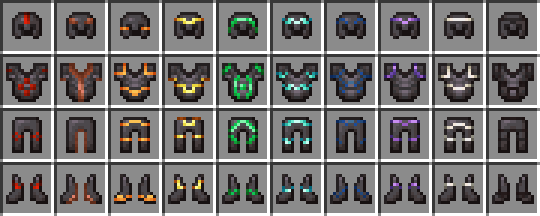
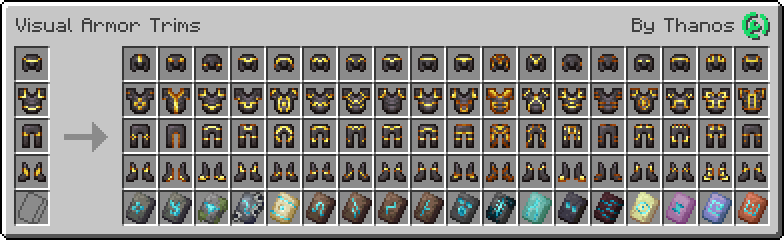
Visual: Armor Trims is a small but helpful vanilla-plus resource pack that updates inventory icons to show the actual trim patterns on your armor items.
Overview
In-depth
Visual: Armor Trims is a compact vanilla-plus resource pack that updates inventory icons to display the actual trim patterns applied to armor items. Instead of relying on the default generic icons, this pack makes it easier to identify trimmed armor at a glance, which is especially handy when you have multiple sets or are sorting through storage. The change is focused and unobtrusive, preserving the vanilla art direction while making a practical quality of life improvement.
The author, thanos, keeps the style faithful to Minecraft, so nothing else in the world receives dramatic visual changes. If you want to browse other texture packs, you can find a wide selection on our main texture packs page. The load is lightweight, since this pack only replaces a small set of GUI and item textures, and it should feel natural alongside most other subtle enhancements.
Installation is straightforward, and the pack works with standard Minecraft vanilla. It should pair well with other vanilla-plus packs that do not alter the same inventory icons. Because the modification touches inventory and item textures, be aware that combining it with large overhaul packs that replace many GUI assets can lead to conflicts. For more packs in the same category, see vanilla-plus choices available on the category page.
Who this pack is for
Players who want clearer visual feedback about armor trims without changing the overall look of the game will appreciate Visual: Armor Trims. It is an efficient solution for role players, server administrators running shops, and any player who likes to keep armor organized by trim style. The pack is licensed under Creative Commons Attribution Share Alike 4.0 International, which allows sharing and adaptation with attribution under the same license terms.
Gallery
Screenshots
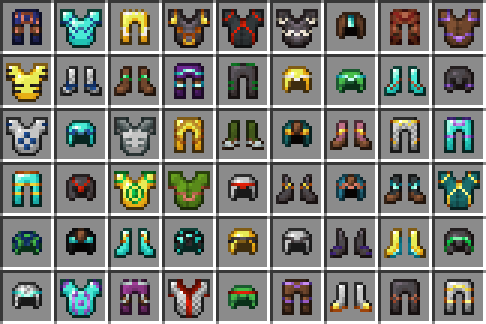
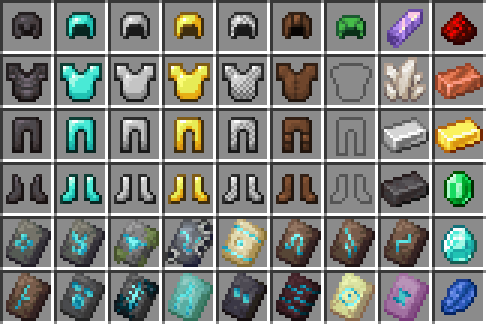
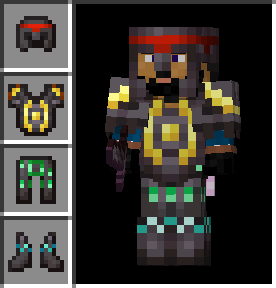
Visual: Armor Trims in game, captured across biomes and lighting conditions.
What you get
Why Visual: Armor Trims?
Immediate visual clarity
Inventory icons reflect armor trim patterns, making it quick to identify which pieces have which trims without equipping them.
Vanilla friendly
Keeps the original Minecraft look while only modifying a focused set of textures for minimal aesthetic disruption.
Lightweight changes
Small asset replacement means low performance impact, suitable for machines that struggle with large packs.
Easy pairing
Designed to work alongside other subtle improvements, as long as those packs do not replace the same inventory textures.
Practical for servers
Makes shop management and item sorting simpler by giving visible cues to armor trims in chests and inventories.
Permissive license
Released under Creative Commons Attribution Share Alike 4.0, allowing sharing and adaptation with proper credit.
Downloads
Get Visual: Armor Trims
The 9 most recent Visual: Armor Trims builds, direct mirror links, no ad redirects.
Install
How to install Visual: Armor Trims
Vanilla route
- 1Download the pack from the author page or texturespack browse page and save the zip file.
- 2Open Minecraft, go to Options then Resource Packs, and click Open Pack Folder.
- 3Move the downloaded zip into the resourcepacks folder without unzipping it.
- 4Back in Minecraft, enable Visual: Armor Trims in the Resource Packs menu and confirm.
Modded route (Minecraft Vanilla)
- 1Install Fabric or Forge depending on your mod setup, with Optifine optional for extra GUI tweaks.
- 2Place the pack zip into the resourcepacks folder of the Minecraft instance used by Fabric or Forge.
- 3Start the game using the Fabric or Forge profile and open Resource Packs from Options.
- 4Enable Visual: Armor Trims and reorder it above or below other packs to resolve priority.
◎ Compatibility
✓ Tested and confirmed working on Minecraft 1.21.11
We ran Visual: Armor Trims on Minecraft 1.21.11 even though the pack was not officially built for this version. Texture packs typically stay compatible across nearby Minecraft releases, and this one runs as expected.
Troubleshooting
Common problems
Icons still look like vanilla
Confirm the pack is enabled in the Resource Packs menu and placed above any packs that also modify inventory icons.
Conflicting textures with another pack
Disable the other pack or move Visual: Armor Trims higher in the pack order so its inventory textures take priority.
Pack does not appear in game
Ensure the zip file was placed in the correct resourcepacks folder for the active Minecraft profile and that the file is not nested inside extra folders.
Minor FPS changes
This pack is small, but if you see drops, try lowering other performance mods or disable high resolution packs that run alongside it.
FAQ
Frequently asked questions
Which Minecraft versions does Visual: Armor Trims support?+
The author lists support for recent 1.20 and 1.21 builds, plus some launcher version entries. Texture packs generally remain compatible with nearby Minecraft versions even when they were not officially built for that release.
Will this pack affect game performance?+
The modifications are minimal and focused on inventory icons, so performance impact is typically negligible on most systems.
Can I use this pack on Bedrock Edition?+
This resource pack targets Java Edition textures, and Bedrock uses a different format, so it will not work on Bedrock without conversion tools.
Do I need Optifine to use Visual: Armor Trims?+
Optifine is not required for this pack, though players using Optifine may notice additional graphical options; the pack works in standard vanilla Minecraft.
Will using this pack trigger server bans or issues?+
Client-side texture packs like this are normally allowed and do not affect server integrity, but always follow the server rules; servers may disallow client modifications in rare cases.
What if an icon looks incorrect or broken?+
Try disabling other resource packs that modify inventory assets, and confirm the pack zip is intact. If problems persist, contact the author or check the pack page for support details.
Ready to install?