Texture pack review
Tree Xray (Unobtrusive Leaves)
Tree Xray (Unobtrusive Leaves) 16x, latest build for Minecraft 26.2
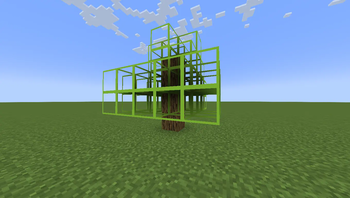
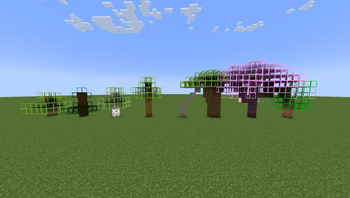
This simple resource pack makes tree leaves transparent with a thin border, allowing you to easily locate hidden logs inside dense forests and large trees.
- Style
- Simplistic
- Platform
- Java
- Author
- CaptainEnder
- First release
- Jul 31, 2024
- Latest version verified
- 26.2
Overview
In-depth
Tree Xray (Unobtrusive Leaves) is a minimalist 16x resource pack that makes tree leaves mostly transparent while keeping a thin border so foliage still reads as foliage. The result is a subtle visual change that helps you spot trunks and hidden logs inside dense forests or custom builds without resorting to full xray tools. It keeps the natural colors and shapes of leaves, so the world still looks like a forest rather than a grid of holes.
The pack is intentionally small in scope, focusing only on leaf opacity and edge definition for all standard leaf types. That restraint means it is compatible with many gameplay styles, from survival building to exploration. Because the change is visual only, it does not modify loot, mob behavior, or world generation. You can pair it with shaders or other minimal resource packs, though you should check for overlapping edits to leaf textures.
How it feels in play
Using Tree Xray (Unobtrusive Leaves) speeds up tasks that require finding trunks or interior spaces in trees, like harvesting, hollowing, or locating cave entrances hidden under canopies. It also reduces the frustration of repeatedly running around a tree to find a seam. The pack is not designed for competitive advantage on servers that restrict visibility mods, so always review server rules before using it online. For more texture pack options browse the full collection at our main page.
If you prefer other visual approaches, explore the Clean category to find similar minimal packs that alter specific blocks rather than global art direction. That category page lists packs that share the same emphasis on clarity and low visual noise. The pack supports the most recent listed game releases, and users report it working across adjacent versions with no extra configuration.
Gallery
Screenshots
Tree Xray (Unobtrusive Leaves) in game, captured across biomes and lighting conditions.
What you get
Why Tree Xray (Unobtrusive Leaves)?
Clearer Tree Interiors
Transparent leaves let you see trunks and hidden log placements without changing leaf color or shape, keeping forest aesthetics intact.
Minimal Visual Impact
A thin border preserves leaf definition, so foliage still reads correctly at distance and while moving through forests.
Low Resolution Friendly
At 16x the pack does not demand performance, making it suitable for lower end machines and consistent frame rates.
Compatible With Shaders
Because it only adjusts leaf textures, you can layer it with many shaders and small packs, though conflicts are possible.
Easy to Spot Logs
Finding trunks inside big trees or custom builds becomes faster, which helps with harvesting and locating hidden structures.
Focused Feature Set
The pack makes a single, purposeful change, which reduces the chance of unintended visual side effects in other blocks.
Downloads
Get Tree Xray (Unobtrusive Leaves)
The 2 most recent Tree Xray (Unobtrusive Leaves) builds, direct mirror links, no ad redirects.
Install
How to install Tree Xray (Unobtrusive Leaves)
Vanilla route
- 1Download the pack zip and place it in your resourcepacks folder.
- 2Open Minecraft, go to Options, then Resource Packs, then Open pack folder.
- 3Select Tree Xray (Unobtrusive Leaves) in the Resource Packs menu and enable it.
- 4Move it to the top of the active packs list for priority over other packs.
- 5Restart the game if textures do not load immediately after enabling.
Modded route (Minecraft Vanilla)
- 1Install Fabric or Forge for your Minecraft version, Optifine optional for extra texture control.
- 2Place the pack zip into the resourcepacks folder used by your modded profile.
- 3Launch Minecraft with the Fabric or Forge profile selected and open Resource Packs.
- 4Enable Tree Xray (Unobtrusive Leaves) and ensure it is prioritized above conflicting packs.
- 5If using Optifine, check shader and texture settings to avoid double handling of transparency.
◎ Compatibility
✓ Tested and confirmed working on Minecraft 26.2 and 26.1.2
We ran Tree Xray (Unobtrusive Leaves) on Minecraft 26.2 and 26.1.2 even though the pack was not officially built for these versions. Texture packs typically stay compatible across nearby Minecraft releases, and this one runs as expected.
Troubleshooting
Common problems
Leaves appear fully invisible
Make sure the pack is enabled and above other packs. If issue persists, check shader or Optifine settings that can override transparency.
Thin border looks jagged
This can happen at certain mipmap or anisotropic settings, so adjust video settings or disable mipmaps for crisper leaf edges.
Conflicts with other leaf edits
Disable or reorder other resource packs that modify leaf textures so Tree Xray (Unobtrusive Leaves) is applied last.
Server flags pack as cheating
Review the server rules, and if required, disable the pack on that server. Ask server staff if visual-only packs are permitted.
FAQ
Frequently asked questions
Which Minecraft versions are supported?+
The pack lists support for 1.21 and 1.21.4, and users often find it works with nearby Minecraft releases without issues. Texture packs generally remain compatible with nearby Minecraft versions even when they were not officially built for that release.
Will this affect game performance?+
At 16x resolution the pack has minimal performance impact for most machines. If you notice slowdowns, test with shaders off and adjust video settings.
Can I use this on Bedrock Edition?+
This resource pack is designed for Java edition, not Bedrock. Bedrock uses a different format, so conversion or a native Bedrock pack would be required.
Do I need Optifine to run it?+
Optifine is not required for the pack to work, but it can offer additional control over transparency and performance. Use Optifine only if you want its optional features.
Is using this pack a risk on multiplayer servers?+
Some servers disallow visibility or xray style packs, so check server rules first. If unsure, ask an admin, and remember many servers treat visual-only packs differently than client mods.
Ready to install?