Texture pack review
Sky Villages - Farmer's Delight Compat
Sky Villages - Farmer's Delight Compat latest build for Minecraft 1.19.3
This compatibility pack merges the floating islands of Sky Villages with the farming mechanics of Farmer's Delight, adding specialized garden islands to the sky.
Overview
In-depth
Sky Villages - Farmer's Delight Compat adapts the floating island aesthetic of Sky Villages to work alongside Farmer's Delight farming blocks and crops. The pack is focused on stylistic harmony, so garden plots, crop rows, and kitchen-related blocks sit naturally on small sky isles. Textures are tuned to maintain the airy, pastoral character of the original Sky Villages while matching the color palette and tile patterns used by Farmer's Delight.
The author, Aureljz, created this compatibility layer to address visual seams players noticed when combining the two mods and texture sets. Expect coordinated textures for planters, crop stages, herb racks, and simple decorative cookware. The result is a more cohesive look when you build a network of garden islands, farm towers, and floating market stalls. You can find more packs and related texture sets on our browse page at texturespack.com.
Textures in Sky Villages - Farmer's Delight Compat tend to keep block resolution modest, prioritizing readability at a distance and clarity for building. That choice works well for players who build large floating settlements and need consistent textures across many tile types. The pack does not introduce new models or gameplay changes, it focuses on visual consistency between the two content sources mentioned in the name, so expect the same in-game mechanics to behave as usual.
Installation is straightforward for most players, but this pack is primarily aimed at those already combining Sky Villages and Farmer's Delight content. If you run a modded client using Fabric or Forge, there are small steps to ensure the textures load in the correct order. We cover basic installation and common troubleshooting below. For browsing more themed texture packs, visit our themed category page on texturespack.com.
Who this suits
This compatibility pack is best for builders who want floating farms and garden islands to feel like a single design system. It is useful for survival players who rely on Farmer's Delight crops and for creative builders assembling skybound villages with consistent decorative language.
Gallery
Screenshots
Sky Villages - Farmer's Delight Compat in game, captured across biomes and lighting conditions.
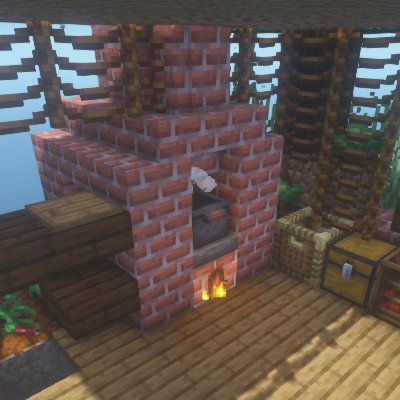
What you get
Why Sky Villages - Farmer's Delight Compat?
Consistent Farming Look
Merges crop and planter textures so garden areas look cohesive across sky islands and village builds.
Matches Color Palette
Adjusts hues and tile patterns to reduce visual clash between Sky Villages and Farmer's Delight assets.
Readable at Distance
Prioritizes clarity so large floating settlements remain legible without close inspection.
Low Complexity
Focuses on texture harmony rather than extra models, keeping performance impact minimal.
Author Maintained
Created by Aureljz, the pack shows targeted fixes rather than broad unrelated changes.
Easy to Layer
Designed to be placed on top of existing packs without heavy conflict resolution steps.
Downloads
Get Sky Villages - Farmer's Delight Compat
The 1 most recent Sky Villages - Farmer's Delight Compat builds, direct mirror links, no ad redirects.
Install
How to install Sky Villages - Farmer's Delight Compat
Vanilla route
- 1Download the pack and unzip to a temporary folder on your computer.
- 2Open Minecraft, go to Options, then Resource Packs, and click Open Pack Folder.
- 3Move the extracted pack folder into the resourcepacks directory.
- 4Select Sky Villages - Farmer's Delight Compat in the Resource Packs menu and confirm.
- 5Reload the world or restart the game to ensure textures apply correctly.
Modded route (Vanilla)
- 1Install Fabric or Forge and any required mods before adding texture packs.
- 2Place the pack in the resourcepacks folder after extracting it from the archive.
- 3Load Minecraft with Fabric or Forge, then open Resource Packs from Options to enable it.
- 4Use texture pack ordering so this compat pack sits above Sky Villages but below any overriding packs.
- 5Optifine may be installed as optional for additional texture features, it is not required.
◎ Compatibility
✓ Tested and confirmed working on Minecraft 1.19.3
We ran Sky Villages - Farmer's Delight Compat on Minecraft 1.19.3 even though the pack was not officially built for this version. Texture packs typically stay compatible across nearby Minecraft releases, and this one runs as expected.
Troubleshooting
Common problems
Crops show mismatched colors
Move the compat pack above the other packs in the resource pack list so its textures take priority; reload the world.
Missing planter texture on islands
Confirm the pack is enabled and ensure Sky Villages and Farmer's Delight textures are present; reinstall if a file was corrupted.
Performance drops in large settlements
Lower render distance and disable fancy graphics or remove additional resource packs that add high resolution textures.
In-game models still look different
Some mods use custom models that textures cannot override, so check mod-specific assets or use Optifine or a model patch for further changes.
FAQ
Frequently asked questions
What Minecraft versions does this pack support?+
The author lists support for several 1.19 and 1.20 builds, but texture packs generally remain compatible with nearby Minecraft versions even when they were not officially built for that release.
Will this pack affect performance?+
This pack focuses on modest resolution textures, so it should have a low performance impact compared to high resolution packs.
Can I use this on Bedrock Edition?+
This pack is designed for Java resource pack structure, and is not directly compatible with Bedrock without conversion tools.
Do I need Optifine to use this pack?+
Optifine is not required for the textures to load, but installing Optifine can add additional graphical options if you want extra visual tweaks.
Is it safe to use on a server?+
Using the pack on a client does not change server mechanics, but server texture enforcement may differ; texture packs are client side and do not typically pose a server risk.
Textures look wrong after updating Minecraft, what should I do?+
Try disabling and re-enabling the pack, or download an updated compat pack if available, and note that many texture packs remain compatible with nearby Minecraft versions even when not officially updated.
Ready to install?