Texture pack review
Simple Grass Flowers
Simple Grass Flowers latest build for Minecraft 1.20
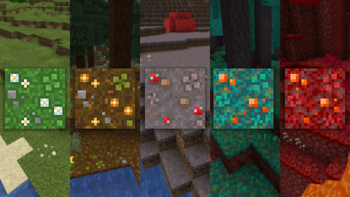
A vanilla-plus texture pack that adds small flowers, clovers, and stones to basic terrain blocks like grass and myclieum without requiring any external mods.
Overview
In-depth
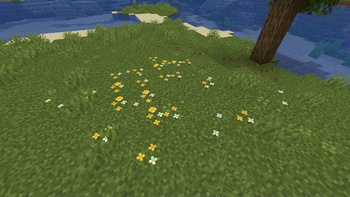
Simple Grass Flowers is a subtle vanilla-plus texture pack by 2DWisp that adds small flowers, clovers, and stones to base terrain blocks like grass and mycelium. The changes feel restrained, more like a light touch than a full overhaul, so familiar biomes remain recognizable while gaining tiny decorative details that break visual repetition.
The pack sticks close to default proportions and color, keeping the Minecraft look intact while scattering small flora across grass blocks and similar surfaces. That approach keeps performance costs low, since there are no heavy shaders or layered models to render. Players who want a bit more variety underfoot but do not want a dramatic art direction shift will find this pack useful.
Installation is straightforward for standard Minecraft, and the pack works without any additional mods. For browsing other texture packs in multiple styles, see our main texture pack browser at texturespack.com. If you prefer packs that emphasize a slightly enhanced vanilla aesthetic, try the vanilla-plus category for related options at texturespack.com/browse/texture-packs?category=vanilla-plus.
The design philosophy is minimal and consistent: small decorative sprites are blended into existing textures rather than replacing them wholesale. That means builds and screenshots retain original intent, while exploring or walking through plains and forests introduces little surprises. Expect the most obvious effects on grassy areas, paths, and mycelium, with occasional tiny stones that add a natural scatter to the terrain.
Who should try it
Simple Grass Flowers is a good fit for players who want mild variety without committing to a full art style change. It pairs well with low-impact resource packs, and with render setups that do not rely on heavy postprocessing. It is also suitable for builders who want small environmental detail that reads well at normal zoom levels, without drawing attention away from larger structures.
Gallery
Screenshots
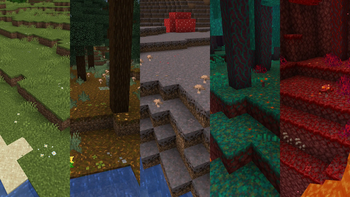
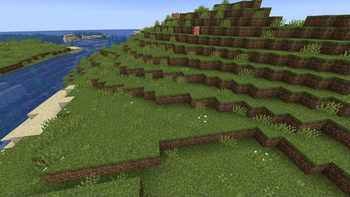
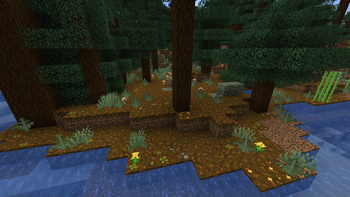
Simple Grass Flowers in game, captured across biomes and lighting conditions.
What you get
Why Simple Grass Flowers?
Subtle detail boost
Adds small flowers and clovers that break visual monotony while keeping the default Minecraft look intact and uncluttered.
Low performance cost
Changes are minor and texture based, so you should see little to no impact on frame rate compared with default textures.
Compatible with builds
Keeps shapes and colors close to vanilla, making it safe to use with existing builds and screenshots without clashing.
Easy to install
Uses standard resource pack installation, requiring no additional tools or complicated setup for most players.
Consistent art approach
Small decorative sprites are blended into base textures, creating a unified, natural look across terrain blocks.
Pairs well with mods
Because it is lightweight, it works well alongside performance or visual mods as long as they do not replace the same textures.
Downloads
Get Simple Grass Flowers
The 10 most recent Simple Grass Flowers builds, direct mirror links, no ad redirects.
Install
How to install Simple Grass Flowers
Vanilla route
- 1Download Simple Grass Flowers and place the zip into your resourcepacks folder.
- 2Start Minecraft and open Options, then Resource Packs from the main menu.
- 3Enable Simple Grass Flowers by moving it to the Selected list and click Done.
- 4Restart Minecraft if textures do not appear immediately after enabling.
- 5Adjust resource pack order if you are using multiple packs that modify terrain.
Modded route (Minecraft Vanilla)
- 1Install Fabric or Forge and launch Minecraft once to generate mod folders, Optifine optional.
- 2Place the Simple Grass Flowers pack zip into the resourcepacks folder.
- 3Enable the pack in Options, Resource Packs, and move it into Selected packs.
- 4If using Optifine, check texture settings for connected textures or custom colors.
- 5Restart the game or mod loader if textures fail to load or appear incorrect.
◎ Compatibility
✓ Tested and confirmed working on Minecraft 1.20
We ran Simple Grass Flowers on Minecraft 1.20 even though the pack was not officially built for this version. Texture packs typically stay compatible across nearby Minecraft releases, and this one runs as expected.
Troubleshooting
Common problems
Textures not showing
Make sure the pack zip is in the resourcepacks folder and enabled in Options, Resource Packs. Restart Minecraft if needed.
Conflicting pack overrides
Check resource pack order and place Simple Grass Flowers above packs that overwrite the same terrain textures.
Odd seams or alignment
Try reloading resource packs with F3 T and verify no other pack is altering nearby block textures that cause visible seams.
Performance drop
Although lightweight, disable other heavy resource packs or shaders and test again; lower settings or remove overlays that may add load.
FAQ
Frequently asked questions
What Minecraft versions does Simple Grass Flowers support?+
The author lists support across many 1.15 through 1.21.x versions. Texture packs generally remain compatible with nearby Minecraft versions even when they were not officially built for that release.
Will this pack affect performance?+
The changes are minimal and texture based, so performance impact is usually negligible unless combined with large shader packs or heavy resource packs.
Can I use this on Bedrock Edition?+
This pack is provided for Minecraft Java texture system. Bedrock uses a different format, so expect extra conversion steps or a separate Bedrock port if available.
Do I need Optifine to run Simple Grass Flowers?+
Optifine is not required for this pack to work. Optifine can be used optionally to tweak texture and connected texture settings, but the pack runs fine without it.
Is it safe to use on servers?+
Using a client-side resource pack like this is safe; servers will not be modified by the pack. Some servers may enforce their own resource pack, which can override local textures.
What if textures look wrong after loading?+
Try reloading resource packs with F3 T, restart Minecraft, and check for other packs that might conflict. Texture packs generally remain compatible with nearby Minecraft versions even when they were not officially built for that release.
Ready to install?