Texture pack review
Round Trees
Round Trees latest build for Minecraft 26.2
Round Trees replaces traditional cubic log models with smooth, circular shapes to create a more organic looking environment without breaking the vanilla feel.
Overview
In-depth
Round Trees replaces traditional cubic log models with smooth, circular shapes to create a more organic looking environment without breaking the vanilla feel. The Round Trees pack focuses on reshaping tree trunks and branches into rounded forms while keeping leaf blocks and other terrain elements close to vanilla, resulting in a subtle but noticeable change to forested areas and wooden structures.
The author, Motschen, keeps the texture language simple and consistent, so the pack reads as a natural variant of Minecraft rather than a total visual overhaul. Rounded logs blend well with vanilla lighting and block palettes, which helps the pack sit comfortably alongside many other light-touch resource packs. Players who want a calmer, less blocky silhouette for trees will appreciate how Round Trees softens horizons and canopy profiles without altering game mechanics.
Because this is a vanilla-plus style pack, it is compatible with standard Minecraft resource loading and does not require mods to function. That makes installation straightforward for most players, whether you are running a single player world or joining servers that permit custom resources. For browsing other options and similar packs, visit our main texture packs page to compare styles and find alternatives.
Textures here are aimed at preserving readability and performance, so you should not expect high resolution or shader specific effects. The result feels coherent in both exploration and building, and Round Trees integrates well with many shader packs and behavior-preserving extensions when used carefully. For more vanilla-plus selections, see the vanilla-plus category which lists packs with a similar design philosophy and approach.
How it feels in play
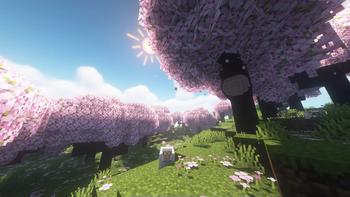
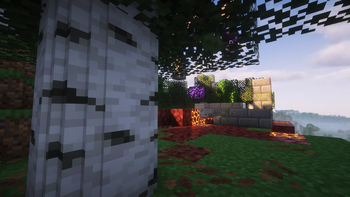
In practice, Round Trees makes forests and wooden builds look softer from a distance, while close-up the rounded logs still read as familiar blocks. The visual change is mostly aesthetic, so gameplay remains unchanged. This pack works well as a lightweight cosmetic tweak, ideal for players who prefer a gentler landscape without committing to a full style conversion.
Gallery
Screenshots
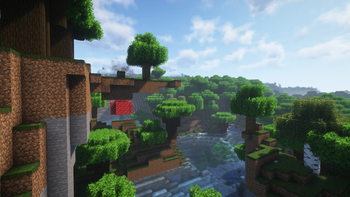
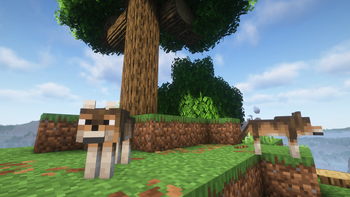
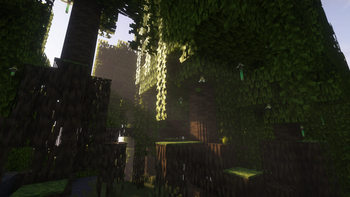
Round Trees in game, captured across biomes and lighting conditions.
What you get
Why Round Trees?
Softer silhouettes
Rounded log models reduce blocky edges, creating more natural looking treelines and a calmer world view while preserving vanilla readability.
Vanilla friendly
Maintains standard textures and palettes so builds and mobs remain familiar, easing the transition for players who prefer small cosmetic tweaks.
Low performance cost
Modest visual changes focus on model shapes, avoiding heavy textures or effects that would significantly impact frame rates.
Easy to mix
Plays nicely with many other resource packs and shaders because it does not rewrite large amounts of the vanilla texture set.
Consistent style
Author attention to matching colors and shading keeps the rounded logs coherent with surrounding blocks and light sources.
Quick cosmetic upgrade
Gives builds and landscapes a fresh look without committing to a full overhaul, suited for casual players and builders.
Downloads
Get Round Trees
The 7 most recent Round Trees builds, direct mirror links, no ad redirects.
Install
How to install Round Trees
Vanilla route
- 1Download the Round Trees pack file from the texture packs page on texturespack.com.
- 2Open Minecraft, then click Options and select Resource Packs or Texture Packs.
- 3Click Open Resource Pack Folder and copy the downloaded zip into that folder.
- 4Back in Minecraft, move Round Trees from Available to Selected to enable it.
- 5Restart the game if textures do not update immediately to ensure models load correctly.
Modded route (Minecraft Vanilla)
- 1Install Fabric or Forge for your Minecraft version, Optifine is optional for extra graphical tweaks.
- 2Place the Round Trees zip into the resourcepacks folder when using Fabric, Forge, or vanilla.
- 3If using resource pack loaders, enable the pack in the Minecraft resource pack menu.
- 4Clear shader caches and restart Minecraft if using shaders to avoid visual glitches.
- 5Test in a single player world before using with modded content to check for compatibility.
◎ Compatibility
✓ Tested and confirmed working on Minecraft 26.2 and 26.1.2
We ran Round Trees on Minecraft 26.2 and 26.1.2 even though the pack was not officially built for these versions. Texture packs typically stay compatible across nearby Minecraft releases, and this one runs as expected.
Troubleshooting
Common problems
Rounded logs not appearing
Ensure the pack is enabled in the resource pack menu and restart Minecraft; corrupted downloads can prevent model changes, so re-download if needed.
Texture seams at chunk borders
This can occur with mismatched resource pack order or cached data, so move Round Trees to the top of the pack list and restart the game.
Compatibility with other packs
If other packs override the same models, use a pack merger or reorder packs so Round Trees takes priority for log models.
Performance drop after install
Lower render distance or disable heavy shaders, then test performance; the pack itself is light, so third party shaders or mods are likely culprits.
FAQ
Frequently asked questions
What Minecraft versions does Round Trees support?+
Round Trees lists support for a wide range of Java editions, including many 1.13 through 1.21 releases. Texture packs generally remain compatible with nearby Minecraft versions even when they were not officially built for that release.
Will Round Trees affect game performance?+
The pack focuses on model changes rather than high resolution textures, so it usually has minimal performance impact. Large shader packs or very high render distance settings will have a greater effect than this pack.
Can I use Round Trees on Bedrock edition?+
Round Trees is built for Minecraft Java resource loading, so it is not directly compatible with Bedrock. Bedrock uses a different resource format and model system.
Do I need Optifine to use this pack?+
Optifine is not required for Round Trees to work, though Optifine can provide additional model or performance features. Texture packs generally remain compatible with nearby Minecraft versions even when they were not officially built for that release.
Will using this pack risk getting banned on servers?+
Most servers allow client side resource packs that only change visuals, but some servers restrict any custom resources. Check server rules before using custom packs on multiplayer servers.
What if a texture looks broken after installing?+
Try reordering resource packs, clearing Minecraft caches, and restarting the game. If the issue persists, re-download the pack to rule out a corrupted file, and test without other packs enabled.
Ready to install?