Texture pack review
rotrBLOCKS
rotrBLOCKS 128x, latest build for Minecraft 26.2
The rotrBLOCKS pack brings 128x high resolution and PBR textures to your world while staying faithful to the blocky look you already know.
Overview
In-depth
rotrBLOCKS delivers a 128x realistic take on Minecraft blocks, keeping their familiar silhouettes while adding detail and material depth. The pack focuses on physical based rendering style textures that make stone, wood, metal, and fabric read as distinct materials without changing block shapes or colors drastically.
The attention is on consistency across biomes and builds, so plains, forests, and mine shafts retain recognizable tones but gain surface information that catches light in subtle ways. Textures avoid excessive noise or overpainting, which helps builds retain readability at medium viewing distances, and the pack plays well with shader effects that emphasize normals and specular highlights.
The author illystray has aimed for balance between realism and clarity, which makes rotrBLOCKS suitable for both survival play and screenshots. For a quick browse of other texture options head over to our main browse page for texture packs at texturespack.com, where you can compare resolutions and styles. If you prefer realistic packs specifically, see the realistic category for related picks and alternatives.
What to expect
Expect refined grout lines on bricks, more variation in wood grain, and metals that respond to light without looking metallicly fake. The pack does not change GUI elements or drastically alter mob appearances, so gameplay cues remain familiar. It is designed primarily for Minecraft Vanilla, and most users report stable behavior across many releases, though certain engine changes can affect how high resolution textures display.
Textures like ore veins and crafted blocks receive extra surface detail but keep contrast low to avoid distracting the eye. If you run shaders, rotrBLOCKS emphasizes normal and roughness maps, so pairing with a shader that respects these maps will deliver the most pronounced results.
Gallery
Screenshots
rotrBLOCKS in game, captured across biomes and lighting conditions.
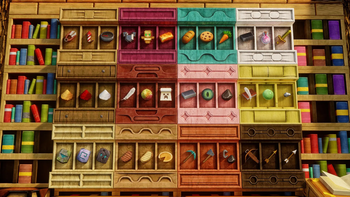
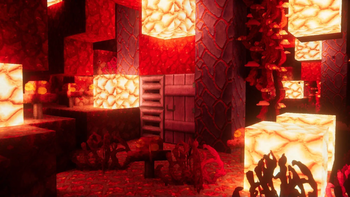
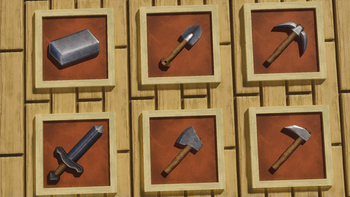
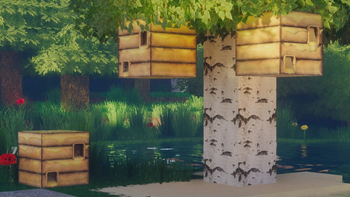
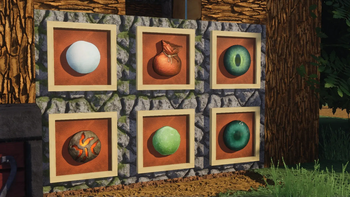
What you get
Why rotrBLOCKS?
Material clarity
Each block has distinct surface cues so wood, stone, and metal read clearly at a glance without changing base colors.
High resolution detail
128x textures add fine grain and grout definition that improve closeups and screenshots while keeping performance reasonable.
Shader friendly
Normal and roughness details are emphasized, making the pack pair well with shaders that use PBR information.
Stick to vanilla
The block shapes and GUI are not heavily altered, preserving gameplay readability and survival functionality.
Consistent aesthetics
Color and contrast choices remain uniform across biomes so builds maintain a coherent visual identity.
Good for builders
Subtle surface detail improves photographs and builds without introducing visual noise that hides patterns.
Downloads
Get rotrBLOCKS
The 10 most recent rotrBLOCKS builds, direct mirror links, no ad redirects.
Install
How to install rotrBLOCKS
Vanilla route
- 1Download the rotrBLOCKS resource pack file from the author or listing page.
- 2Open Minecraft, then select Options, Resource Packs from the main menu.
- 3Click Open Pack Folder and move the downloaded rotrBLOCKS zip into that folder.
- 4Return to Minecraft and enable rotrBLOCKS from the available packs list.
- 5Adjust Video Settings like mipmaps and render distance to suit performance and look.
Modded route (Minecraft Vanilla)
- 1Install Fabric or Forge for your Minecraft version, Optifine is optional for extra settings.
- 2Place the rotrBLOCKS zip in the resourcepacks folder as with vanilla installs.
- 3If using Optifine, open Video Settings and tweak quality options for textures.
- 4If using a modded launcher, ensure the selected profile matches the resource pack version.
- 5Restart the game and enable rotrBLOCKS in the Resource Packs menu.
◎ Compatibility
✓ Tested and confirmed working on Minecraft 26.2 and 26.1.2
We ran rotrBLOCKS on Minecraft 26.2 and 26.1.2 even though the pack was not officially built for these versions. Texture packs typically stay compatible across nearby Minecraft releases, and this one runs as expected.
Troubleshooting
Common problems
Blurry textures at distance
Increase mipmap levels and set default texture filtering in Video Settings, or raise render distance slightly to reduce blurring.
Low FPS after enabling pack
Lower render distance and clouds, disable fancy graphics, or run the pack with a lighter shader profile to recover performance.
Normal maps not showing with shaders
Ensure your shader pack supports PBR normals and roughness maps, and use a shader version compatible with your Minecraft release.
Pack not appearing in-game
Confirm the zip is placed in the resourcepacks folder and not inside another folder, then restart the launcher if it still does not appear.
FAQ
Frequently asked questions
Which Minecraft versions does rotrBLOCKS support?+
The pack lists support for many 1.13 through 1.21 and later profiles. Texture packs generally remain compatible with nearby Minecraft versions even when they were not officially built for that release.
Will these 128x textures hurt performance?+
Higher resolution textures use more VRAM and can lower FPS on weaker systems, try lowering render distance or using fewer concurrent resource packs to improve performance.
Can I use rotrBLOCKS on Bedrock Edition?+
This pack is designed for Minecraft Java Vanilla, Bedrock handles resource formats differently so conversion would be required and may not be complete.
Do I need Optifine to run rotrBLOCKS?+
Optifine is not required for basic use, but it offers extra texture and performance controls that can improve visual fidelity and frame rates.
Is this pack safe to use on servers?+
Using a clientside resource pack is safe for most servers, but some servers enforce or recommend specific packs, so follow their guidelines and disable server-side forced packs if needed.
Textures look wrong after a Minecraft update, what now?+
Try reloading resource packs or updating to the pack version matching your client. Texture packs generally remain compatible with nearby Minecraft versions even when they were not officially built for that release.
Ready to install?