Texture pack review
Rodrigo's Pack
Rodrigo's Pack latest build for Minecraft 26.2
Rodrigo's Pack offers a vibrant, 8x8 cartoon style designed for performance and clarity, making it a favorite for PvP players on older versions.
Overview
In-depth
Rodrigo's Pack is a compact, 8x8 cartoon style texture pack focused on clarity and performance, aimed at players who prefer a clean PvP look on older Minecraft clients. The palette is bright and saturated, with simplified block faces and item sprites that make targets and important elements easy to pick out during fast fights. This pack trims unnecessary visual noise, which helps maintain consistent frame rates on lower-end hardware while keeping a playful, energetic aesthetic.
The pack was created by rodrigo_al_, and its low resolution keeps resource demands small without removing character from the world. Textures are intentionally bold, colors are slightly exaggerated, and contrast is increased in key areas like ores and hostile mob features. Those changes help the player read the environment quickly, which is useful in duels, arenas, and server minigames.
Installation is straightforward for vanilla Minecraft, and the pack works well alongside common PvP setups. You can browse other texture packs on the site to compare styles and resolutions at this link to the main texture pack directory.
What to expect
Expect a profile that favors legibility over realism. The simplified UI elements and item icons reduce clutter, and the consistent visual language across blocks helps with hotkey and inventory recognition. Rodrigo's Pack concentrates on speed and function, and it remains a practical choice for players using legacy Minecraft versions. For more PvP oriented options see the PvP category of texture packs on the site.
Because Rodrigo's Pack targets older versions, check compatibility notes before using it with current snapshots or much newer releases. Many texture packs remain compatible with nearby Minecraft versions even when they were not officially built for that release, but you may notice small visual differences in blocks added after the pack was created.
Gallery
Screenshots
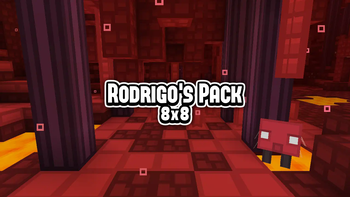
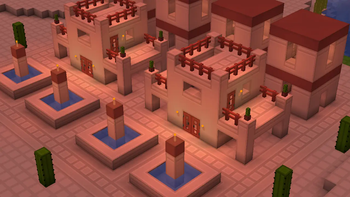
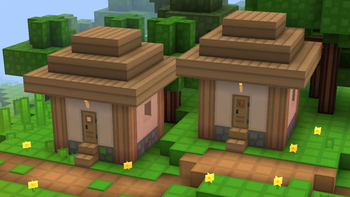
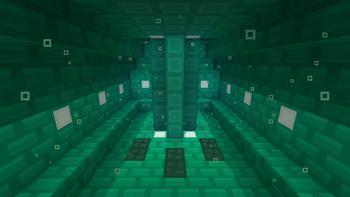
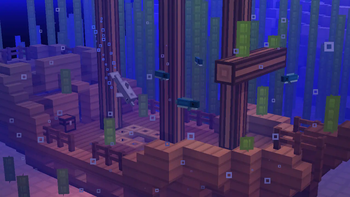
Rodrigo's Pack in game, captured across biomes and lighting conditions.
What you get
Why Rodrigo's Pack?
Improved Performance
Low 8x8 resolution reduces GPU load, which helps keep framerates high on modest systems during hectic fights.
Clear Visuals
Bold colors and simplified shapes make enemies, ores, and dropped items easier to spot in combat situations.
PvP Focused
UI and item icons are optimized for quick recognition, supporting fast inventory swaps and hotbar use.
Consistent Style
A unified cartoon approach keeps the world readable without jarring texture transitions between blocks.
Legacy Support
Designed for older Minecraft versions, this pack works well with classic PvP servers and antique clients.
Lightweight
Tiny assets mean fast loading times and minimal memory impact, useful for players running many mods or plugins.
Downloads
Get Rodrigo's Pack
The 2 most recent Rodrigo's Pack builds, direct mirror links, no ad redirects.
Install
How to install Rodrigo's Pack
Vanilla route
- 1Download Rodrigo's Pack resource file from the pack page on the site.
- 2Open Minecraft, go to Options, then Resource Packs, and click Open Pack Folder.
- 3Move the downloaded pack zip into the resourcepack folder, do not extract it.
- 4Return to Minecraft and click the pack to activate it, then click Done to apply.
Modded route (Minecraft Vanilla)
- 1Install Fabric or Forge and launch Minecraft once to create the mods folder, Optifine optional.
- 2Place Rodrigo's Pack zip into the resourcepacks folder in your Minecraft directory.
- 3If using Optifine, adjust settings for performance and texture animations as desired.
- 4Launch Minecraft with Fabric or Forge profile and enable the pack in Resource Packs.
◎ Compatibility
✓ Tested and confirmed working on Minecraft 26.2 and 26.1.2
We ran Rodrigo's Pack on Minecraft 26.2 and 26.1.2 even though the pack was not officially built for these versions. Texture packs typically stay compatible across nearby Minecraft releases, and this one runs as expected.
Troubleshooting
Common problems
Blurry textures on modern versions
Enable default mipmap settings and make sure the pack is not being stretched by a shader. Try lowering mipmap level if blur appears.
Missing textures added in newer Minecraft
Use a compatibility pack or fallback resource pack for newer blocks, or accept the default textures from vanilla Minecraft.
Items look too similar
Adjust GUI and item settings in Options to increase contrast, or swap to a different pack for clearer item differentiation.
Pack not appearing in Resource Packs
Confirm the file is a zip and placed in the correct resourcepacks folder, then restart Minecraft to refresh the list.
FAQ
Frequently asked questions
Which Minecraft versions does Rodrigo's Pack support?+
The pack targets several older versions including 1.8 and 1.16 series. Texture packs generally remain compatible with nearby Minecraft versions even when they were not officially built for that release.
Will this pack improve my FPS?+
Yes, the 8x8 resolution is designed to be lightweight and can boost performance on weaker systems by reducing texture load.
Can I use this pack on Bedrock Edition?+
This pack is built for Java edition formats and will not install on Bedrock without conversion. Bedrock uses a different resource system.
Do I need Optifine to use Rodrigo's Pack?+
Optifine is not required for basic use, but it can provide extra performance tweaks and animation options. Many players use Optifine optionally for smoother visuals.
Is using this pack safe on multiplayer servers?+
Generally yes, plain texture packs do not affect gameplay and are allowed on most servers. Always check server rules, as some servers restrict custom textures.
What should I do if a texture is broken?+
Re-download the pack to ensure the file is intact, then try activating only this pack to isolate conflicts with other resource packs.
Ready to install?