Texture pack review
Realism Mats
Realism Mats latest build for Minecraft 26.2
Realism Mats is a high-definition texture pack designed for Minecraft Java Edition, focusing on ultra-realistic materials, depth-mapping, and shader compatibility to create a lifelike visual experience.
Overview
In-depth
Realism Mats is a high-definition texture pack for Minecraft Java Edition that focuses on lifelike materials, depth mapping, and shader compatibility. Surfaces like wood, stone, and metals gain a convincing sense of grain, roughness, and reflectivity that feels grounded without oversaturating colors. The result is a cleaner, more tactile world that rewards close inspection while staying readable during fast gameplay.
The author, wimdesigns077, leans into subtlety. Blocks retain practical silhouettes for survival play, yet textures carry refined detail that makes builds feel crafted rather than flat. Expect consistent tonality across biomes and building palettes, so your roofs, paths, and interiors blend smoothly in daylight and at night.
Paired with shader packs that read depth or material maps, Realism Mats shows pronounced contouring and light interaction. Even without shaders, the pack provides crisp edges, careful noise control, and balanced contrast that reduces visual clutter. Mobs and items keep a familiar profile, so you can enjoy the realism without relearning object shapes or losing clarity in combat.
It supports Minecraft 1.20.4, 1.21, and 1.21.1 for Java Edition. The license is Creative Commons Attribution Non Commercial No Derivatives 4.0 International, so share credit and avoid modifying or commercial use. If you want a similar feel across your worlds, browse other realistic texture packs for complementary styles.
Tips, setup, and pairing
High-definition textures benefit from solid performance settings. If you run shaders, start with moderate shadow quality and lower render distance, then raise options gradually. Iris with Fabric or OptiFine can help unlock features like parallax or material effects, depending on your shader. Keep Realism Mats near the top of your pack list to prevent conflicts with other visuals.
For more community favorites and alternatives that mix well with this pack, explore our full texture pack library. Whether you build modern cities, photoreal cottages, or grounded survival bases, Realism Mats brings a polished, material-focused look that stays functional during daily play.
Gallery
Screenshots
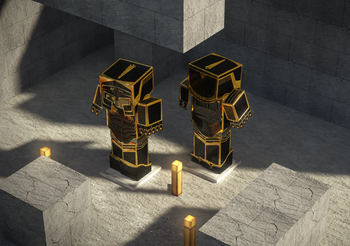
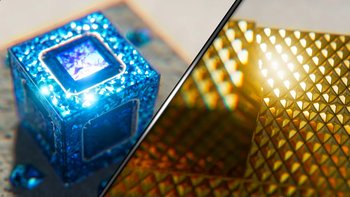
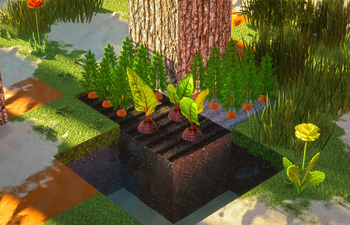
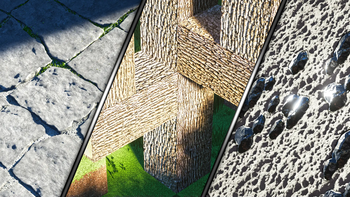
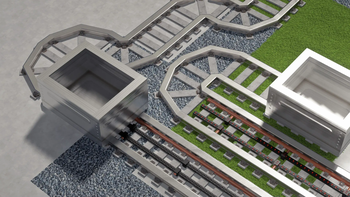
Realism Mats in game, captured across biomes and lighting conditions.
What you get
Why Realism Mats?
Lifelike Material Detail
Wood grain, stone roughness, and metal sheen appear natural and consistent across blocks. The pack emphasizes believable surfaces that look clean up close while keeping textures readable from a distance during survival or creative building sessions.
Shader Ready Design
Depth mapping and material-aware textures pair well with shaders that support normals or parallax. Enable compatible shader features to highlight contours and light response without losing the pack’s careful color balance and visual clarity.
Balanced Color Palette
Colors avoid harsh saturation, so builds fit together without odd tonal jumps. Landscapes, interiors, and roofs keep a coherent look that photographs well and remains easy on the eyes during long play sessions.
Consistent Block Readability
Realism Mats keeps familiar silhouettes and avoids noisy patterns, so blocks are quick to identify. That makes mining, crafting, and combat straightforward even when using higher-fidelity textures and optional shader features.
Good For Builds Screenshots
Detailed yet controlled textures help architecture and terrain read clearly in screenshots and videos. Surfaces capture light predictably, which makes timelapses and portfolio images look polished with minimal post-processing.
Simple To Install
It works as a standard Java resource pack, so setup is quick. You can optionally add shaders, Fabric, Forge, or OptiFine to unlock depth and material effects while keeping the base pack easy to manage.
Downloads
Get Realism Mats
The 2 most recent Realism Mats builds, direct mirror links, no ad redirects.
Install
How to install Realism Mats
Vanilla route
- 1Download the Realism Mats zip file to a known folder.
- 2Launch Minecraft Java 1.20.4, 1.21, or 1.21.1.
- 3Open Options, then Resource Packs, and click Open Pack Folder.
- 4Move the Realism Mats zip into the resourcepacks folder.
- 5Back in Minecraft, select the pack and click Done to apply.
Modded route (Minecraft Vanilla)
- 1Install Fabric or Forge, then add a compatible shader loader like Iris.
- 2Optionally install OptiFine for extra visual features and shader options.
- 3Start the matching Minecraft version and open the Resource Packs menu.
- 4Place the Realism Mats zip into the resourcepacks folder and return.
- 5Enable the pack, then configure your shader for depth or parallax effects.
◎ Compatibility
✓ Tested and confirmed working on Minecraft 26.2 and 26.1.2
We ran Realism Mats on Minecraft 26.2 and 26.1.2 even though the pack was not officially built for these versions. Texture packs typically stay compatible across nearby Minecraft releases, and this one runs as expected.
Troubleshooting
Common problems
Textures look flat.
Enable a shader that supports normal or parallax mapping. If using shaders already, turn on relief or parallax features in the shader settings and reload resources.
Low FPS after enabling.
Lower render distance and shadow quality. Use performance mods like Sodium or choose a lighter shader preset, then restart the game to apply changes cleanly.
Purple or missing textures.
Redownload the pack from a trusted source and remove duplicates. Make sure Realism Mats is above conflicting packs and that the Minecraft version matches the pack listing.
Connected glass not working.
Install OptiFine or a CTM-compatible mod and enable connected textures. If unavailable, place glass carefully to minimize seams or switch to a shader preset that hides edges.
FAQ
Frequently asked questions
Which Minecraft versions does Realism Mats support?+
It supports Java Edition 1.20.4, 1.21, and 1.21.1. Texture packs often remain compatible with nearby Minecraft versions even when not officially built for that exact release.
How demanding is Realism Mats on performance?+
High-definition textures and shaders can be demanding on weaker hardware. Reduce render distance, enable mipmaps, and use performance-friendly shaders or mods to keep frame rates steady.
Does Realism Mats require OptiFine or shaders?+
No, it works as a standard resource pack. To see depth mapping and enhanced material effects, use a compatible shader through OptiFine or a shader loader like Iris.
Can I use this pack on Bedrock Edition?+
It is made for Minecraft Java Edition. Third-party converters exist, but results vary and are not official, so expect potential issues with materials or shader-like effects.
Is it safe to use on multiplayer servers?+
Resource packs are client side and typically allowed on most servers. Download only from trusted sources and avoid unauthorized modifications to respect the pack’s license.
What texture resolution does Realism Mats use?+
It uses high-definition assets, but exact pixel dimensions can vary by file. You can inspect textures inside the pack to confirm, then adjust mipmaps and GUI scale for clarity.
Ready to install?