Texture pack review
Programmer Art Fix
Programmer Art Fix 16x, latest build for Minecraft 1.21.11
This patch updates the official classic Programmer Art textures to support newer game features, fixing broken assets and adding old-school styles for modern blocks and mobs.
Overview
In-depth
Programmer Art Fix updates the classic Programmer Art textures with careful adjustments to bring older pixel styles into newer Minecraft releases. The pack preserves the familiar 16x look while correcting mismatched or missing assets that can appear as Minecraft gains new blocks and mechanics. The result is a coherent retro palette that plays nicely with modern lighting and block models, while keeping the aesthetic faithful to the original Programmer Art era.
This texture pack focuses on practical fixes rather than radical redesigns. Expect corrected item icons, consistent mob skins where the original art left gaps, and replacements for textures that otherwise rendered incorrectly in recent game versions. The author, THGABS, aimed to maintain that nostalgic low resolution feel while making sure textures align with current block shapes and animations.
A notable benefit is the pack's wide version coverage, which makes it a solid choice for players who prefer the classic visual identity across many Minecraft releases. It is listed as a vanilla style resource, so no extra loader is necessary for basic use. Reviewers and players who enjoy a light touch rather than heavy overhaul will appreciate the restrained approach.
For people browsing other options, you can find more texture packs on the main browse page at TexturesPack. If you want to see more in the same style, check the vanilla-plus category for similar minimalist, compatible packs at vanilla-plus textures.
Who this is for
Programmer Art Fix is best for players who miss the original Programmer Art look but need those visuals to render correctly on modern clients. It blends nostalgia with utility, making it a pragmatic pick for survival servers, single player worlds, or content creators aiming for a retro vibe without texture glitches.
Gallery
Screenshots
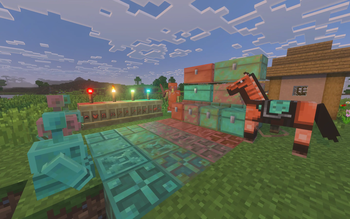
Programmer Art Fix in game, captured across biomes and lighting conditions.
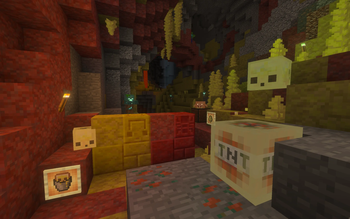
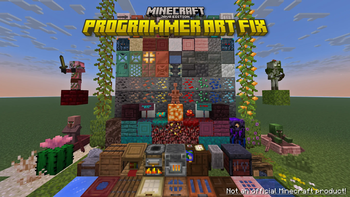
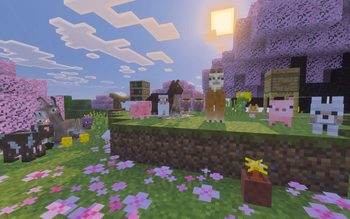
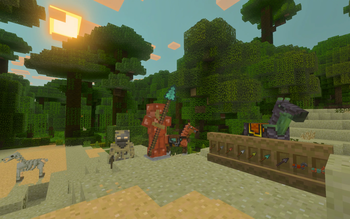
What you get
Why Programmer Art Fix?
Preserves classic look
Keeps the original 16x Programmer Art style intact, so nostalgia remains central while small corrections are applied.
Wide version support
Includes textures compatible across many Minecraft releases, which reduces the need to switch packs for different game versions.
Fixes broken assets
Addresses missing or mismatched textures introduced by newer blocks and mechanics, improving visual consistency.
Low performance cost
At 16x resolution the pack uses minimal resources, making it suitable for lower powered systems and higher framerates.
Minimalist approach
Makes conservative changes rather than complete overhauls, preserving familiar visuals while solving compatibility issues.
Good for content creators
Provides stable, predictable visuals that work for screenshots and videos while keeping the Programmer Art identity.
Downloads
Get Programmer Art Fix
The 10 most recent Programmer Art Fix builds, direct mirror links, no ad redirects.
Install
How to install Programmer Art Fix
Vanilla route
- 1Download the Programmer Art Fix pack file from the source page.
- 2Open Minecraft, go to Options, then Resource Packs, and click Open Pack Folder.
- 3Place the downloaded pack zip into the resourcepacks folder.
- 4Return to Minecraft and enable the Programmer Art Fix pack in the Resource Packs menu.
- 5Reload the world or restart Minecraft to ensure all textures load correctly.
Modded route (Minecraft Vanilla)
- 1Install Fabric or Forge for your Minecraft version, Optifine is optional for extra settings.
- 2Download the Programmer Art Fix pack zip and place it into the resourcepacks folder.
- 3Launch Minecraft with your Fabric or Forge profile and open Resource Packs.
- 4Enable the pack and adjust mod settings or Optifine options if desired.
- 5Restart the game or reload resources to apply changes across mods and vanilla content.
◎ Compatibility
✓ Tested and confirmed working on Minecraft 1.21.11
We ran Programmer Art Fix on Minecraft 1.21.11 even though the pack was not officially built for this version. Texture packs typically stay compatible across nearby Minecraft releases, and this one runs as expected.
Troubleshooting
Common problems
Missing textures on new blocks
Ensure you have the latest pack version and that the pack is enabled in Resource Packs. If textures still show as missing, try re-downloading the pack and restarting Minecraft.
Inconsistent mob appearance
Disable conflicting resource packs in the list, enable Programmer Art Fix alone, then reload resources to confirm the corrected mob skins are applied.
Low contrast on certain items
Toggle in-game brightness and check Optifine or shader settings if used, the pack keeps original contrast which may look different under advanced lighting.
Pack not showing in menu
Make sure the zip is placed directly in the resourcepacks folder and not inside another folder; restart Minecraft if the pack still does not appear.
FAQ
Frequently asked questions
What Minecraft versions does Programmer Art Fix support?+
The pack lists support across many 1.13 through 1.21 releases and later loader versions, so it should work on those editions. Texture packs often remain compatible with nearby Minecraft versions even when they were not officially built for that release, though minor misalignments can occur.
Will this pack affect performance?+
At 16x resolution this pack is very light on performance, so most systems will not see a significant hit. Performance can still vary depending on shaders, Optifine, or other mods in use.
Can I use Programmer Art Fix on Bedrock Edition?+
This pack is designed for Minecraft Java resource packs and is not packaged for Bedrock. Bedrock uses a different format, so conversion is required and may not preserve exact results.
Do I need Optifine to use this pack?+
Optifine is not required for basic use, but you can use Optifine for additional texture and performance options. The pack functions normally without Optifine.
Is it safe to use on a multiplayer server?+
Using Programmer Art Fix client side is safe and does not change server files, but server resource packs may override client textures if enforced. Texture packs generally remain compatible with nearby Minecraft versions even when they were not officially built for that release.
Textures look wrong after a version update, what do I do?+
Try re-downloading the latest pack release and reapplying it. If problems persist, disable other resource packs and check for mod conflicts, as that often resolves rendering issues.
Ready to install?