Texture pack review
Os' Colorful Grasses
Os' Colorful Grasses latest build for Minecraft 1.21
Os' Colorful Grasses adds a delightful twist to Minecraft's traditional grass textures, offering a vibrant and lush visual upgrade to your gameplay. With various styles and options, you can create the ideal grass landscape to suit your aesthetic needs.
Overview
In-depth
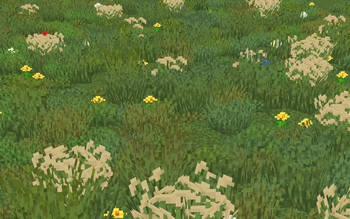
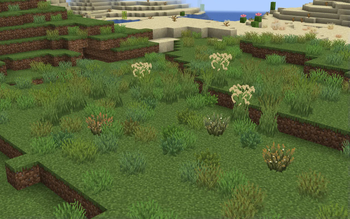
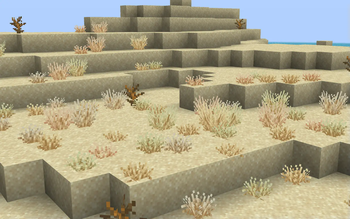
Os' Colorful Grasses adds a subtle but noticeable twist to the way grassy blocks and pampas plants appear in Minecraft. The pack keeps the vanilla look while introducing color tipped blades and multiple model styles, which helps fields, meadows, and roadside foliage read as softer and more varied without changing block shapes or biome colors drastically.
The author Oslypsis focuses on small, repeatable variations rather than full overhaul textures, so individual patches of grass can show different tip colors and slightly different heights. That keeps the feeling familiar for players who prefer a vanilla-plus approach, while still offering an easy visual refresh for long played worlds. Many players describe the effect as organic and painterly, since the color tips break up large flat stretches without drawing attention away from builds or terrain.
Installation is straightforward for vanilla Minecraft and compatible with common mod loaders. The pack does not require a shader to be effective, though it pairs well with lighting and foliage shaders for more pronounced contrast. You can browse similar packs and alternatives on our main texture pack index.
Textures are provided in the vanilla format and include multiple model style options so you can choose how pronounced the variation is. This makes Os' Colorful Grasses a flexible choice whether you want a light accent or something more decorative. For more packs with a similar philosophy, check the vanilla plus category for curated selections.
Who this is for
Use this pack when you want subtle biomes that feel handcrafted rather than dramatically altered. It works well in survival playthroughs where visual changes should be readable at a distance and nonintrusive up close. Expect a modest visual update that complements most builds rather than overshadowing them.
Gallery
Screenshots
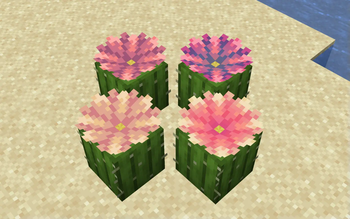
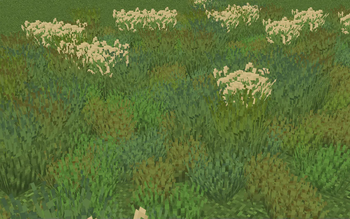
Os' Colorful Grasses in game, captured across biomes and lighting conditions.
What you get
Why Os' Colorful Grasses?
Subtle natural variation
Small color tips break large grassy surfaces into varied patches, which reduces monotony while keeping a familiar vanilla feel.
Multiple model options
Includes different grass and pampas models so players can pick a style that suits their world, from understated to slightly decorative.
Vanilla friendly
Designed primarily for use with unmodded Minecraft, the pack integrates without altering block shapes or core visuals.
Shader compatible
Does not require shaders, yet it pairs well with lighting and foliage shaders to enhance contrast and color depth.
Low visual noise
Adds detail without heavy patterns or high contrast, making it suitable for builds that rely on readable textures.
Easy toggle options
Model choices let you dial the effect up or down, so you can test what looks best for each world or biome.
Downloads
Get Os' Colorful Grasses
The 10 most recent Os' Colorful Grasses builds, direct mirror links, no ad redirects.
Install
How to install Os' Colorful Grasses
Vanilla route
- 1Download Os' Colorful Grasses from the pack page and save the ZIP file.
- 2Open Minecraft, select Options then Resource Packs and click Open Pack Folder.
- 3Move the downloaded ZIP into the resourcepacks folder and return to Minecraft.
- 4Enable the pack from the Available list and move it to Selected Resource Packs.
- 5Restart the game to ensure models and textures load correctly.
Modded route (Minecraft Vanilla)
- 1Install Fabric or Forge and run Minecraft once to create mods and resource folders, Optifine optional.
- 2Place the Os' Colorful Grasses ZIP inside the resourcepacks folder.
- 3If using Optifine and custom models, enable Custom Item Textures and connected textures as needed.
- 4Launch Minecraft with the chosen mod loader profile and enable the pack in Resource Packs.
- 5Test in a world and toggle conflicting packs or mods if visuals look off.
◎ Compatibility
✓ Tested and confirmed working on Minecraft 1.21
We ran Os' Colorful Grasses on Minecraft 1.21 even though the pack was not officially built for this version. Texture packs typically stay compatible across nearby Minecraft releases, and this one runs as expected.
Troubleshooting
Common problems
Grass colors look identical
Ensure the pack is enabled above other resource packs and restart Minecraft, then check model options included with the pack.
Pampas plants do not show variation
Verify you placed the pack in the correct resourcepacks folder and that no other pack is overriding plant textures.
Models appear blocky or missing
Try restarting the game and disabling Optifine connected texture toggles, some settings can interfere with vanilla models.
Visible seams between chunks
Reload resource packs from the menu or rejoin the world; if issue persists, test with all other packs disabled to identify conflicts.
FAQ
Frequently asked questions
Which Minecraft versions does Os' Colorful Grasses support?+
The pack lists support for several recent 1.20 and 1.21 releases. Texture packs often remain compatible with nearby Minecraft versions even when they were not officially built for that release, so it may work on adjacent versions as well.
Will this texture pack affect performance?+
This is a lightweight vanilla-plus pack, and it should have minimal impact on framerate. Performance can vary with shaders, increased render distance, or other heavy packs.
Can I use this on Minecraft Bedrock?+
This pack is provided in the Java resource format and is not directly compatible with Bedrock without conversion tools or manual edits.
Do I need Optifine to use custom models in the pack?+
No, Optifine is not required for the vanilla models included, though Optifine is optional if you want additional graphical controls.
Is there any risk running this pack on a multiplayer server?+
Resource packs are client side and generally safe to use on servers, though server packs can override textures. Always respect server rules about required packs.
What should I do if textures look wrong after installing?+
Reload resource packs, try disabling other packs to find conflicts, and restart the game. Many issues are caused by pack priority or overlapping files.
Ready to install?