Texture pack review
Night Vision
Night Vision latest build for Minecraft 26.2
A lightweight resource pack that modifies lightmaps to provide full visibility in caves and nighttime environments.
- Style
- Mod Support
- Platform
- Java
- Author
- Luracasmus
- First release
- Feb 11, 2023
- Latest version verified
- 26.2
Overview
In-depth
Night Vision is a lightweight resource pack by Luracasmus that brightens Minecraft's darkest places by editing the game's lightmaps. The idea is simple: remove deep shadows so caves, ravines, and night skies are readable without spamming torches. Blocks, items, and mobs keep their original look since the pack does not swap textures, it only changes how light is mapped. This makes it practical for mining, early game exploration, and late game projects alike. Installation is quick, and you can turn it on or off per world anytime.
Because it targets lighting rather than art, Night Vision maintains the familiar vanilla color palette, just without crushing blacks. Underwater ruins, ocean monuments, woodland mansions, and end cities become much easier to survey. Builders can plan palettes and structure outlines at night without placing temporary light sources. Redstone testers see dust paths and comparators clearly in unlit test chambers. Many players also find it easier on the eyes during long sessions compared to staring into pitch black.
If you prefer utility packs that adjust visuals without replacing art, consider exploring our selection of mods texture packs for similar ideas.
What this pack changes
By replacing the vanilla lightmap with a brighter profile, Night Vision reduces contrast in darkness so surfaces remain visible. The pack pairs fine with most shaders, though some shader brightness or exposure controls may need small tweaks. Optifine or alternatives are optional, not required. Since it contains only lightmap data, file size stays small and conflicts are rare. If you prefer partial brightness, you can always compensate with in-game Brightness, shader curves, or your monitor settings.
The pack lists support for Minecraft 1.19.3 through 1.21.11, plus the 26.1.x line noted in its version entries. It is distributed under the Creative Commons Attribution 4.0 International license, which allows reuse with credit. Whether you mine, speedrun, or build, Night Vision offers a clean way to see more while keeping Minecraft's style intact. To compare it with other projects, head over to our texture pack browser and see what fits your setup.
Gallery
Screenshots
Night Vision in game, captured across biomes and lighting conditions.
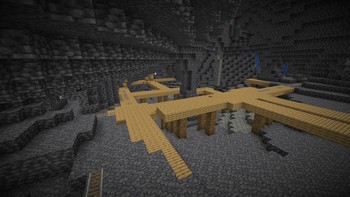
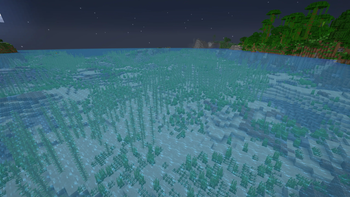
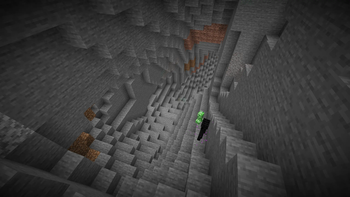
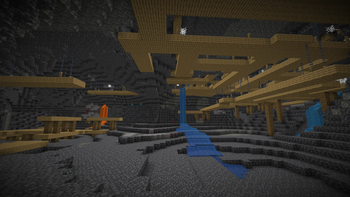
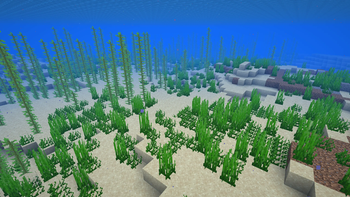
What you get
Why Night Vision?
See darkness clearly
Brightens caves, nights, and underwater areas so you can navigate, loot, and fight without placing temporary light sources. Surfaces stay readable, which helps avoid surprise drops or mob ambushes while exploring long tunnels or structures.
Vanilla look preserved
The pack edits lightmaps only, not block or item textures, so the game's art direction stays intact. Your worlds look familiar, just easier to read in dark scenes where detail would normally disappear.
Minimal performance impact
Because it changes a small lighting table instead of full texture sets, GPU and CPU load remain almost identical to vanilla. Most players notice no measurable FPS hit, even on older laptops or modded instances.
Build and test easier
Planning palettes, counting blocks, and tracing redstone lines becomes straightforward at night or in enclosed builds. You can work through long sessions without constantly placing torches or toggling day commands in creative.
Fast, conflict free setup
Drop a single zip into the resourcepacks folder and enable it in settings. It rarely collides with other packs, and you can move it to the top or toggle it off whenever needed.
Works across many versions
The pack lists compatibility across multiple modern releases, and lightmap edits are usually resilient. That makes it a dependable companion as you upgrade your client or jump between worlds and servers.
Downloads
Get Night Vision
The 10 most recent Night Vision builds, direct mirror links, no ad redirects.
Install
How to install Night Vision
Vanilla route
- 1Download the Night Vision zip file and do not extract it.
- 2Launch Minecraft, open Options, then click Resource Packs in settings.
- 3Click Open Pack Folder, move the zip into the resourcepacks directory.
- 4Back in game, enable Night Vision and move it to the top.
- 5Press Done to reload, then join a world to confirm brightness.
Modded route (Minecraft Vanilla)
- 1Install Fabric or Forge using their installers, then create a modded profile.
- 2Optionally add Optifine for shader settings or finer brightness controls.
- 3Launch the modded profile, open Options and enter the Resource Packs menu.
- 4Click Open Pack Folder, place the Night Vision zip inside.
- 5Activate the pack in game, and move it above visual modifiers.
◎ Compatibility
✓ Tested and confirmed working on Minecraft 26.2 and 26.1.2
We ran Night Vision on Minecraft 26.2 and 26.1.2 even though the pack was not officially built for these versions. Texture packs typically stay compatible across nearby Minecraft releases, and this one runs as expected.
Troubleshooting
Common problems
Everything looks washed out
Lower the in-game Brightness slider or adjust shader exposure. If needed, reduce your monitor gamma to bring back contrast.
Pack not showing in menu
Keep the file as a .zip in the resourcepacks folder, not extracted. Verify you are launching the correct profile, then restart the game.
Flickering with shaders at night
Disable conflicting shader options like dynamic exposure or color grading. Try a different preset, or adjust the pack and shader load order.
Nether and End are too bright
Temporarily disable the pack in those dimensions or reduce Brightness. You can also use shader controls to tone down highlights.
FAQ
Frequently asked questions
Which Minecraft versions does Night Vision support?+
Night Vision lists support for 1.19.3, 1.19.4, 1.20, 1.20.1, 1.20.4, 1.20.6, 1.21 through 1.21.11, and 26.1, 26.1.1, 26.1.2. Texture packs generally remain compatible with nearby Minecraft versions even when they were not officially built for that release.
Will this pack affect my FPS?+
It is very light, since it only replaces the lightmap. Most systems see no noticeable performance change compared to vanilla.
Is there a Bedrock or MCPE version?+
This download targets Java Edition's resource pack format. Bedrock Edition uses a different format, so you would need a separate port to use a similar effect there.
Do I need Optifine to use Night Vision?+
No. It runs as a normal resource pack. Optifine or shader loaders are optional if you want extra brightness or color controls.
Is using this on servers allowed?+
Resource packs are client side and do not alter gameplay logic. Many servers permit fullbright packs, but competitive communities may have rules, so check the server guidelines first.
What resolution is this pack?+
It modifies lightmaps, not block textures, so effective resolution is vanilla. You can stack it with high resolution texture packs, just place Night Vision above them if needed.
Ready to install?