Texture pack review
New Glowing Ores
New Glowing Ores latest build for Minecraft 26.2
New Glowing Ores makes mining easier by adding emissive textures to all ore blocks and providing a bordered version to highlight hidden resources in deep caves.
Overview
In-depth
New Glowing Ores is a clean, practical texture pack from GridExpert that makes mining easier without changing Minecraft’s core identity. Every ore receives a bright, glow-inspired treatment that increases contrast against stone, deepslate, and netherrack. The pack also offers a bordered variant, which surrounds ore veins with a clear outline so hidden blocks tucked behind cave walls or deepslate patterns are easier to spot. It is a straightforward quality of life upgrade for players who spend time caving, speed mining, or simply want better visual clarity in dark areas.
What it changes
The glow here is visual clarity, not magical light casting. In supported clients, emissive-style textures can appear more vivid in low light. Even on pure Vanilla, the higher contrast patterns make veins stand out from surrounding terrain. If your setup includes OptiFine or a shader that recognizes emissive mappings, you can enable those features for an even brighter look. Prefer a subtler approach instead The non-bordered version keeps the familiar vanilla shapes, just with smarter highlights that reduce eye strain during long mining sessions.
Performance impact stays minimal because the pack keeps a vanilla-like resolution and avoids heavy post-processing tricks. That means it is comfortable for extended caving runs and does not distract with unnecessary ornamentation. If you enjoy simple, readable textures that help you plan routes and notice side veins, this hits the mark. You can also browse more texture packs to pair with it, such as lighting or HUD tweaks, then place New Glowing Ores higher in your load order to ensure its ore edits take priority.
Compatibility is broad, covering modern Java releases from 1.17 through the recent 1.21 line as listed by the author. The license is Creative Commons Attribution Non Commercial Share Alike 4.0 International, so you can read and follow those terms before repacking or sharing. If you prefer similar visual aids focused on readability and gameplay clarity, the gameplay packs category is a good place to compare options that complement this pack’s approach.
Setup is simple. Drop the ZIP into your resourcepacks folder, then activate it above any pack that alters ores. For emissive-style effects where supported, enable OptiFine’s Emissive Textures or your shader’s matching option. If you want maximum visibility in huge deepslate caverns, try the bordered edition. If you want a gentler look, stick with the standard version. Either way, New Glowing Ores focuses on clarity first, so you can spend more time following the vein and less time squinting at stone.
Gallery
Screenshots
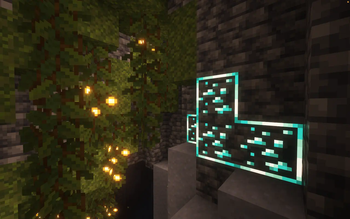
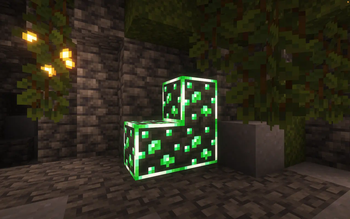
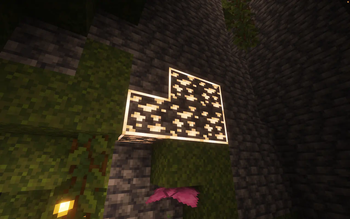
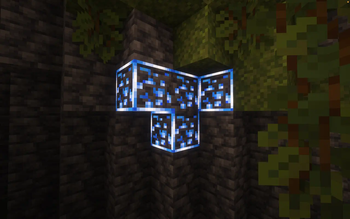
New Glowing Ores in game, captured across biomes and lighting conditions.
What you get
Why New Glowing Ores?
Easier Ore Spotting
High contrast patterns make coal, iron, copper, redstone, lapis, gold, diamond, emerald, and nether ores stand out from surrounding blocks. You notice side veins faster, which helps reduce backtracking and missed resources during long cave runs.
Optional Highlight Borders
A bordered edition adds a clean outline around ore clusters, which is helpful in noisy deepslate textures and complex ravines. Switch to the standard version when you want subtler visibility without a defined edge around each vein.
Better Low Light Clarity
Textures are tuned to remain readable in dim caves and torchlight. With clients that support emissive-style rendering, certain details appear brighter, while on Vanilla you still get improved contrast that guides your path without changing gameplay.
Minimal Performance Cost
The pack keeps a vanilla-like resolution and avoids heavy effects, so frame rates typically remain stable. Any slowdown you notice usually comes from shaders or other mods, not the ore textures themselves, which are lightweight by design.
Preserves Vanilla Identity
Ores retain their familiar shapes and colors, so you will recognize every block at a glance. The changes focus on readability instead of stylistic overhaul, which fits worlds, servers, and building palettes already tuned to vanilla aesthetics.
Works With Your Setup
Use it on a plain Java client, or alongside Fabric, Forge, OptiFine, and most shader packs. Place it above other packs that modify ores to ensure its clarity tweaks are the ones you actually see underground.
Downloads
Get New Glowing Ores
The 9 most recent New Glowing Ores builds, direct mirror links, no ad redirects.
Install
How to install New Glowing Ores
Vanilla route
- 1Download the New Glowing Ores ZIP, do not extract the archive.
- 2Launch Minecraft, open Options, then Resource Packs, click Open Pack Folder.
- 3Move the ZIP into the folder that just opened from Minecraft.
- 4In Resource Packs, activate New Glowing Ores and click Done to apply.
- 5Drag it above other ore packs to ensure its textures take priority.
Modded route (Minecraft Vanilla)
- 1Start a Fabric or Forge profile, OptiFine or shaders optional for emissive effects.
- 2From the main menu, open Options, Resource Packs, then click Open Pack Folder.
- 3Place the ZIP into the folder, return to Minecraft, and enable it.
- 4Move the pack above mods or packs that edit ore textures.
- 5Using OptiFine, toggle Emissive Textures in Video Settings, Quality, then reload.
◎ Compatibility
✓ Tested and confirmed working on Minecraft 26.2 and 26.1.2
We ran New Glowing Ores on Minecraft 26.2 and 26.1.2 even though the pack was not officially built for these versions. Texture packs typically stay compatible across nearby Minecraft releases, and this one runs as expected.
Troubleshooting
Common problems
Ores do not glow.
Enable Emissive Textures in OptiFine or your shader settings, then reload. On pure Vanilla, rely on the pack’s brighter contrast and borders, and ensure no other pack overrides ore textures.
Border outline missing.
Install the bordered edition of New Glowing Ores. Place it above any other packs that modify ores so its outlined textures are the ones displayed.
Purple and black ore textures.
The pack likely failed to load. Remove the file, re-download a fresh ZIP for your Minecraft version, then restart the game and re-enable the pack.
Performance drops in caves.
Disable heavy shaders or reduce shader settings first. Keep New Glowing Ores enabled alone for testing, then reintroduce other packs or mods to find the conflict.
FAQ
Frequently asked questions
Which Minecraft versions does New Glowing Ores support?+
The author lists support from 1.17 through the recent 1.21 line on Java. Texture packs generally remain compatible with nearby Minecraft versions even when they were not officially built for that release.
Will this pack hurt my performance?+
It is very light, using vanilla-like resolution and simple texture edits. Any large performance changes usually come from shaders or heavy mods, not from New Glowing Ores itself.
Is there a Bedrock or MCPE version?+
This release targets Java Edition. There is no confirmed Bedrock build from the author, though community tools can sometimes convert textures. Results vary, so test on a copy of your world.
Do I need OptiFine for the glow effect?+
No. The pack improves visibility on Vanilla through contrast alone. For emissive-style brightness, enable OptiFine’s Emissive Textures or use a shader that supports emissive mappings.
Can I use this on multiplayer servers safely?+
Yes. It is a client-side resource pack that changes visuals only. Always follow each server’s rules, but this type of pack is commonly allowed because it does not automate gameplay.
What resolution are the textures?+
They follow the vanilla scale, which blends well with default assets. You can combine it with higher resolution packs, just keep New Glowing Ores above others that edit ore blocks.
Ready to install?