Texture pack review
Low On Fire
Low On Fire 16x, latest build for Minecraft 26.2
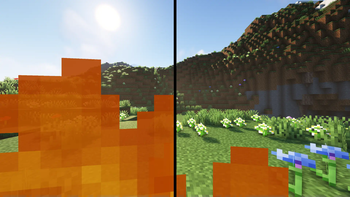
Low On Fire is a utility resource pack that lowers the fire overlay on your screen, preventing visual obstruction during combat or accidental falls into lava while keeping ground fire looking standard.
Overview
In-depth
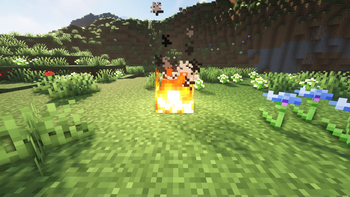
Low On Fire is a focused utility texture pack that reduces the size and opacity of the fire overlay you see when on fire. The author, Haikis, kept everything else close to vanilla, so flames on the ground remain unchanged while the intrusive screen effect is minimized. That makes it a subtle quality of life change for players who find the default fire overlay obstructive during PvP, builds near lava, or exploration in tight spaces.
The pack uses a 16x resolution which matches Minecraft Vanilla assets, so it will not clash with most other 16x packs or bundled mods. Because Low On Fire only changes the on-screen fire texture, it is lightweight and simple to combine with other tweaks or full resource packs. For more texture pack choices, browse the full collection here and compare similar entries in the tweaks category.
What to expect
Expect a single purpose alteration: a smaller and less opaque fire overlay. The reduction helps keep sightlines clear when you are taking fire damage, while still providing a clear visual indicator that you are burning. The restrained approach means no dramatic visual overhaul, which is useful for players who prefer vanilla aesthetics with minor improvements.
Gallery
Screenshots
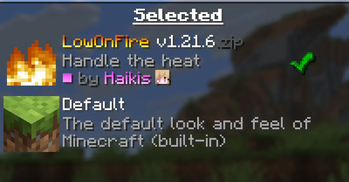
Low On Fire in game, captured across biomes and lighting conditions.
What you get
Why Low On Fire?
Clearer sightlines
Reduces the on-screen fire overlay so you can see enemies, terrain, and incoming projectiles during heated moments.
Minimal changes
Alters only the fire overlay, keeping ground flames and other textures looking like vanilla to avoid visual inconsistency.
16x compatibility
Uses the same 16 by 16 resolution as default Minecraft textures, making it simple to stack with other 16x packs.
Low maintenance
Because the pack targets a single texture, it is unlikely to conflict with most resource packs and mods.
Better PvP focus
Helps reduce visual obstruction in player versus player encounters where quick reactions and clear view matter.
Simple installation
The pack contains only a few files, which makes it fast to add or remove without affecting wider resource folders.
Downloads
Get Low On Fire
The 10 most recent Low On Fire builds, direct mirror links, no ad redirects.
Install
How to install Low On Fire
Vanilla route
- 1Download the Low On Fire zip and leave it compressed.
- 2Open Minecraft, go to Options, then Resource Packs.
- 3Click Open Pack Folder to reveal the resourcepacks folder.
- 4Move the Low On Fire zip into the resourcepacks folder and return to Minecraft.
- 5Select Low On Fire in the resource pack list and click Done to apply it.
Modded route (Minecraft Vanilla)
- 1Install Fabric or Forge and run Minecraft once to create mod folders, Optifine is optional.
- 2Place the Low On Fire zip into the resourcepacks folder as with vanilla installs.
- 3If using mod managers, enable the pack through the client's resource pack tab.
- 4Restart Minecraft after changing mods or Optifine to ensure the texture loads correctly.
◎ Compatibility
✓ Tested and confirmed working on Minecraft 26.2 and 26.1.2
We ran Low On Fire on Minecraft 26.2 and 26.1.2 even though the pack was not officially built for these versions. Texture packs typically stay compatible across nearby Minecraft releases, and this one runs as expected.
Troubleshooting
Common problems
Fire overlay still blocks view
Ensure the pack is selected in the resource pack list and loaded above any conflicting packs, then restart Minecraft.
Texture looks different than expected
Confirm you are using the 16x default GUI scale and no other pack is overriding the fire overlay texture.
Pack not listed in resource packs
Place the zip directly into the resourcepacks folder and avoid extracting nested folders; restart the game if necessary.
Visual bug with modded HUD
Disable or reorder mods that alter the HUD, since some mods can render overlays on top of resource pack changes.
FAQ
Frequently asked questions
Which Minecraft versions does Low On Fire support?+
The pack was authored for older releases but tends to work across nearby Minecraft versions. Texture packs generally remain compatible with nearby Minecraft versions even when they were not officially built for that release.
Will using this pack improve game performance?+
Reducing a single overlay has negligible impact on FPS; the pack is lightweight but performance gains are not guaranteed.
Can I use Low On Fire on Bedrock Edition?+
This pack is designed for Java resource packs, Bedrock uses a different format so it will not work without conversion tools.
Do I need Optifine to use Low On Fire?+
No, Optifine is not required for this texture pack, though Optifine can be used alongside it for other graphical tweaks.
Could using this pack get me kicked from a server?+
Servers rarely ban simple client-side texture packs, but check server rules; texture packs that modify gameplay-sensitive visuals may be restricted.
How do I restore the original fire overlay?+
Remove or disable Low On Fire in the resource pack menu, then reselect the default pack and restart the game if needed.
Ready to install?