Texture pack review
Jakotens' Pokémon Trainer Cosmetics!
Jakotens' Pokémon Trainer Cosmetics! latest build for Minecraft 1.21.1
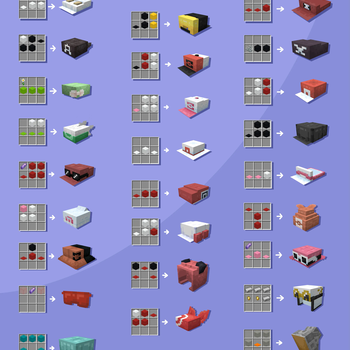
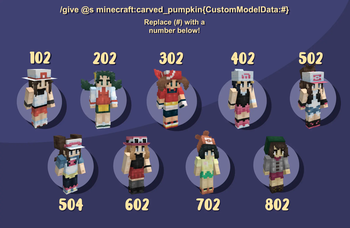
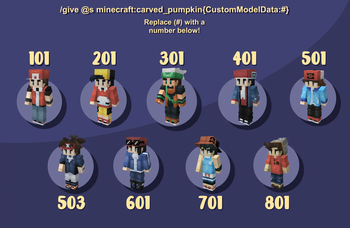
This pack brings iconic Pokémon protagonist outfits and hats into Minecraft, featuring custom models for characters from Red and Blue through to Sword and Shield.
Overview
In-depth
Jakotens' Pokémon Trainer Cosmetics! places classic trainer outfits and hats into Minecraft, giving player skins a recognizable, themed appearance without changing game mechanics. The pack focuses on wearable cosmetics, with custom models and layered textures that map onto the standard player model to emulate trainers from Red and Blue through Sword and Shield. Because it sticks to player visuals and hat layers, this pack is easy to try out in any world and pairs well with other non conflicting resource packs.
The style leans toward faithful recreations rather than heavy realism, so sprites and iconic color palettes are preserved while fitting within Minecraft's blocky proportions. Players who enjoy roleplay, speedruns with a personal flair, or streaming character continuity will find the simple goal of this pack appealing: it is about wearing the look and recognizing the reference in casual multiplayer or single player sessions. The pack does not modify mobs, UI, or item textures, which helps keep performance demands low compared with full overhauls.
Because the pack uses the game's player model layers and custom head geometry, some visuals appear better with higher player view distance and standard skin settings enabled. This pack lists several supported versions, and has been observed to work correctly across those close releases. If you want to browse other themed options, see the themed category on TexturesPack for more curated choices. For general browsing and downloads, check the texture packs directory on TexturesPack.
Who will enjoy this pack
Players who enjoy character driven roleplay, nostalgia for early Pokémon protagonists, or subtle cosmetic changes will get the most out of Jakotens' Pokémon Trainer Cosmetics!. It is a lightweight way to adopt an iconic look without altering gameplay. Note that because cosmetics map onto the player model, server rules about custom skins and cosmetics may still apply, so check server policies before using the pack on public servers.
Gallery
Screenshots
Jakotens' Pokémon Trainer Cosmetics! in game, captured across biomes and lighting conditions.
What you get
Why Jakotens' Pokémon Trainer Cosmetics!?
Instant Character Identity
Swap your default appearance for a recognizable Pokémon trainer outfit that reads clearly in multiplayer and screenshots.
Low Performance Impact
The pack alters only player visuals and hat layers, keeping resource use minimal compared with full texture overhauls.
Faithful Retro Designs
Designs preserve classic color palettes and silhouettes so trainers from older games remain immediately identifiable.
Easy To Combine
Because it does not change blocks or UI, it layers well with environment or shader packs when desired.
Great For Roleplay
Subtle cosmetics help players adopt a character for streams or private servers without changing gameplay balance.
Keeps Vanilla Compatibility
Built for the vanilla player model, the pack works across many nearby versions with little need for updates.
Downloads
Get Jakotens' Pokémon Trainer Cosmetics!
The 9 most recent Jakotens' Pokémon Trainer Cosmetics! builds, direct mirror links, no ad redirects.
Install
How to install Jakotens' Pokémon Trainer Cosmetics!
Vanilla route
- 1Download the pack from the texturespack directory and save the ZIP file locally.
- 2Open Minecraft, go to Options, then Resource Packs, and click Open Pack Folder.
- 3Move the downloaded ZIP into the resourcepacks folder without extracting it.
- 4Return to Minecraft and enable Jakotens' Pokémon Trainer Cosmetics! in the Resource Packs list.
- 5Restart the game if the player layers do not appear immediately, then load into a world.
Modded route (Minecraft Vanilla)
- 1Install Fabric or Forge for your Minecraft version and launch once to generate folders.
- 2Place the pack ZIP into the resourcepacks folder the same way as vanilla.
- 3Run Minecraft with your Fabric or Forge profile, Optifine may be used as an optional enhancement.
- 4Enable the pack from Options, Resource Packs, then restart if visuals do not apply.
◎ Compatibility
✓ Tested and confirmed working on Minecraft 1.21.1
We ran Jakotens' Pokémon Trainer Cosmetics! on Minecraft 1.21.1 even though the pack was not officially built for this version. Texture packs typically stay compatible across nearby Minecraft releases, and this one runs as expected.
Troubleshooting
Common problems
Player layer not visible
Make sure the resource pack is enabled and higher in the priority list, then restart Minecraft to force a reload of player layers.
Hats or custom head geometry looks misaligned
Check that you are using the default player model and skin settings, and disable conflicting packs that also modify player models.
Pack appears unchanged on server
Confirm server-side rules and that the server allows client resource packs, some servers override or block player cosmetics.
Visual glitches after update
Clear the resourcepack cache by removing and re-adding the ZIP, then restart the launcher and game to reload assets.
FAQ
Frequently asked questions
Which Minecraft versions does this pack support?+
The pack lists specific supported versions, and players have reported it working across nearby releases. Texture packs generally remain compatible with nearby Minecraft versions even when they were not officially built for that release.
Will this pack hurt my FPS?+
Because it only changes player visuals, performance impact is usually negligible unless combined with heavy shaders or many other packs.
Can I use this on Bedrock Edition?+
This pack was created for Java player model layers and custom geometry, which means it is not directly compatible with Bedrock without conversion tools.
Do I need Optifine to use the pack?+
Optifine is not required for the basic cosmetics to work, though Optifine can improve performance and some visual options; texture packs generally remain compatible with nearby Minecraft versions even if not built specifically for them.
Will using this pack get me banned on servers?+
Most servers allow client-side cosmetic packs, but server rules vary; check server policies before joining to avoid possible enforcement actions.
My custom skin replaces the trainer look, how do I fix it?+
Enable player skin layers and ensure the resource pack is above any conflicting packs in the list; you may need to remove other skin modifying packs.
Ready to install?