Texture pack review
FurSky Reborn
FurSky Reborn 16x, latest build for Minecraft 1.21.9
FurSky Reborn provides a specialized visual overhaul for nearly every item found in Hypixel Skyblock, now optimized for the latest game versions.
Overview
In-depth
FurSky Reborn brings a themed, 16x reinterpretation of many Hypixel Skyblock items and UI elements, focusing on clearer silhouettes and a playful color palette. The pack keeps the block textures familiar while introducing distinctive item art that makes inventory scanning faster and more satisfying. Textures are simplified rather than hyper detailed, which helps preserve a fluid look at standard in-game distances.
The author Tylerrrr aims to balance recognizability with personality, so many iconic Skyblock items receive small but meaningful tweaks: brighter contrast, crisper edges, and subtle thematic flourishes that read well on the default GUI. Because it uses the Minecraft Vanilla loader, installation is straightforward for unmodded players, and it does not require additional resource loading tools to function.
Performance impact is low, thanks to the 16x resolution, which should suit players on modest hardware as well as those who prefer consistent frame rates. Expect an experience that keeps the original Minecraft art direction while making Hypixel Skyblock items easier to pick out during hectic play. For more texture packs similar in scope, browse the site collection at texturespack.com.
Who this pack is for
This pack is best suited to Skyblock players who want clearer item visuals without a radical overhaul. It works well as a base for customization or for players who run minimal mods. If you want to explore other themed packs, check the themed category for related options that follow a similar aesthetic approach.
Gallery
Screenshots
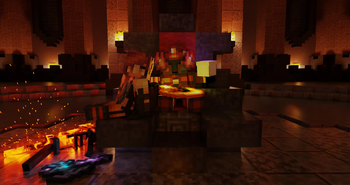
FurSky Reborn in game, captured across biomes and lighting conditions.
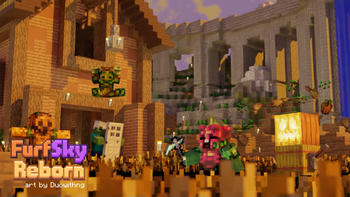
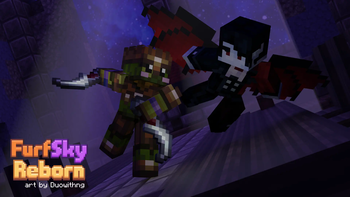
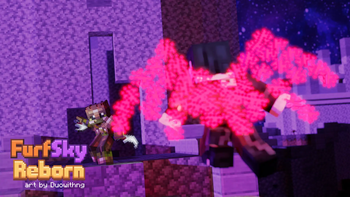
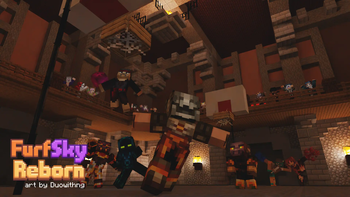
What you get
Why FurSky Reborn?
Clean item clarity
Items and tools use crisper outlines and contrast, which makes sorting and quick recognition easier during fast gameplay.
Low performance cost
At 16x resolution the pack keeps frame rates stable on most systems, suitable for players who prefer consistent performance.
Skyblock focused
Many textures target Hypixel Skyblock items specifically, so inventory-heavy sessions feel less cluttered and more navigable.
Faithful block art
Blocks remain close to vanilla appearance, so the world looks familiar while items receive the most visual attention.
Simple aesthetic
Themed accents add personality without overwhelming the base game art, creating a playful but restrained look.
Easy base for mods
Because it uses vanilla loading, FurSky Reborn can serve as a foundation for further customization or model packs.
Downloads
Get FurSky Reborn
The 10 most recent FurSky Reborn builds, direct mirror links, no ad redirects.
Install
How to install FurSky Reborn
Vanilla route
- 1Download the FurSky Reborn zip from the pack page on the site.
- 2Open your Minecraft resourcepacks folder via Options, Resource Packs, Open Pack Folder.
- 3Move the downloaded pack zip into the resourcepacks folder without extracting it.
- 4Launch Minecraft, go to Resource Packs, and click the arrow to enable FurSky Reborn.
- 5Confirm changes and restart the game if textures do not apply immediately.
Modded route (Minecraft Vanilla)
- 1Install Fabric or Forge for your Minecraft version, Optifine is optional for extra settings.
- 2Place the FurSky Reborn zip into the resourcepacks folder as with vanilla installs.
- 3If using Optifine, enable connected textures and custom colors if desired in Video Settings.
- 4Start Minecraft with your Fabric or Forge profile and activate the pack from Resource Packs.
- 5Restart the game after enabling the pack to ensure mods and textures load together.
◎ Compatibility
✓ Tested and confirmed working on Minecraft 1.21.9
We ran FurSky Reborn on Minecraft 1.21.9 even though the pack was not officially built for this version. Texture packs typically stay compatible across nearby Minecraft releases, and this one runs as expected.
Troubleshooting
Common problems
Textures not visible after enabling
Move the pack zip into the resourcepacks folder and enable it in-game, then restart Minecraft to force assets to reload.
Items look identical to vanilla
Ensure the active pack is FurSky Reborn in the Resource Packs menu and that no higher priority pack is overriding its files.
Slight UI misalignment
Disable other resource packs that modify GUI, or reorder packs so FurSky Reborn has higher priority for UI textures.
Errors on startup about missing metadata
Those warnings are usually noncritical, but redownload the pack from the official page if errors persist to rule out a corrupted file.
FAQ
Frequently asked questions
Which Minecraft versions does FurSky Reborn support?+
The pack lists support for a broad set of 1.8 and 1.21 era versions, and many players report packs continue to work on nearby releases. Texture packs generally remain compatible with nearby Minecraft versions even when they were not officially built for that release.
Will this pack affect game performance?+
Because FurSky Reborn is 16x, it usually has minimal impact on frame rates. Performance can vary by system and other mods, so test in a low-load area to confirm.
Can I use this on Minecraft Bedrock?+
This pack is designed for Java edition and the vanilla Java loader, so Bedrock compatibility is not provided. Resource format differences mean it will not work on Bedrock without conversion.
Do I need Optifine to use the pack?+
Optifine is not required, the pack works with standard Minecraft. Optifine is optional for extra graphical options like connected textures and additional performance tweaks.
Is there any risk using this pack on multiplayer servers like Hypixel?+
Using client-side texture packs is generally allowed on most servers, including Hypixel, but server rules vary so check their guidelines. Texture packs do not alter server-side gameplay unless they include modified client code.
What should I do if an item texture looks wrong?+
Try disabling other resource packs and reordering them so FurSky Reborn is highest priority, then restart Minecraft. If the issue continues, redownload the pack to ensure integrity.
Ready to install?