Texture pack review
Fully Hisuian Starters (Cobblemon)
Fully Hisuian Starters (Cobblemon) latest build for Minecraft 26.2
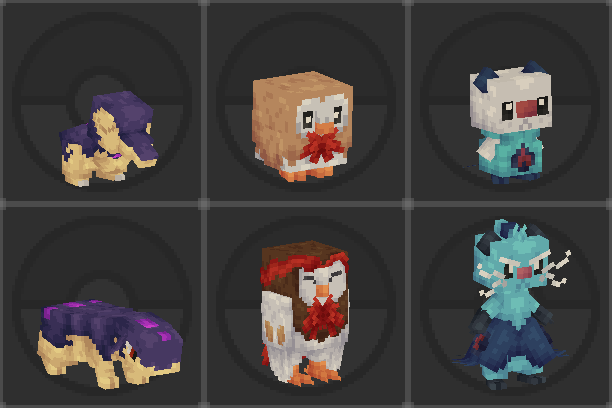
This simple resource pack adjusts the textures for Rowlet, Cyndaquil, and Oshawott lines to match their Hisuian final evolutions from the start of their journey.
- Style
- Mod Support
- Platform
- Java
- Author
- SwordEnd
- First release
- May 12, 2024
- Latest version verified
- 26.2
Overview
In-depth
Fully Hisuian Starters (Cobblemon) updates the appearance of the Rowlet, Cyndaquil, and Oshawott evolution lines so you can begin a Cobblemon playthrough with the Hisuian looks from the first capture. This pack does not change models or behavior, it only replaces sprite textures so your starter companions visually match their later regional forms while you play. The result is a consistent aesthetic from early game to late game without relying on mods that alter evolution or mechanics.
The pack is authored by SwordEnd and is aimed at players who prefer a specific regional style for their team from the outset. It is lightweight in scope, focused on a handful of creature textures rather than a full overhaul, which makes it a straightforward swap for players running Cobblemon alongside other modest visual packs. For browsing other texture packs that suit modded runs see our main texture pack collection page at TexturesPack browse.
Installation is simple for most users and it plays well with many texture loaders. Because the pack targets the Cobblemon mod visuals, it fits naturally into a mods category environment and is most often used together with client-side mods that add or manage creature assets. For players seeking similar themed packs, visit the mods category for more options at mods textures.
Visually the pack keeps the original pixel feel of Cobblemon while shifting color palettes and small detail lines to reflect the Hisuian designs. The changes are specific, so you will not see alterations to unrelated mobs, terrain, or UI elements. That makes Fully Hisuian Starters (Cobblemon) a targeted choice when you want a consistent appearance for those three starter families without affecting the rest of your modded game visuals.
Who should try it
Players running Cobblemon who like the Hisuian style from the beginning of their run, or content creators who want consistent starter sprites for screenshots or videos, will find this pack convenient. It is also a good match for anyone who prefers smaller, single-purpose packs that are easy to add and remove while testing different visual setups.
Gallery
Screenshots
Fully Hisuian Starters (Cobblemon) in game, captured across biomes and lighting conditions.
What you get
Why Fully Hisuian Starters (Cobblemon)?
Immediate Hisuian Look
Start your Cobblemon run with starters that visually match their Hisuian evolutions, avoiding any midgame sprite mismatch.
Minimal Scope
Only the Rowlet, Cyndaquil, and Oshawott lines are changed, keeping the rest of your visuals untouched for easy compatibility.
Easy To Toggle
Because it is a small resource pack, enabling or disabling it takes seconds and it is ideal for testing different aesthetics.
Good For Screenshots
Use consistent starter sprites for screenshots or videos without needing to evolve or alter in-game mechanics first.
Mod-Friendly
Designed to be used alongside Cobblemon and similar client-side mods, it integrates cleanly with most mod setups.
Maintains Pixel Style
Adjusts palettes and details while keeping the original pixel aesthetic of the mod, preserving game feel.
Downloads
Get Fully Hisuian Starters (Cobblemon)
The 3 most recent Fully Hisuian Starters (Cobblemon) builds, direct mirror links, no ad redirects.
Install
How to install Fully Hisuian Starters (Cobblemon)
Vanilla route
- 1Download the resource pack zip and place it into your resourcepacks folder.
- 2Launch Minecraft and open Options, then Resource Packs.
- 3Move Fully Hisuian Starters (Cobblemon) into the Selected section.
- 4Click Done and wait for the textures to load before entering a world.
Modded route (Minecraft Vanilla)
- 1Install Fabric or Forge and the Cobblemon mod, Optifine optional for extra texture control.
- 2Place the pack zip in the resourcepacks folder of the modded instance.
- 3Start the modded launcher and go to Options, Resource Packs.
- 4Enable the pack and click Done, then launch or reload your world to see changes.
◎ Compatibility
✓ Tested and confirmed working on Minecraft 26.2 and 26.1.2
We ran Fully Hisuian Starters (Cobblemon) on Minecraft 26.2 and 26.1.2 even though the pack was not officially built for these versions. Texture packs typically stay compatible across nearby Minecraft releases, and this one runs as expected.
Troubleshooting
Common problems
Textures not appearing
Make sure the pack is in the resourcepacks folder and enabled in Options, Resource Packs; restart the game after activating the pack.
Conflict with another pack
Move Fully Hisuian Starters (Cobblemon) above other packs in the resource pack order so its textures take precedence.
Sprites look broken in-game
Verify you are running a compatible Cobblemon version and reload resource packs; corrupted downloads can be fixed by re-downloading the pack.
No change after mod updates
Check that the mod has not changed file paths; update or reapply the pack to match the mod structure after major mod revisions.
FAQ
Frequently asked questions
Which Minecraft versions does this pack support?+
The pack lists support around 1.20.1 and 1.21.1, so it is intended for those versions. Texture packs often remain compatible with nearby Minecraft versions even when they were not officially built for that release, but test it in a copy of your instance before regular play.
Will this pack affect game performance?+
Because it only replaces a few creature textures, performance impact is negligible on most systems, but very old hardware may notice minor loading time differences.
Can I use this on Bedrock Edition?+
This pack targets Java mod visuals and is not packaged for Bedrock. Bedrock uses a different resource format, so direct use is not supported.
Do I need Optifine to run this pack?+
Optifine is not required for the textures to show, though using Optifine can offer additional texture and performance options; it remains optional.
Is there any risk using this on a server?+
Client-side texture packs only change your local visuals and do not alter server mechanics, but make sure server rules allow custom client-side assets for consistency during multiplayer.
What if textures overlap with another mod?+
If two packs or mods provide the same texture path, the pack higher in your resource pack order will win; adjust priorities or remove the conflicting pack to resolve overlap.
Ready to install?