Texture pack review
Fullbright UB
Fullbright UB latest build for Minecraft 26.2
Fullbright UB removes darkness from Minecraft, allowing you to see clearly in deep caves and at night without needing torches or external lighting mods.
Overview
In-depth
Fullbright UB removes darkness from Minecraft, letting you see clearly in caves, the Nether, and night-time biomes without relying on torches or potion effects. Built as a simple vanilla-plus resource pack by worldresourcepack, it focuses on lighting only, so your blocks, items, and mobs retain their familiar vanilla textures. The effect is straightforward: dark areas render as bright and readable, which makes mining, exploring, and building after sunset feel fast and hassle free.
The pack achieves its look using resource pack lighting adjustments, not shaders or external mods, so it is light on performance and easy to enable or disable at any moment. Because it does not redraw block textures, Fullbright UB stacks cleanly with your favorite art styles. Load it on top to keep other packs intact while removing gloom. For more packs with a similar quality of life focus, explore our selection of vanilla plus packs.
What to expect in game
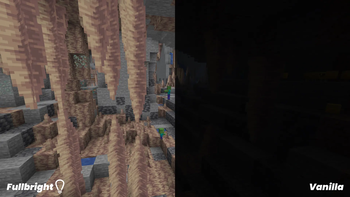
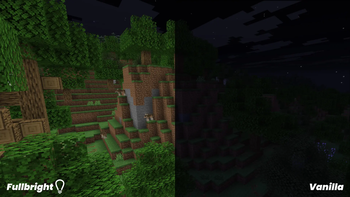
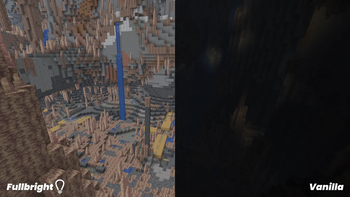
Expect pitch black areas to appear evenly lit, with shadows and contrast greatly reduced. Colors may appear flatter in some scenes, especially in very dark biomes, which is a normal tradeoff when darkness is removed. Gameplay rules do not change. Hostile mobs still spawn based on light level, and beacon, torch, or lantern light remains visible, only less noticeable beside the brightened environment. If you prefer ambience for building or screenshots, simply toggle the pack off in the resource packs menu.
Fullbright UB lists support through modern Java versions in the 1.19 and 1.21 series. Even when you see a minor version warning, this type of pack often works across nearby versions because it edits a simple lighting file. You can quickly browse more texture packs in our catalog from the main browse page, then mix and match visual styles to suit your world.
Gallery
Screenshots
Fullbright UB in game, captured across biomes and lighting conditions.
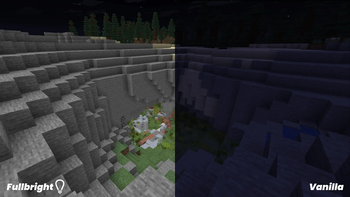
What you get
Why Fullbright UB?
Clear caves and nights
Brighten every dark area so ores, mobs, and terrain stay readable without carrying stacks of torches. Mining, exploring, or building after sunset becomes smoother because visibility remains consistent in every direction.
Keeps vanilla look
Only the lighting is changed. Blocks, items, GUIs, and particles retain their familiar vanilla appearance, which helps your world feel the same, just easier to see in low light.
Pairs with other packs
Load Fullbright UB above your favorite texture packs to keep their art while removing darkness. This works well for builders who want stylistic blocks with clear visibility during designing or detailing.
Helpful for creators
Content creators, mapmakers, and server admins can record, inspect builds, or moderate without fighting shadows. Screenshots and videos capture details clearly, reducing the need for temporary lighting setups.
Low performance impact
Since it is a resource pack that adjusts lighting, there is typically little to no FPS cost. It runs well on most systems without needing shaders or heavy post processing.
Safer navigation cues
Hazards like ravines, lava pools, and drops are easier to spot when darkness is removed. You can react faster while caving or bridging because edges and surfaces remain visible from a distance.
Downloads
Get Fullbright UB
The 7 most recent Fullbright UB builds, direct mirror links, no ad redirects.
Install
How to install Fullbright UB
Vanilla route
- 1Download the Fullbright UB zip file to a convenient location.
- 2Launch Minecraft Java, then open Options and select Resource Packs.
- 3Click Open Pack Folder and move the zip into the resourcepacks folder.
- 4Back in game, enable Fullbright UB and move it to the top position.
- 5Click Done to apply changes, then load a world to verify brightness.
Modded route (Minecraft Vanilla)
- 1Install Fabric or Forge if you use a modded client setup.
- 2Launch the modded profile once to create the resourcepacks folder.
- 3Move the Fullbright UB zip into the resourcepacks folder for that instance.
- 4Enable the pack in Options, Resource Packs, placing it at the top for priority.
- 5Optional: Add OptiFine or performance mods, then test for any lighting conflicts.
◎ Compatibility
✓ Tested and confirmed working on Minecraft 26.2 and 26.1.2
We ran Fullbright UB on Minecraft 26.2 and 26.1.2 even though the pack was not officially built for these versions. Texture packs typically stay compatible across nearby Minecraft releases, and this one runs as expected.
Troubleshooting
Common problems
World still looks dark
Make sure the pack is enabled and at the top of your active list. Disable shaders or datapacks that override lightmaps, then reload resources with F3 plus T.
Colors appear washed out
Reduce in-game Brightness or your monitor gamma slightly. If you prefer more contrast, toggle the pack off selectively or combine with a subtle shader that adds contrast without restoring darkness.
Incompatible version warning
Many fullbright packs work across nearby versions. Try loading it anyway, or download a release closer to your Minecraft version for fewer warnings.
Server policy conflict
Some servers restrict fullbright for fairness. Check the rules, and disable the pack on that server if requested to avoid penalties.
FAQ
Frequently asked questions
Which Minecraft versions does Fullbright UB support?+
It is listed for modern Java versions in the 1.19 and 1.21 series. If you see a minor warning, try it anyway. Texture packs generally remain compatible with nearby Minecraft versions even when they were not officially built for that release.
Does Fullbright UB reduce performance or FPS?+
It typically has minimal impact because it only changes lighting through a resource pack file. Most players see no measurable FPS drop compared to vanilla.
Is there a Bedrock Edition or mobile version?+
There is no confirmed Bedrock release from the author on this listing. Some players attempt ports, but support is not guaranteed and behavior can differ from Java.
Do I need OptiFine to use this pack?+
No, OptiFine is not required. You can optionally pair it with OptiFine or performance mods, but Fullbright UB works in pure vanilla resource pack mode.
Is using Fullbright UB allowed on multiplayer servers?+
It is client side and does not alter server files, but some servers forbid fullbright for competitive balance. Always check the server rules and disable it if requested.
What resolution does the pack use, and can I adjust brightness?+
It follows your game’s resource pack pipeline and focuses on lighting rather than texture resolution. The in-game Brightness slider still works, though the effect is subtle because darkness is largely removed.
Ready to install?