Texture pack review
Fresh Flower Pots
Fresh Flower Pots latest build for Minecraft 1.20
This visual update adds diverse 3D models and various soil textures to flower pots while maintaining a vanilla aesthetic.
Overview
In-depth
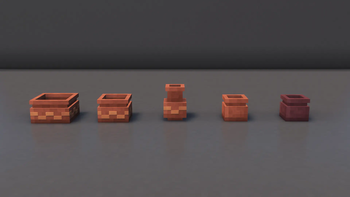
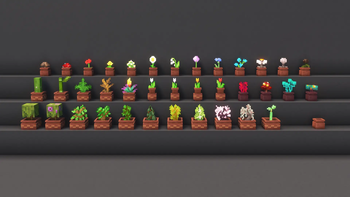
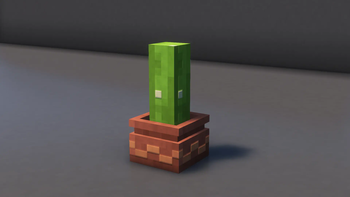
Fresh Flower Pots updates the vanilla flower pot visuals with subtle 3D touches and varied soil textures while keeping the base Minecraft look. This pack by BlueHDGaming replaces the flat pot faces with gently modeled rims and slightly different soil surfaces for each plant variant, which helps planted arrangements read better at a glance without changing block behavior.
The author keeps the changes focused, so all vanilla items and blocks remain familiar. The pack excels at small details: individual flowers and saplings sit with a marginally improved silhouette, and the pot materials show faint shading and edge highlights that catch light from different angles. That restrained approach makes Fresh Flower Pots an easy drop-in for builders who want more clarity in window gardens, market stalls, or interior decorations without dramatically changing the world aesthetics.
Performance impact is minimal because the pack does not add high resolution textures or complex shaders. It is designed for Minecraft Vanilla loaders, and most players report the visuals simply feel cleaner. You can browse more texture packs at our main collection to compare styles and find complementary packs that keep the same low overhead.
Installation is straightforward for vanilla users, and the pack works alongside many resource packs that keep a vanilla-plus philosophy. If you use mods, this pack is compatible with common resource loaders provided no higher level texture replacements conflict with the same files. See the category page for other vanilla-plus choices that share a similar subtle enhancement approach.
Who should try it
Choose Fresh Flower Pots if you want a minor visual polish to decorative pots and planted items without a full graphic overhaul. It is particularly useful for players focused on base interiors and small decorative builds, where these subtle differences are most noticeable.
Gallery
Screenshots
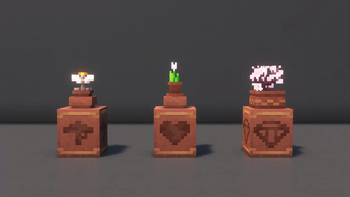
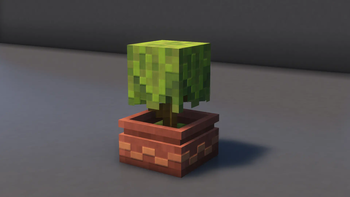
Fresh Flower Pots in game, captured across biomes and lighting conditions.
What you get
Why Fresh Flower Pots?
Clearer plant shapes
Individual flowers and saplings get improved silhouettes, making decorative arrangements easier to read from a distance.
Varied soil textures
Different soil looks for each pot add visual variety and reduce repetition in planted displays.
Low performance cost
Subtle model tweaks and textures keep resource use low, suitable for players who prioritize frame rate.
Vanilla friendly
The pack preserves the base aesthetic, making it a good fit for players who prefer minimal stylistic change.
Easy to combine
Works well with other vanilla-plus packs as long as they do not replace the same pot textures or models.
Focused updates
Changes target flower pots and soils only, which keeps the visual impact precise and predictable.
Downloads
Get Fresh Flower Pots
The 8 most recent Fresh Flower Pots builds, direct mirror links, no ad redirects.
Install
How to install Fresh Flower Pots
Vanilla route
- 1Download the Fresh Flower Pots pack from its page on the site.
- 2Open Minecraft, then click Options, Resource Packs, Open Pack Folder.
- 3Move the downloaded zip file into the resourcepacks folder.
- 4In-game Resource Packs menu, enable Fresh Flower Pots and return to game.
- 5Restart Minecraft if textures do not appear immediately after enabling.
Modded route (Minecraft Vanilla)
- 1Install Fabric or Forge for your Minecraft version, Optifine is optional for extra settings.
- 2Place the Fresh Flower Pots zip into the resourcepacks folder for your instance.
- 3If using a modded launcher, ensure the correct instance uses that resourcepacks folder.
- 4Launch Minecraft with Fabric or Forge and enable the pack from Resource Packs.
- 5If using Optifine, check Connected Textures and Fast Render settings for compatibility.
◎ Compatibility
✓ Tested and confirmed working on Minecraft 1.20
We ran Fresh Flower Pots on Minecraft 1.20 even though the pack was not officially built for this version. Texture packs typically stay compatible across nearby Minecraft releases, and this one runs as expected.
Troubleshooting
Common problems
Texture not appearing
Confirm the zip is in the resourcepacks folder and enable it in-game, then restart Minecraft if needed.
Pot models look wrong
Ensure no other resource pack is replacing the same pot files; disable conflicting packs and test again.
Visual glitches with shaders
Turn off or adjust shader options, as some shader packs may conflict with subtle model shading here.
Pack not listed on older client
Make sure you are running a supported Minecraft version; try a nearby version as packs often remain compatible.
FAQ
Frequently asked questions
Which Minecraft versions does Fresh Flower Pots support?+
The author lists support across recent 1.20 and 1.21 releases. Texture packs generally remain compatible with nearby Minecraft versions even when they were not officially built for that release.
Will this pack affect game performance?+
It uses subtle model and texture tweaks so performance impact is normally minimal, but very old systems may notice small differences.
Can I use this on Bedrock Edition?+
This pack is designed for Java edition loaders, and it will not work directly on Bedrock without conversion tools.
Do I need Optifine to use Fresh Flower Pots?+
Optifine is not required for this pack to function, it is optional if you want extra texture or performance settings.
Is using this pack safe on multiplayer servers?+
Resource packs are client side, so they are safe to use on servers; server rules may restrict certain packs, so check server policy first.
Ready to install?