Texture pack review
Fresh Animations: Extensions
Fresh Animations: Extensions latest build for Minecraft 26.1
An all-in-one collection of official add-ons for the Fresh Animations pack, featuring new mob varieties, item models, and better entity movement for a livelier world.
Overview
In-depth
Fresh Animations: Extensions builds on the original Fresh Animations idea, offering a focused set of add-ons that change mob behavior, item models, and entity motion while keeping the vanilla look. This pack is presented as a companion collection rather than a total overhaul, so textures remain familiar while several animations receive subtle polish.
The pack adds new mob varieties and adjusted movement patterns that feel more dynamic without abandoning Minecraft aesthetics. Animations for common mobs and some items are refined to reduce stiffness, and new model variants create small visual variety when exploring or building. Users who like a clean, vanilla-plus style will likely appreciate the conservative direction here.
Fresh Animations: Extensions is designed to be compatible with standard Minecraft resource pack loading, so it works with launchers that accept vanilla format packs. For more options and other packs in this style, browse our full texture pack listings on the site.
What to expect
Expect animation improvements that are noticeable in motion, not distracting during gameplay. The pack does not attempt to reskin every block or item, it focuses on liveliness and model tweaks. Because it is an extension to a larger project, some changes are additive and may require disabling overlapping mods or other animation packs for the cleanest results. For more packs in this category, check the vanilla-plus collection on our site.
Gallery
Screenshots
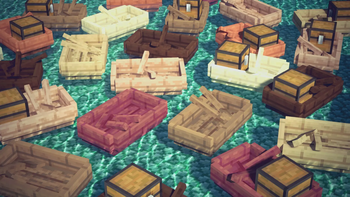
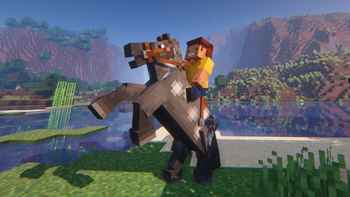
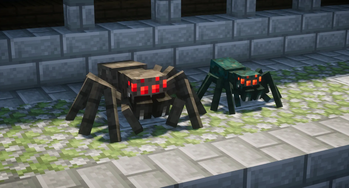
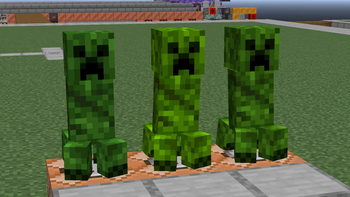
Fresh Animations: Extensions in game, captured across biomes and lighting conditions.
What you get
Why Fresh Animations: Extensions?
Subtle motion upgrades
Adds smoother movement to many mobs and items, making animations feel more fluid without changing the art style.
Maintains vanilla look
Keeps textures familiar while introducing model variants, so builds and biomes retain their original appearance.
Lightweight adjustments
Focuses on targeted animation files and models rather than replacing whole texture sets, limiting performance impact.
Better mob variety
Introduces small visual differences between mobs, which reduces repetition when exploring or farming.
Easy compatibility
Designed to load like a normal resource pack, making it simple to add or remove without complex install steps.
Good for builders
Subtle changes help player-made scenes look more alive during screenshots and roleplay without distracting.
Downloads
Get Fresh Animations: Extensions
The 10 most recent Fresh Animations: Extensions builds, direct mirror links, no ad redirects.
Install
How to install Fresh Animations: Extensions
Vanilla route
- 1Download the Fresh Animations: Extensions pack file from the pack page.
- 2Open Minecraft, go to Options, then Resource Packs to open the folder.
- 3Move the downloaded zip into the resourcepacks folder, do not extract it.
- 4Enable the pack from the resource pack menu and reload the game assets.
Modded route (Minecraft Vanilla)
- 1Install Fabric or Forge for the Minecraft version you run, Optifine optional for shader support.
- 2Place the Fresh Animations: Extensions zip into the resourcepacks folder as usual.
- 3If using shader or animation mods, verify load order so the resource pack overrides correctly.
- 4Restart Minecraft and confirm the pack is active in the resource pack menu.
◎ Compatibility
✓ Tested and confirmed working on Minecraft 26.1
We ran Fresh Animations: Extensions on Minecraft 26.1 even though the pack was not officially built for this version. Texture packs typically stay compatible across nearby Minecraft releases, and this one runs as expected.
Troubleshooting
Common problems
Animations look jittery
Lower conflicting mods or shader settings and test with only the pack enabled; jitter often comes from mod interaction.
Pack does not appear in game
Ensure the zip is placed in the resourcepacks folder and not nested inside another folder, then reload resources.
Models overlap with other packs
Disable other animation or model packs, then enable Fresh Animations: Extensions alone to identify conflicts and reorder packs.
Lowered FPS after enabling
Turn off high intensity shaders and try Optifine or lower animation settings, since extra animation files can add rendering work.
FAQ
Frequently asked questions
Which Minecraft versions does this pack support?+
Fresh Animations: Extensions lists support for a range of Java versions around 1.19 through recent 1.21 builds and some loader versions. Texture packs generally remain compatible with nearby Minecraft versions even when they were not officially built for that release.
Will this pack affect performance?+
It focuses on animations and models so performance impact is normally modest, but additional animation work can increase rendering load on weaker systems.
Can I use this on Bedrock Edition?+
This pack is built for Minecraft Java resource pack format, Bedrock uses a different format so it will not work without conversion.
Do I need Optifine to use this pack?+
Optifine is not required for the resource pack to function, though it can help with performance and some advanced model features if you choose to use it.
Will this pack cause problems on multiplayer servers?+
Resource packs are client side and should not risk your account, though some servers enforce specific pack configurations; texture packs generally remain compatible with nearby Minecraft versions even when they were not officially built for that release.
How do I fix missing or broken animations?+
Disable other resource packs and mods that alter models, then enable Fresh Animations: Extensions alone to locate the issue; updating Minecraft or the pack often helps as well.
Ready to install?