Texture pack review
Fresh Animations
Fresh Animations latest build for Minecraft 26.2
This animation overhaul replaces the rigid movements of Minecraft creatures with fluid, expressive behaviors using custom entity models for a more dynamic feel.
Overview
In-depth
Fresh Animations takes the familiar mobs of Minecraft and gives them expressive movement, sharper reactions, and a livelier presence. Created by FreshLX, this vanilla plus pack focuses on animation and model tweaks rather than changing block textures, so your world still looks like Minecraft, only with creatures that feel more awake. The approach uses custom entity models to replace stiff, uniform motions with smoother, context aware behaviors that read well from a distance and up close.
The difference shows in daily play. Villagers gesture as they go about tasks, hostile mobs telegraph intent more clearly, and passive animals show character beyond a static idle. The result can make exploration and combat easier to read without straying from the original art style. Because it concentrates on entities, it layers neatly with your preferred block or UI pack in the resource pack list.
Browse more texture packs if you want to pair Fresh Animations with a clean blocks pack or a lightweight UI refresh. Keeping this pack at the top of the order is usually best, since entity changes should override other packs that touch the same files.
What you will notice
Animations feel fluid rather than robotic, and mobs convey personality without cartoon excess. Movements are tuned to the default proportions so they sit naturally alongside the classic textures. Many players report that action reads better in caves and raids because swings, turns, and idle cues are easier to parse. Since textures are not upscaled, performance impact tends to be modest on most systems.
Setup is straightforward: add the pack to your resourcepacks folder and enable it in game. If you like to experiment, try it with a minimal shader or a soft lighting pack. For users who mod their client, optional tools like OptiFine or compatible feature mods can enhance model based effects. Exact behavior can vary by version, so check your settings and load order if something looks off.
If you enjoy upgrades that respect the base style, this belongs in the vanilla plus category. It keeps the heart of Minecraft intact while giving everyday mobs the kind of nuance you notice the moment a zombie lurches or a villager glances your way. Small touches add up to a world that feels more alive without changing its identity.
Gallery
Screenshots
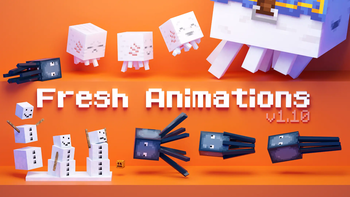
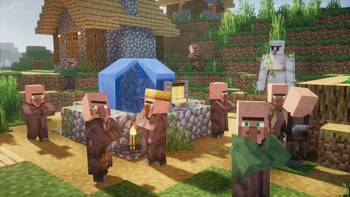
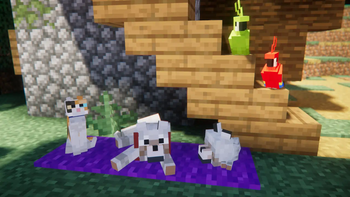
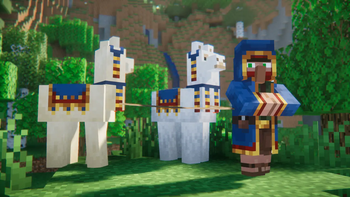
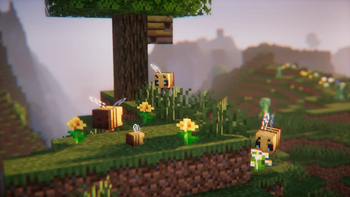
Fresh Animations in game, captured across biomes and lighting conditions.
What you get
Why Fresh Animations?
Livelier mob behavior
Smoother, more expressive motions replace stiff defaults, so creatures feel present rather than mechanical. Subtle idle loops and clearer attack cues make caves, raids, and farms easier to read without changing the classic Minecraft look.
Keeps vanilla identity
The focus is animation and models, not flashy retextures, preserving the art direction you know. It complements default blocks and UI, so your world still looks familiar, just more characterful when entities move and react.
Better combat readability
Telegraphed swings and turns help you track threats in low light or crowded fights. You notice intent faster, which can improve timing for shields, bows, and strafing without needing any HUD addons or extra particle noise.
Pairs with other packs
Because it targets entities, it usually stacks cleanly above block or GUI packs. Put it at the top of your resource pack list so its model changes take priority over broader texture overhauls that might touch mobs.
Low performance impact
It avoids high resolution textures, so frame rates tend to remain stable on modest hardware. Most effects are model and animation tweaks, which are lighter than heavy shaders or 512x packs and suit laptops or older PCs.
Works across versions
Builds are available for many modern releases, and minor updates often remain usable. If your exact version is not listed, nearby versions commonly load fine, though checking pack order and settings helps avoid oddities.
Downloads
Get Fresh Animations
The 10 most recent Fresh Animations builds, direct mirror links, no ad redirects.
Install
How to install Fresh Animations
Vanilla route
- 1Download the Fresh Animations zip file and do not unzip it.
- 2Launch Minecraft, open Options, then click Resource Packs.
- 3Click Open Pack Folder to open the resourcepacks directory.
- 4Move the zip into resourcepacks, then return to the game window.
- 5Enable Fresh Animations and drag it to the top of active packs.
Modded route (Minecraft Vanilla)
- 1Use a matching game version, then install Fabric or Forge as desired.
- 2Optionally add OptiFine for extra entity model features and tweaks.
- 3Open your instance folder and place the zip in resourcepacks.
- 4Start the modded profile, open Resource Packs, and enable the pack.
- 5Keep Fresh Animations at the top, above other packs that edit mobs.
◎ Compatibility
✓ Tested and confirmed working on Minecraft 26.2 and 26.1.2
We ran Fresh Animations on Minecraft 26.2 and 26.1.2 even though the pack was not officially built for these versions. Texture packs typically stay compatible across nearby Minecraft releases, and this one runs as expected.
Troubleshooting
Common problems
Mobs look unchanged.
Place Fresh Animations above other packs in the active list. Restart the world after enabling to ensure models and animations reload correctly.
Broken or stretched limbs.
Another pack edits the same entity models. Disable conflicting packs or move Fresh Animations to the top so its models override others.
Flickering or z fighting on entities.
Reduce overlapping features by turning off conflicting settings in shaders or mods. Test with shaders disabled to identify the source, then re enable gradually.
Lower FPS in crowded areas.
Lower entity render distance and turn down particles. Close other packs that add heavy effects, then relaunch the game to clear cached assets.
FAQ
Frequently asked questions
Which Minecraft versions does Fresh Animations support?+
The pack has builds for many modern Java releases, including long running series from 1.13.2 through recent 1.21.x entries. Texture packs generally remain compatible with nearby Minecraft versions even when they were not officially built for that release.
Will it hurt performance on my PC?+
Most users report small to moderate impact since it does not raise texture resolution. If frames dip in mob heavy areas, try lowering entity distance or disabling shaders.
Does Fresh Animations require OptiFine?+
You can load it as a standard resource pack. Certain advanced model based effects may rely on features provided by OptiFine or compatible client mods, which can improve visuals on supported versions.
Is it compatible with Bedrock or Minecraft PE?+
This pack targets Java Edition. Bedrock uses a different format and lacks several Java specific entity model features, so there is no native Bedrock version of these animations.
Is using this on servers safe or bannable?+
Resource packs are client side and cosmetic, so they are generally safe on public servers. They do not alter gameplay mechanics or provide competitive advantages.
What resolution does it use, and can I combine it?+
It is designed around the default look, so it works well with 16x packs. You can stack it above block or GUI packs, but avoid other mob overhauls that edit the same entities.
Ready to install?