Texture pack review
Fast Better Grass
Fast Better Grass latest build for Minecraft 1.20
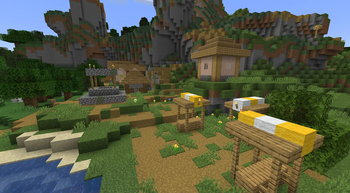
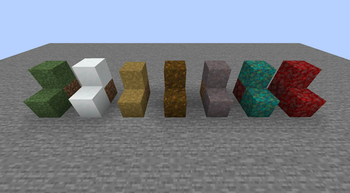
Fast Better Grass changes how dirt and grass blocks look on the side by stretching the top texture all the way down. It works with most resource packs and provides a cleaner landscape look.
Overview
In-depth
Fast Better Grass updates how dirt and grass blocks render on their sides by stretching the top texture down, and Fast Better Grass keeps that behavior focused and efficient. The pack is authored by robotkoer and aims to deliver a cleaner, less blocky transition between grass tops and their vertical faces, which can reduce visual noise in fields, hills, and paths.
Because the pack is small and targeted, it works alongside most resource packs without replacing their main textures. That means you can combine Fast Better Grass with high resolution or stylized packs to keep a consistent look where the grass meets the terrain. Many players report that the effect looks natural on rolling landscapes, and the tweak avoids adding extra patterns or overlay artifacts that some grass mods introduce.
Installation is straightforward for vanilla players, and the pack does not require separate mod frameworks to function. It follows a simple resource layout that Minecraft recognizes, so using it with your existing pack order usually produces immediate results. Note that some combined packs or shaders may change how the stretched texture appears, so test in a creative world before committing to a long play session.
Who this is for
Fast Better Grass is aimed at players who want subtle terrain polishing without a full visual overhaul. If you prefer small, purposeful tweaks rather than sweeping texture replacements, this pack fits that approach. For more texture packs across different categories, visit texturespack.com to browse the full catalog. If you want to see other tweaks, check the tweaks category for related packs that modify small aspects of the game for a cleaner look.
Gallery
Screenshots
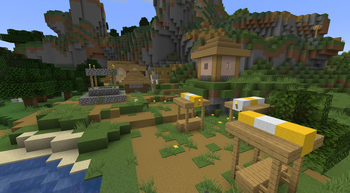
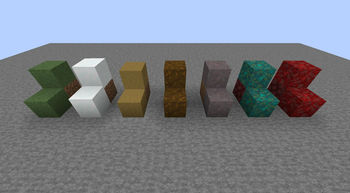
Fast Better Grass in game, captured across biomes and lighting conditions.
What you get
Why Fast Better Grass?
Cleaner Terrain Edges
Stretches the grass top down the sides to reduce visible seams, producing smoother looking slopes and transitions.
Compatible With Packs
Designed to work with a wide range of resource packs without overwriting their main textures, preserving your chosen style.
Minimal Performance Impact
This is a focused tweak rather than a full overhaul, so it adds little to no measurable load on most systems.
Quick Install
Simple resource pack format means you can enable it in seconds through Minecrafts resource pack menu.
Subtle Visual Fix
Improves a common visual annoyance without changing block art dramatically, keeping the familiar Minecraft look.
Open License
Published under the MIT License, allowing reuse and study with minimal restrictions for creators.
Downloads
Get Fast Better Grass
The 10 most recent Fast Better Grass builds, direct mirror links, no ad redirects.
Install
How to install Fast Better Grass
Vanilla route
- 1Download the Fast Better Grass resource pack file to your computer.
- 2Open Minecraft, go to Options, then Resource Packs, and click Open Pack Folder.
- 3Move the downloaded pack file into the opened resourcepacks folder.
- 4Back in Minecraft, enable Fast Better Grass from the Available list and move it to Selected.
- 5Reload the resource packs or restart the game to confirm the grass sides update.
Modded route (Minecraft Vanilla)
- 1Install Fabric or Forge for your Minecraft version, Optifine is optional for extra settings.
- 2Place the Fast Better Grass file into the resourcepacks folder as with vanilla installs.
- 3Ensure any other resource packs are ordered so Fast Better Grass does not get overridden.
- 4If using Optifine or shader mods, test in-game and adjust options for connected textures.
- 5Restart the game and confirm the visual change in a creative or test world.
◎ Compatibility
✓ Tested and confirmed working on Minecraft 1.20
We ran Fast Better Grass on Minecraft 1.20 even though the pack was not officially built for this version. Texture packs typically stay compatible across nearby Minecraft releases, and this one runs as expected.
Troubleshooting
Common problems
No visible change to grass sides
Confirm the pack is enabled in the resource pack menu and placed above other packs that may override textures, then reload resource packs.
Conflicts with another pack
Move Fast Better Grass higher in the resource pack order so its textures take precedence, or use a merged pack to combine assets.
Odd seams or stretching artifacts
Disable shaders or Optifine connected texture features temporarily to see if they are altering the intended look, then adjust shader settings.
Texture not recognized by game
Verify the pack uses the correct resource pack format for your Minecraft version and redownload from the original source if files appear corrupted.
FAQ
Frequently asked questions
Which Minecraft versions does Fast Better Grass support?+
The author lists support for multiple 1.19 through 1.21 builds and several others. Texture packs generally remain compatible with nearby Minecraft versions even when they were not officially built for that release.
Will this pack hurt performance?+
It is a small tweak and should not cause noticeable performance drops on most machines. Texture packs of similar scope usually have minimal impact compared with large resolution packs.
Can I use this on Bedrock Edition?+
Fast Better Grass is aimed at Java resource packs and is not set up for Bedrock. Packs for Bedrock use a different format and need conversion to work.
Do I need Optifine to use this pack?+
No, Optifine is not required, though using it can change how some texture effects render. Texture packs often work without Optifine, but Optifine can provide additional graphical options.
Will using this pack get me kicked from servers?+
Client-side resource packs like this do not change server files and are generally safe to use, though some servers enforce their own packs. Texture packs generally remain compatible with nearby Minecraft versions even when they were not officially built for that release.
How do I revert after installation?+
Open Minecrafts Resource Packs menu and move Fast Better Grass back to Available or remove the file from the resourcepacks folder, then reload resource packs.
Ready to install?