Texture pack review
FancyFast Bushy Leaves
FancyFast Bushy Leaves latest build for Minecraft 1.13
This resource pack combines the aesthetics of fluffy, bushy trees with the performance logic of fast leaf rendering. It is perfect for players who want a lush look in jungles or swamps without killing their frame rate.
Overview
In-depth
FancyFast Bushy Leaves is a texture pack that blends fuller, bushier leaf artwork with textures designed for efficient rendering. The pack focuses on leaf blocks and foliage, offering a visibly denser canopy while keeping a modest performance profile compared with heavy shader-dependent packs.
The author Jagutka keeps the style close to vanilla, so the changes feel familiar rather than drastic. Colors and shapes remain natural, which helps trees in jungles and swamps appear lusher without clashing with standard terrain textures. Because the pack targets fast leaf behavior, it is suitable for players who want improved foliage visuals while avoiding the major frame rate hit that some high detail packs introduce.
FancyFast Bushy Leaves integrates well with most vanilla-style packs and can be combined with broader texture suites when only foliage needs enhancement. Installation is the same as other resource packs, and the pack uses the normal resource pack folder so it is straightforward to add or remove during gameplay. Visit our main texture pack browse page to see related options and alternative foliage packs.
TexturesPack categorizes this pack under vanilla-plus, reflecting that it is an incremental visual upgrade rather than a full overhaul. That makes it a practical choice for players who want a subtle but visible change to their forests. For those who prefer more radical art direction, consider checking the vanilla-plus section for other packs that modify stone, wood, or biome palettes while preserving the game aesthetic.
Who this is for
Use FancyFast Bushy Leaves if you want fuller foliage visuals with minimal fuss. It works well on lower to mid spec systems and on servers where clients supply their own visuals. Because it keeps to vanilla conventions, it will not dramatically change building materials or block readability, making it suitable for survival play and builds where foliage should enhance rather than dominate the scene.
Gallery
Screenshots
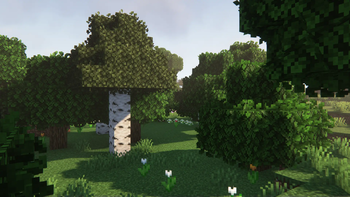
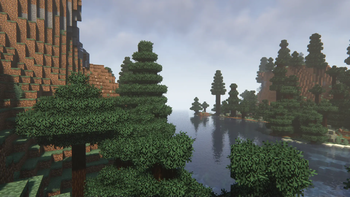
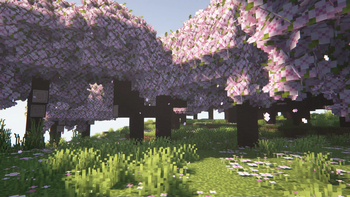
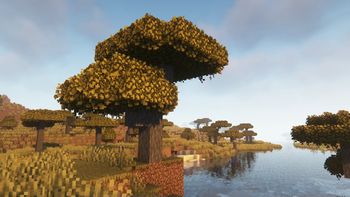
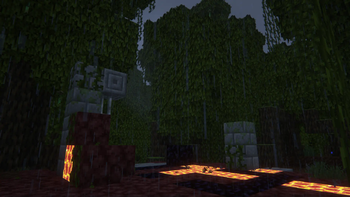
FancyFast Bushy Leaves in game, captured across biomes and lighting conditions.
What you get
Why FancyFast Bushy Leaves?
Denser Foliage Look
Leaves appear fuller and bushier, making forests and jungle canopies feel more layered and natural without changing other block artwork.
Performance Friendly
Textures are optimized for fast leaf rendering to reduce the common frame rate drop that comes with high detail foliage packs.
Vanilla Plus Style
Maintains the vanilla color palette and shape language, so the pack blends with standard textures and keeps block readability high.
Easy Compatibility
Designed to slot into most vanilla-style resource packs, letting you swap foliage visuals without overhauling the entire look.
Simple Installation
Uses the standard resource pack format, so adding or removing the pack is straightforward for both new and experienced players.
Good for Builds
Adds visual depth to landscaping and builds that rely on natural foliage, improving background interest without distracting from structures.
Downloads
Get FancyFast Bushy Leaves
The 3 most recent FancyFast Bushy Leaves builds, direct mirror links, no ad redirects.
Install
How to install FancyFast Bushy Leaves
Vanilla route
- 1Download FancyFast Bushy Leaves from the pack page on texturespack.com.
- 2Open Minecraft, go to Options, then Resource Packs, and click Open Pack Folder.
- 3Move the downloaded zip file into the resourcepacks folder without extracting it.
- 4Back in Minecraft, select the pack from Available Resource Packs and click Done.
- 5Restart Minecraft if textures do not load correctly after selection.
Modded route (Minecraft Vanilla)
- 1Install Fabric or Forge for your Minecraft version, with Optifine optional for extra control.
- 2Place the FancyFast Bushy Leaves zip into the resourcepacks folder as with vanilla.
- 3If using Optifine, enable Custom Colors or Random Mobs as needed in Video Settings.
- 4Some modded loaders may require a game restart, so restart Minecraft after adding the pack.
- 5If using a resource pack manager mod, import the zip through that tool for easier switching.
◎ Compatibility
✓ Tested and confirmed working on Minecraft 1.13
We ran FancyFast Bushy Leaves on Minecraft 1.13 even though the pack was not officially built for this version. Texture packs typically stay compatible across nearby Minecraft releases, and this one runs as expected.
Troubleshooting
Common problems
Leaves look identical to vanilla
Ensure the pack is above other resource packs in the loaded order and restart Minecraft to force a texture refresh.
Performance still poor
Lower render distance or enable fast graphics in Video Settings, and verify no heavy shader mod is active alongside the pack.
Textures missing on server
Confirm the resource pack is enabled client-side, servers rarely force client textures unless they provide a download link.
Incompatible with other foliage packs
Place FancyFast Bushy Leaves higher in the pack order or remove conflicting foliage packs to ensure its leaf textures take precedence.
FAQ
Frequently asked questions
Which Minecraft versions does FancyFast Bushy Leaves support?+
The pack lists many versions from 1.13 through recent 1.21.x releases. Texture packs generally remain compatible with nearby Minecraft versions even when they were not officially built for that release.
Will this pack affect my frame rate?+
It is optimized for faster leaf rendering and should have a smaller impact than high detail foliage packs, but actual performance depends on your hardware and settings.
Can I use this on Bedrock Edition?+
This pack is made for Java resource packs, and it will not work on Bedrock without conversion. Bedrock has a different resource format and limitations.
Do I need Optifine to use this pack?+
Optifine is not required. Optifine is optional and can offer additional options for colors and performance, but the pack works without it.
Is there any server risk using this pack on multiplayer?+
Using a client-side resource pack is generally safe; servers cannot see or alter your local textures. However, do not download packs from untrusted sources to avoid corrupted files.
What should I do if textures look corrupt after installing?+
Try re-downloading the pack, ensure the zip was not extracted, clear the resource pack cache by restarting the game, and check for conflicts with other installed packs.
Ready to install?