Texture pack review
Faithful 64x
Faithful 64x 64x, latest build for Minecraft 26.2
Faithful 64x takes the familiar vanilla appearance and sharpens it into a 64-pixel resolution, maintaining the original game's soul while adding much-needed clarity and crispness to every block.
Overview
In-depth
Faithful 64x refines the classic Minecraft look by keeping the original designs and increasing pixel density to a 64x resolution. This pack preserves the recognizable shapes and color palette while tightening edges, so textures feel cleaner without leaving the vanilla aesthetic.
The pack works well for players who prefer a familiar visual style with a modest boost in detail. Blocks, items, and common mobs are all treated with subtle sharpening and additional pixel detail, not a radical stylistic overhaul. That makes Faithful 64x a good match for builds that rely on the vanilla feel but look slightly more polished. You can browse similar packs on our site at this collection of texture packs.
Performance is generally friendly to mid-range systems because the increase to 64x is moderate compared with high resolution packs. Some subtle normal and specular touches appear on certain assets, though the pack remains focused on clarity rather than heavy effects. Textures work with vanilla Minecraft without extra tools, though players who use shader mods will notice how the higher resolution interacts with lighting and shadows.
HARYA301 keeps the style approachable for builders and survival players alike, retaining the readable silhouettes that make block placement predictable. The pack’s enhancements are especially noticeable at close range, where items and UI elements gain crispness and reduced noise. If you prefer a visual upgrade that stays true to default Minecraft, Faithful 64x offers that balance. For more texture packs in the vanilla-plus category, also see the vanilla-plus collection.
Who this is for
Players who want a faithful change rather than a complete redesign, multiplayer servers that want a consistent look across clients, and streamers who need readable visuals at common resolutions will find Faithful 64x useful. It blends familiarity and refinement in a way that fits many playstyles without forcing a new aesthetic direction.
Gallery
Screenshots
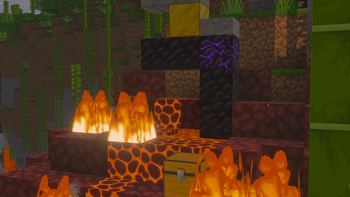
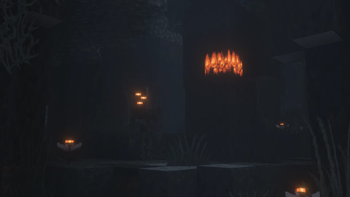
Faithful 64x in game, captured across biomes and lighting conditions.



What you get
Why Faithful 64x?
Clearer block detail
Faithful 64x improves block definition so builds read better at close and medium range, making textures feel sharper and less noisy.
Vanilla friendly
The pack keeps the original color palette and proportions, so the game retains its familiar look while gaining subtle refinement.
Performance conscious
At 64x resolution the pack balances increased detail with reasonable performance, suitable for many midrange systems.
Consistent style
Textures are updated uniformly across blocks and items, preserving visual cohesion for builders and servers.
Better UI elements
Icons and inventory graphics receive higher fidelity, which improves readability when managing items or building.
Compatible with shaders
The cleaner textures pair well with shader mods, letting lighting and reflections appear more distinct without clashing.
Downloads
Get Faithful 64x
The 10 most recent Faithful 64x builds, direct mirror links, no ad redirects.
Install
How to install Faithful 64x
Vanilla route
- 1Download the Faithful 64x resource pack file to your computer.
- 2Open Minecraft, go to Options, then Resource Packs, and click Open Pack Folder.
- 3Move the downloaded Faithful 64x zip into the resourcepacks folder.
- 4Back in Minecraft, enable Faithful 64x from the Available Resource Packs list.
- 5Restart Minecraft if textures do not appear correctly after enabling the pack.
Modded route (Minecraft Vanilla)
- 1Install Fabric or Forge for your Minecraft version, with Optifine optional for extra settings.
- 2Place the Faithful 64x zip into the resourcepacks folder in your Minecraft directory.
- 3If using Optifine, enable it in video settings for additional texture features.
- 4Launch Minecraft with the Fabric or Forge profile and enable the pack in Resource Packs.
- 5Test in-game and adjust video settings or mod configs for performance or visual preferences.
◎ Compatibility
✓ Tested and confirmed working on Minecraft 26.2 and 26.1.2
We ran Faithful 64x on Minecraft 26.2 and 26.1.2 even though the pack was not officially built for these versions. Texture packs typically stay compatible across nearby Minecraft releases, and this one runs as expected.
Troubleshooting
Common problems
Textures look blurry
Make sure the pack zip is placed in the resourcepacks folder and enabled in Minecraft, and lower GUI scale or disable resource pack smoothing in graphics settings.
Performance drops after enabling
Reduce render distance and graphics settings, or try running without shaders to see if the pack alone causes the slowdown.
Items or blocks missing
Confirm you downloaded the correct Faithful 64x version for your Minecraft release and that the zip is not nested inside another folder.
Incompatible with a modded asset
Check mod resource pack compatibility and load order, placing Faithful 64x below mod packs or use a combined pack that supports both.
FAQ
Frequently asked questions
Which Minecraft versions does Faithful 64x support?+
The author lists support for several 1.19 through 1.21 releases. Texture packs generally remain compatible with nearby Minecraft versions even when they were not officially built for that release, so try the pack on close versions and test for missing assets.
Will Faithful 64x hurt my FPS?+
A 64x pack can reduce performance on lower end systems, but the impact is usually moderate. Lower render distance and graphics settings to recover FPS.
Can I use Faithful 64x on Bedrock edition?+
This pack is designed for Java edition, and Bedrock has a different resource format. You would need a Bedrock specific conversion for proper use.
Do I need Optifine to run Faithful 64x?+
Optifine is not required for the pack to work, but it is optional for additional performance and texture options if you want extra controls.
Is there any risk using this on a multiplayer server?+
Resource packs are client side and normally safe to use on servers, though some servers require or recommend specific packs. Running client side packs does not pose a direct server security risk.
Textures show errors after updating Minecraft, what should I do?+
Re-check that you have the latest Faithful 64x release for your Minecraft version and move the pack back into the resourcepacks folder. Texture packs generally remain compatible with nearby Minecraft versions even when they were not officially built for that release.
Ready to install?