Texture pack review
Fresh Animations: Player Extension
Fresh Animations: Player Extension latest build for Minecraft 1.20
This extension pack applies the iconic, high-quality movements of the main Fresh Animations pack to your own character, replacing stiff vanilla movements with fluid transitions.
Overview
In-depth
Fresh Animations: Player Extension brings the movement work from the Fresh Animations family directly to your player model, smoothing out walking, running, jumping, and idle transitions with a realistic style. This extension focuses on player-specific motion, so it does not replace mobs or item animations, it layers on top of the base Fresh Animations feel for a more natural avatar presence in gameplay. The author FreshLX aims for subtlety, dialing down jarring pops and abrupt pose changes so common in default animation cycles.
The pack is designed to work with standard Minecraft resource packs and targets the vanilla loader, which keeps installation straightforward for most players. While it modifies only player animations, you can combine it with a main Fresh Animations pack or other compatible animation collections. For browsing other texture packs and animation extensions see our main listings at texturespack.com/browse/texture-packs and find related realistic options in the realistic category at texturespack.com/browse/texture-packs?category=realistic.
Visual changes are concentrated on timing and posture, with attention to limb movement, head tilt, and subtle weight shifts. In practice this produces walking strides that feel more human and jumping arcs that do not snap midair. The extension is appropriate for builders, role players, and content creators who want their player camera and recorded footage to feel less mechanical without altering textures or world visuals.
What to expect
Expect a light footprint that touches only player animation data, which means lower risk of conflicts with texture packs that adjust skins or GUI elements. Because it is animation focused, performance impact is minimal compared with high resolution texture packs, though results can vary by setup. Test it in creative mode first to confirm the motion fits your playstyle, and consider pairing it with the main Fresh Animations pack for full mob and item parity.
Gallery
Screenshots
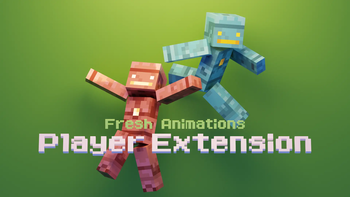
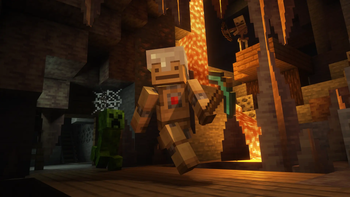
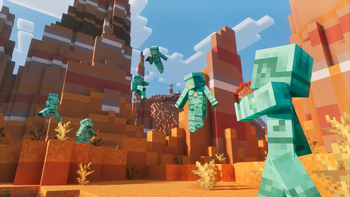
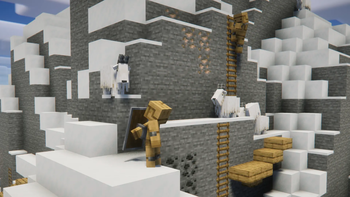
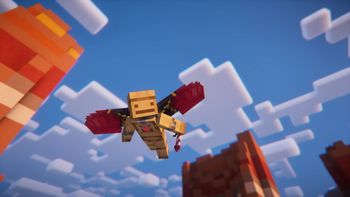
Fresh Animations: Player Extension in game, captured across biomes and lighting conditions.
What you get
Why Fresh Animations: Player Extension?
Smoother Player Motion
Replaces rigid default cycles with fluid transitions, making walking and sprinting appear more natural without changing textures.
Minimal Performance Cost
Animation only changes keep CPU and GPU load low compared with high resolution texture packs, making it suitable for many systems.
Easy To Combine
Designed to layer with other packs and the main Fresh Animations collection, reducing conflicts with unrelated texture or GUI packs.
Cleaner Recording Footage
Subtle motion adjustments reduce mechanical jitter, producing more pleasing first person and replay footage for content creators.
Focused Scope
Targets player animations only, so it does not overwrite mob or item behaviors unless explicitly paired with the main pack.
Consistent Realism
Prioritizes small posture and timing changes that read as believable, fitting realistic themed builds and role play servers.
Downloads
Get Fresh Animations: Player Extension
The 2 most recent Fresh Animations: Player Extension builds, direct mirror links, no ad redirects.
Install
How to install Fresh Animations: Player Extension
Vanilla route
- 1Download the Fresh Animations: Player Extension resource pack file from its page.
- 2Open Minecraft, go to Options, then Resource Packs to open the resource pack screen.
- 3Click Open Pack Folder and move the downloaded zip into the folder without extracting it.
- 4Back in Minecraft, enable the Fresh Animations: Player Extension pack and move it to the top of the list.
- 5Restart Minecraft to ensure the animation changes load cleanly before testing in world.
Modded route (Minecraft Vanilla)
- 1Install Fabric or Forge for your Minecraft version, Optifine is optional for other visual tweaks.
- 2Place the pack zip into the resourcepacks folder as with vanilla installs.
- 3If using animation mods, ensure compatibility by placing the pack above mod resource packs in the list.
- 4Restart the client after enabling the pack, and test animations in a single player world before joining servers.
- 5Use Optifine only if you need specific graphical adjustments, noting it is optional for this pack.
◎ Compatibility
✓ Tested and confirmed working on Minecraft 1.20
We ran Fresh Animations: Player Extension on Minecraft 1.20 even though the pack was not officially built for this version. Texture packs typically stay compatible across nearby Minecraft releases, and this one runs as expected.
Troubleshooting
Common problems
No visible change to player animation
Ensure the pack is enabled and at the top of the resource pack list, then restart Minecraft and test in third person to observe full pose changes.
Conflicts with other animation packs
Disable other animation resource packs or move Fresh Animations: Player Extension higher in priority, then retest to identify the conflicting pack.
Unintended camera or HUD shifts
Check for GUI or shader packs that modify camera behavior, temporarily disable them, and confirm the issue is from the animation pack alone.
Perceived stuttering during movement
Lower animation or replay settings in mods, ensure game is running at stable frame rates, and try toggling the pack off and on after a restart.
FAQ
Frequently asked questions
Which Minecraft versions does this pack support?+
This pack lists compatibility through 1.21 and some records into mappings like 26.1 series. Texture packs generally remain compatible with nearby Minecraft versions even when they were not officially built for that release.
Will this cause lag or FPS drops?+
Animation only packs usually have minimal impact, but lower end systems may notice slight differences. Performance varies by hardware and other active packs or shaders.
Can I use this on Bedrock Edition?+
This extension targets Java resource pack format, so it will not work on Bedrock without conversion tools or manual reformatting, which is not guaranteed to reproduce all motion.
Do I need Optifine to run this pack?+
Optifine is not required for Fresh Animations: Player Extension, it works with vanilla loaders, though Optifine is optional for additional graphical tweaks.
Is there any risk to joining servers with this pack enabled?+
Using a client-side resource pack carries no inherent account risk, servers may block custom client modifications, but animation packs are client side and generally safe.
What if animations look broken after installing?+
Disable other resource packs and restart Minecraft to isolate the issue, and then re-enable packs one at a time to find the conflict. Texture packs often stay compatible across nearby versions.
Ready to install?