Texture pack review
Even Better Enchants
Even Better Enchants latest build for Minecraft 26.2
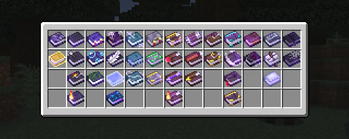
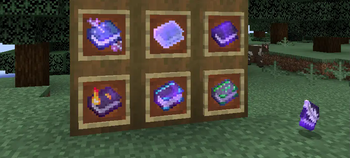
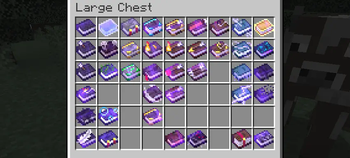
Even Better Enchants gives every enchantment book its own distinct visual look while keeping the classic pixel art style of vanilla Minecraft.
Overview
In-depth
Even Better Enchants gives every enchantment book its own distinct visual look while keeping the classic pixel art style of vanilla Minecraft. This pack focuses on clarity and small but meaningful icon differences so players can spot specific books at a glance in inventories, chest screens, and enchanted table previews.
The palette and pixel patterns remain faithful to the base game, so Even Better Enchants will feel consistent alongside other vanilla-plus packs and resource packs that do not alter the GUI heavily. The author mythitorium has concentrated on readable symbols and color cues rather than radical reworking of item shapes, so the result is a subtle, practical upgrade more than a cosmetic overhaul.
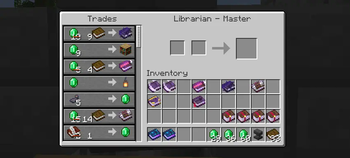
Expect custom textures primarily on enchanted books and related UI elements, with careful attention to contrast and scale so the icons remain legible at common GUI sizes. Players who spend time sorting books, running trading halls, or managing libraries may find inventory navigation quicker with these unique icons.
This pack lists compatibility with a wide range of Java versions, including many iterations of 1.17 through 1.21 and some modern snapshots. Texture packs generally remain usable across nearby Minecraft releases even when not explicitly rebuilt for every release, though small visual inconsistencies can appear between major updates.
Usage notes
Even Better Enchants uses a vanilla-plus approach, which means it edits specific item textures without changing the overall aesthetic. For installation, use the standard resource pack folder for vanilla clients, or combine it with mod loaders that accept standard resource packs. For a broader selection of similar packs, browse the full collection on our resource list at texturespack.com, or see other entries in the vanilla-plus category for comparable styles at texturespack.com/browse/texture-packs?category=vanilla-plus.
Gallery
Screenshots
Even Better Enchants in game, captured across biomes and lighting conditions.
What you get
Why Even Better Enchants?
Faster Book Recognition
Distinct icons make it quicker to find the exact enchantment in inventories or chests, saving time during sorting and trading sessions.
Subtle Vanilla Feel
Design maintains the original pixel art language, so the pack blends well with other vanilla-style textures without jarring changes.
Improved Inventory Workflow
Visual differentiation helps when organizing large caches of books, making repetitive tasks less error prone and more efficient.
Low Visual Noise
Icons prioritize clarity and contrast rather than flashy effects, which keeps tooltips and menus easy to read.
Broad Version Coverage
Listed support spans many Java releases, reducing the need to hunt for version-specific variants for common setups.
Simple Integration
Because it edits only item textures, the pack is straightforward to combine with other resource packs and most mods.
Downloads
Get Even Better Enchants
The 10 most recent Even Better Enchants builds, direct mirror links, no ad redirects.
Install
How to install Even Better Enchants
Vanilla route
- 1Download the Even Better Enchants zip file from the pack page.
- 2Open Minecraft, go to Options, then Resource Packs, and click Open Resource Pack Folder.
- 3Move the downloaded zip into the resourcepacks folder without extracting it.
- 4Back in Minecraft, enable the pack from the Available Resource Packs list.
- 5Restart Minecraft if textures do not load correctly after enabling the pack.
Modded route (Minecraft Vanilla)
- 1Place the Even Better Enchants zip into the resourcepacks folder for your modded profile.
- 2Run Minecraft with Fabric or Forge, Optifine optional for extra texture settings.
- 3Ensure resource pack order places Even Better Enchants above packs that override item textures.
- 4Use the in-game Resource Packs menu to enable the pack and confirm visuals.
- 5Restart the modded client if textures appear missing or inconsistent.
◎ Compatibility
✓ Tested and confirmed working on Minecraft 26.2 and 26.1.2
We ran Even Better Enchants on Minecraft 26.2 and 26.1.2 even though the pack was not officially built for these versions. Texture packs typically stay compatible across nearby Minecraft releases, and this one runs as expected.
Troubleshooting
Common problems
Textures not appearing
Ensure the zip is in the resourcepacks folder and enabled in the Resource Packs menu, then restart Minecraft to force a reload.
Icons look clipped in GUI
Check for texture pack conflicts by disabling other packs that modify item textures, then re-enable Even Better Enchants alone to confirm the issue.
Pack causes minor FPS drops
Turn off unnecessary graphical features in video settings, consider using Optifine or lowering render distances to offset any small overhead.
Incompatibility with other packs
Adjust resource pack order so Even Better Enchants is higher priority, or combine only the specific files you need into a merged pack.
FAQ
Frequently asked questions
What Minecraft versions does Even Better Enchants support?+
The author lists many Java versions across 1.17 to 1.21. Texture packs generally remain compatible with nearby Minecraft versions even when they were not officially built for that release.
Will this pack affect game performance?+
This pack focuses on item textures and has minimal performance impact, though individual systems vary and enabling Optifine can help manage any minor overhead.
Can I use Even Better Enchants on Bedrock Edition?+
This pack is provided for Java resource packs. Bedrock uses a different format, so conversion is required and results may vary.
Do I need Optifine to use this pack?+
Optifine is not required for Even Better Enchants, it uses standard resource pack features. Optifine can be used optionally for extra texture controls.
Is there any risk using this pack on a multiplayer server?+
Using client-side resource packs like this is typically safe and does not affect servers, but server-side texture enforcement could require different steps to display textures for others.
What if a texture looks wrong after updating Minecraft?+
Try re-enabling the pack and restarting the client, check for updated versions, and remember that texture packs often continue to work on nearby releases even without official rebuilding.
Ready to install?