Texture pack review
Enchantment Descriptions Compat
Enchantment Descriptions Compat latest build for Minecraft 1.17.1
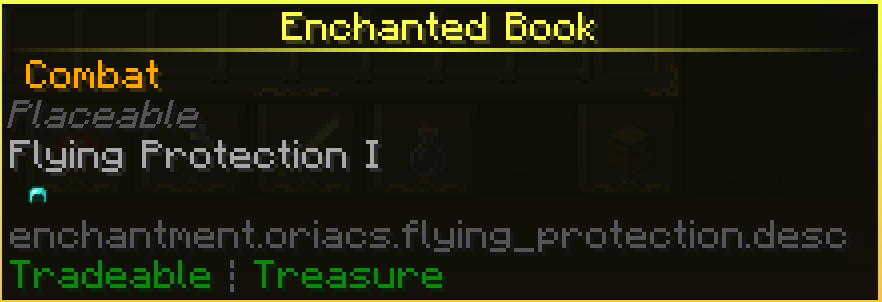
This pack bridges the gap between the Enchantment Descriptions mod and various popular mods that are missing text for their custom enchants.
Overview
In-depth
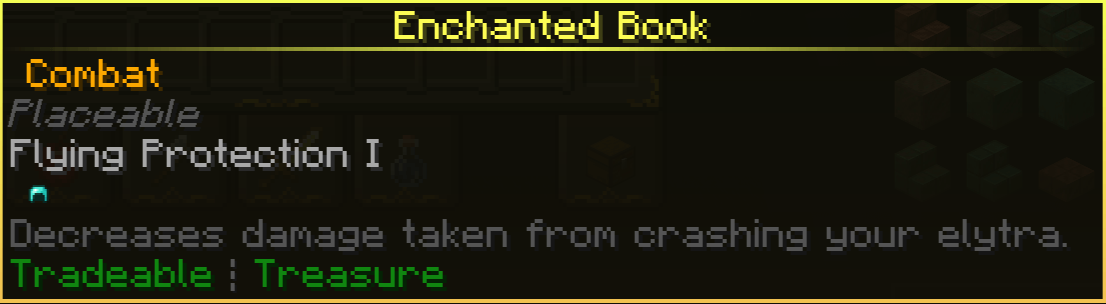
Enchantment Descriptions Compat provides a focused set of compatibility texts for the Enchantment Descriptions mod, aiming to add missing descriptions for custom enchantments introduced by popular mods. This pack does not change textures or models, it supplies human readable lines that appear alongside enchantment names so players can understand what each custom enchant does without digging into mod pages or wikis.
The author, CyberRat2, created this as a lightweight bridge to fill gaps left by modpacks that add unique enchantments. Because it is a compatibility resource rather than a visual overhaul, Enchantment Descriptions Compat is suitable for players who want clarity in their tooltip text while keeping their chosen texture set intact. It plays nicely with many packs that do not touch text files, and it can be layered under or over other resource packs depending on your priority preferences.
Installation is straightforward and does not require altering core game files. You can use it in a plain client, or combine it with Forge or Fabric along with Optifine if you want additional texture or font tweaks. The pack lists a range of supported Minecraft versions, and like most text based packs, it generally remains functional across adjacent releases even when the pack was not explicitly built for a specific version. For more texture packs and similar utilities, browse the main collection at this site.
Because this pack only adds textual data, conflicts are rare, but you may need to adjust load order in your resource pack menu to prefer these descriptions over other packs that change the same language entries. If your mod of choice receives an update that renames enchants, you might need an updated compatibility file. For themed or similar packs, check the themed category for related resources and add-ons.
Quick note
This resource is best thought of as a convenience layer that improves clarity in modded play, it is not a mod in itself and will not alter gameplay mechanics.
Gallery
Screenshots
Enchantment Descriptions Compat in game, captured across biomes and lighting conditions.
What you get
Why Enchantment Descriptions Compat?
Clear Enchantment Text
Adds concise descriptions to custom enchantments so players know their effects at a glance without consulting external guides.
Lightweight Compatibility
Only modifies language entries, keeping performance impact negligible while increasing readability in modded setups.
Cross Version Friendly
Supports several Minecraft releases and often remains usable with nearby versions when not explicitly updated for them.
Easy to Layer
Designed to be combined with other resource packs, simply set load order to prioritize these descriptions when needed.
Minimal Maintenance
Focused scope means fewer required updates compared with texture heavy packs, reducing the chance of breakage.
Author Driven Fixes
Created by CyberRat2 to address specific missing text issues, offering targeted fixes for popular mod enchantments.
Downloads
Get Enchantment Descriptions Compat
The 4 most recent Enchantment Descriptions Compat builds, direct mirror links, no ad redirects.
Install
How to install Enchantment Descriptions Compat
Vanilla route
- 1Download the zip and place it into your Minecraft resourcepacks folder
- 2Launch Minecraft and open Options, then Resource Packs
- 3Enable Enchantment Descriptions Compat by moving it to the Selected list
- 4Adjust resource pack order if other packs override language files
- 5Restart the game if descriptions do not appear immediately after enabling
Modded route (Vanilla)
- 1Place the pack zip into the resourcepacks folder used by your modded profile
- 2Run the game with Fabric or Forge, Optifine optional for additional font tweaks
- 3Open Resource Packs from Options and enable the pack, set priority
- 4Restart the client if tooltips do not update after enabling
- 5If using a modpack launcher ensure the resourcepacks directory is linked to the profile
◎ Compatibility
✓ Tested and confirmed working on Minecraft 1.17.1
We ran Enchantment Descriptions Compat on Minecraft 1.17.1 even though the pack was not officially built for this version. Texture packs typically stay compatible across nearby Minecraft releases, and this one runs as expected.
Troubleshooting
Common problems
Descriptions not showing
Ensure the pack is enabled in the Resource Packs menu and moved into the Selected column, then restart the game to reload language files.
Conflict with another pack
Place Enchantment Descriptions Compat higher in load order or temporarily disable the other pack that replaces language files.
Some enchants still unnamed
The pack only covers specific mods, check the pack notes for supported mods and request additions from the author for missing entries.
Text appears incorrect after mod update
Mod updates can rename keys, wait for an updated compat pack or manually edit language files to match new keys.
FAQ
Frequently asked questions
Which Minecraft versions are supported?+
The pack lists several supported versions but may still work with nearby releases. Texture packs and language packs often remain compatible across adjacent Minecraft versions even when not explicitly built for them.
Will this affect game performance?+
No, this pack only adds text entries and does not include heavy assets, so performance impact is negligible.
Can I use this on Bedrock Edition?+
This pack is designed for Java resource packs and will not work on Bedrock without conversion. Java resource packs generally do not apply directly to Bedrock.
Do I need Optifine to use this pack?+
Optifine is not required, the pack works with vanilla Java. Optifine is optional for additional font or rendering tweaks but not necessary for descriptions.
Will using this pack cause bans on servers?+
Language-only resource packs are client side and generally do not cause server issues. Server rules vary, so check server policy before joining to be safe.
Ready to install?