Texture pack review
Enchanted Books: Re-covered
Enchanted Books: Re-covered 16x, latest build for Minecraft 1.21.5
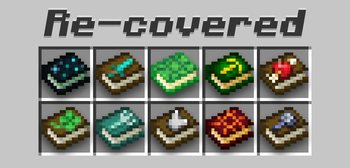
Enchanted Books: Re-covered is a 16x vanilla-plus resource pack that gives unique, intuitive textures to every enchanted book cover based on its specific power.
Overview
In-depth
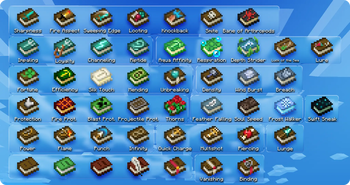
Enchanted Books: Re-covered gives every enchanted book a distinct, recognizable cover that reflects its contained enchantment. At 16x resolution and a vanilla-plus style, this pack keeps Minecraft feeling familiar while making inventory management and enchanting tables easier to scan at a glance.
The author, carl_classic, has focused on clear visual cues rather than flashy redesigns. Colors, small icons, and subtle texture variations help you tell Protection from Sharpness, Efficiency from Fortune, and other effects without opening each book. That makes sorting, trading, and enchanting more efficient in survival play, and it reduces the time spent hunting for the right book during creative builds.
Textures maintain the original Minecraft aesthetic, so they blend well with default blocks, GUI elements, and HUD indicators. Because the pack uses the same 16x grid as vanilla, it avoids scale mismatch with most other low resolution packs. The pack is aimed at players who want usability improvements, such as clearer inventory organization, while retaining a near-vanilla look.
Installation is straightforward for vanilla players, and there are no extra models or high resolution assets to slow down framerate. If you use a launcher that manages resource pack profiles, adding Enchanted Books: Re-covered is a quick way to refine your user interface without affecting performance noticeably. You can browse more packs, or compare similar vanilla-plus options, on the main textures directory.
Who this pack suits
This pack suits players who prefer a tidy inventory and functional design touches. It is a good match for servers that want consistent visuals for enchanted items, as well as for builders who label storage by sight. If you need a category view of similar packs, check the vanilla-plus collection for alternatives and companions.
Gallery
Screenshots
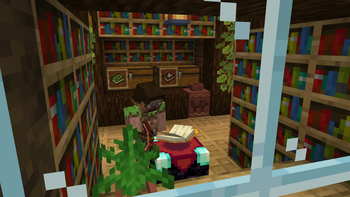
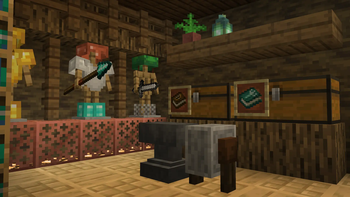
Enchanted Books: Re-covered in game, captured across biomes and lighting conditions.
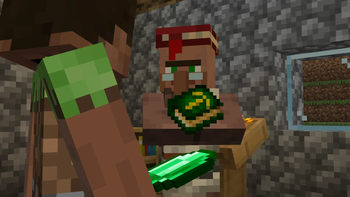
What you get
Why Enchanted Books: Re-covered?
Faster Book Identification
Distinct covers and icons let you spot the enchantment you need without opening each item, saving time when sorting or enchanting.
Vanilla Friendly Look
16x resolution and subtle changes keep the pack visually consistent with default Minecraft, avoiding jarring or out of place textures.
Low Performance Impact
No high resolution assets or complex models means minimal effect on frame rates, useful for lower end systems and large servers.
Improved Inventory Flow
Clear visual cues reduce inventory management friction, helping you organize collections and find specific enchanted books quickly.
Server Compatibility
Because changes are limited to book covers, the pack plays well alongside other server resource packs or UI mods without heavy conflicts.
Subtle Artistic Touches
Color and small glyph differences give personality to each enchantment while maintaining readability and simplicity.
Downloads
Get Enchanted Books: Re-covered
The 10 most recent Enchanted Books: Re-covered builds, direct mirror links, no ad redirects.
Install
How to install Enchanted Books: Re-covered
Vanilla route
- 1Download the pack file from the pack page on texturespack.com.
- 2Open Minecraft, go to Options, then Resource Packs, and click Open Pack Folder.
- 3Move the downloaded zip into the resourcepacks folder and return to Minecraft.
- 4Activate Enchanted Books: Re-covered from the Available list and click Done.
- 5Restart Minecraft if textures do not appear immediately in inventories.
Modded route (Minecraft Vanilla)
- 1Download the pack and place the zip into the resourcepacks folder like a normal pack.
- 2If using Fabric or Forge, ensure your mod loader is up to date; Optifine is optional for extra settings.
- 3Use your modded launcher to start Minecraft with Fabric or Forge profile selected.
- 4Enable the pack from Options, Resource Packs, then restart the game to confirm textures load.
◎ Compatibility
✓ Tested and confirmed working on Minecraft 1.21.5
We ran Enchanted Books: Re-covered on Minecraft 1.21.5 even though the pack was not officially built for this version. Texture packs typically stay compatible across nearby Minecraft releases, and this one runs as expected.
Troubleshooting
Common problems
Textures not showing in inventory
Ensure the pack is enabled in Options, Resource Packs, and move it to the Selected list; restart Minecraft if needed.
Conflicting pack overwrites book covers
Disable other resource packs that modify item textures or reorder packs so Enchanted Books: Re-covered has priority.
Books look unchanged after updating game
Clear resource pack cache by reapplying the pack and restarting the client, and verify you are using a matching Minecraft version.
Server forces a different resource pack
Use server resource pack options or speak with the server admin to allow this pack, or run the pack locally without server enforcement.
FAQ
Frequently asked questions
Which Minecraft versions does Enchanted Books: Re-covered support?+
The pack lists support for many 1.18 through 1.21.x versions and newer mappings. Texture packs generally remain compatible with nearby Minecraft versions even when they were not officially built for that release.
Will this pack affect my FPS or cause lag?+
At 16x resolution and with no extra models, performance impact should be minimal for most systems. Lower end machines may notice slight changes, but significant lag is unlikely.
Can I use this pack on Bedrock Edition?+
This pack targets Java resource pack format, so it is not directly compatible with Bedrock without conversion tools and manual adjustments.
Do I need Optifine to use the pack?+
No, Optifine is not required to use Enchanted Books: Re-covered; Optifine may be used optionally for additional graphical settings if desired.
Will using this pack cause issues on multiplayer servers?+
Using a client side texture pack is generally safe, but some servers enforce their own pack. There is no inherent security risk from the textures themselves.
What should I do if a texture looks wrong or corrupted?+
Try disabling other packs to rule out conflicts, re-download the pack, and restart Minecraft. If problems persist, check the pack page for notes or contact the author.
Ready to install?