Texture pack review
Enchant Icons
Enchant Icons latest build for Minecraft 26.2
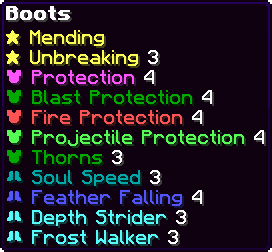
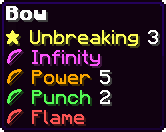
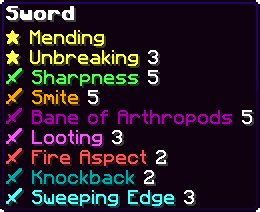
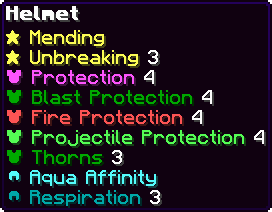
This pack assigns unique icons and colors to enchantment names, making it easier to identify buffs on items and enchanted books without reading through long lists.
Overview
In-depth
Enchant Icons is a lightweight, purpose driven texture pack that replaces plain enchantment text with concise icons and color cues. The goal is to make it quicker to scan enchanted items and books in inventories, chests, and trading screens, so you spend less time hunting through long lists.
The pack from CountXD focuses on clarity rather than a full visual overhaul. Enchant Icons maps familiar enchantments to simple glyphs and consistent color accents, which read well at small sizes and in busy inventories. Because it modifies only UI text and related textures, it plays nicely alongside most other packs that change block and mob artwork. For users who keep many enchanted items or maintain anvil repair stations, the icons reduce cognitive load and make comparison tasks faster.
Installation is straightforward for vanilla Minecraft and does not require heavy performance tweaks. You can browse other texture packs on the site for complementary options at our texture pack directory.
Compatibility covers many recent Minecraft releases, and users report the visuals remain usable across nearby versions even when not explicitly rebuilt. If you use shader packs or resource heavy collections, test the icons in a controlled setup to confirm they remain visible and unobstructed. For a collection of similar utility style packs, check the tweaks category on our site.
Who this pack suits
Players who manage large item libraries, server shop owners, and builders who want a tidy inventory interface will find Enchant Icons helpful. It does not alter gameplay mechanics, so it is safe for single player and server use. Expect a modest, practical change that speeds up routine inventory actions without changing the game's aesthetic in a major way.
Gallery
Screenshots
Enchant Icons in game, captured across biomes and lighting conditions.

What you get
Why Enchant Icons?
Faster Inventory Scanning
Icons let you identify enchantments at a glance, reducing time spent opening and closing item tooltips while sorting or trading.
Clear Visual Distinction
Consistent colors and glyphs separate similar enchantments, helping prevent misclicks during repairs or enchanting sessions.
Minimal Performance Impact
The pack only changes UI elements and text textures, so it is unlikely to affect frame rates or load times in most setups.
Easy To Combine
Because it focuses on enchantment visuals, the pack pairs well with packs that change blocks, mobs, or shaders without major conflicts.
Improves Book Management
Tracking enchanted books in chests and shulker boxes becomes more efficient, useful for librarians and trading systems.
Simple, Functional Design
The iconography is restrained and readable, prioritizing utility over elaborate artistic redesigns that can distract in inventories.
Downloads
Get Enchant Icons
The 10 most recent Enchant Icons builds, direct mirror links, no ad redirects.
Install
How to install Enchant Icons
Vanilla route
- 1Download the Enchant Icons zip from the pack page on the site.
- 2Open Minecraft, go to Options, then Resource Packs to open the resource pack folder.
- 3Move the downloaded zip into the resourcepacks folder without extracting it.
- 4Back in Minecraft, activate the pack from Available Resource Packs and move it to Selected.
- 5Reload resources with the Reload Resource Packs button or press F3 T to refresh in-game.
Modded route (Minecraft Vanilla)
- 1Install Fabric or Forge as your mod loader and launch Minecraft once to create folders, Optifine is optional.
- 2Place the Enchant Icons zip into the resourcepacks folder for the selected profile.
- 3If using Optifine, enable Custom Fonts or connected textures only when needed, Optifine is optional.
- 4Start Minecraft with the modded profile, then enable the pack under Options, Resource Packs.
- 5Use F3 T to reload resources after enabling to ensure icons load correctly.
◎ Compatibility
✓ Tested and confirmed working on Minecraft 26.2 and 26.1.2
We ran Enchant Icons on Minecraft 26.2 and 26.1.2 even though the pack was not officially built for these versions. Texture packs typically stay compatible across nearby Minecraft releases, and this one runs as expected.
Troubleshooting
Common problems
Icons not showing
Ensure the pack is active in the Resource Packs menu and press F3 T to reload resources. Check for duplicate packs that might override the same files.
Incorrect or missing glyphs
Confirm you are running a supported Minecraft version; resource packs often remain compatible with nearby versions, but newer releases may change text keys requiring an update.
Conflicts with other UI packs
Temporarily disable other resource packs that alter fonts or interface textures to identify which pack overrides the enchantment assets.
Icons appear blurry
Verify your GUI scale and game resolution, and switch GUI scale settings to see if that sharpens small icons; also test without shaders enabled.
FAQ
Frequently asked questions
Which Minecraft versions does Enchant Icons support?+
The pack lists support for many recent Java versions around 1.18 through 1.21.11. Texture packs generally remain compatible with nearby Minecraft versions even when they were not officially built for that release.
Will Enchant Icons affect game performance?+
No significant performance hit is expected because the pack changes small UI textures only. Performance can vary with other heavy resource packs or shaders active.
Can I use this on Bedrock Edition?+
This pack is made for Minecraft Java. Bedrock handles resource packs differently, so the pack is not directly compatible without conversion tools.
Do I need Optifine to use Enchant Icons?+
Optifine is not required to use the pack. Optifine can add additional font or texture controls, but the pack works in vanilla Java without it.
Is this safe to run on a multiplayer server?+
Yes, client side texture packs do not change server rules or gameplay. Servers that enforce specific resource packs may still request a pack download, but using Enchant Icons poses no intrinsic server risk.
Ready to install?