Texture pack review
E19 - Cobblemon Minimap Icons
E19 - Cobblemon Minimap Icons latest build for Minecraft 26.2
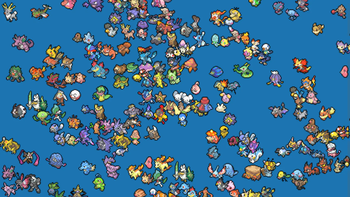
This visual addon brings high-quality pixel art icons to Xaero’s Minimap for the Cobblemon mod, supporting shiny forms, regional variants, and dozens of popular expansion packs.
- Style
- Mod Support
- Platform
- Java
- Author
- Emery319
- First release
- Jan 14, 2024
- Latest version verified
- 26.2
Overview
In-depth
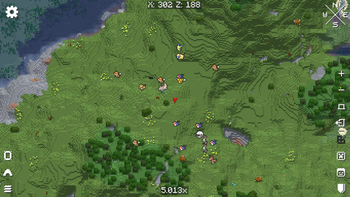
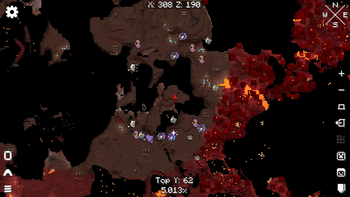
E19 - Cobblemon Minimap Icons is a focused visual addon that replaces Xaero's Minimap icons with hand crafted pixel art designed for the Cobblemon mod. The pack targets clarity at small sizes, so each icon reads well on the minimap without drawing too much attention away from the world. The artwork covers base species, shiny forms, and several regional variants, and the author notes support for many popular expansion packs. This makes the pack useful for players who rely on the minimap for quick identification rather than large in world sprites.
The icons follow a consistent palette and pixel grid, which helps them integrate with a range of resource packs and GUI themes. Because this is an addon for Xaero's Minimap rather than a full resource pack, installation is lightweight and mainly involves dropping files into the minimap folder. For players using mods like Cobblemon, these icons can make tracking spawned creatures easier, especially when many species populate a single biome.
Compatibility is listed for recent Java releases, and a typical player report suggests the pack works across nearby versions as well. The license is permissive enough for personal use and modded setups, and the author provides the pack in a format that matches Xaero's expected layout. For more texture packs and addons browse our main collection here, and if you want texture packs in the mods category see this page for similar items.
Who this is for
Choose E19 - Cobblemon Minimap Icons if you use Xaero's Minimap together with Cobblemon and want clearer, better matched icons on your map. It is especially helpful for multiplayer servers where quick visual identification of species matters, and for players running multiple expansion packs who need consistent iconography across forms and variants.
Gallery
Screenshots
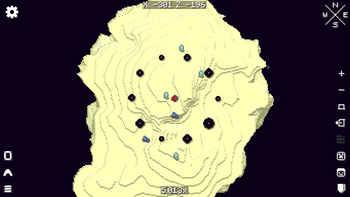
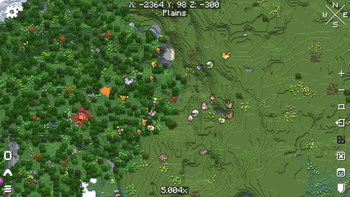
E19 - Cobblemon Minimap Icons in game, captured across biomes and lighting conditions.
What you get
Why E19 - Cobblemon Minimap Icons?
Clear small icons
Icons are optimized for legibility at minimap sizes, making species easier to spot in crowded areas.
Shiny and variants
Includes shiny forms and regional variants so you do not lose information when different forms spawn.
Consistent pixel style
A cohesive palette and grid help these icons blend with a wide range of GUI and resource pack styles.
Lightweight addon
Files are designed to be dropped into Xaero's Minimap structure, keeping installation simple and noninvasive.
Good mod compatibility
Created specifically for Cobblemon and many expansions, so icons reflect the mod content you actually see.
Permissive license
The pack uses a recognized open license that allows personal use within modded setups without heavy restrictions.
Downloads
Get E19 - Cobblemon Minimap Icons
The 10 most recent E19 - Cobblemon Minimap Icons builds, direct mirror links, no ad redirects.
Install
How to install E19 - Cobblemon Minimap Icons
Vanilla route
- 1Download the pack archive and extract the icons folder to a temporary location.
- 2Open your Minecraft folder and locate xaeros_minimap folder in config or mods settings.
- 3Copy the extracted icon files into the minimap icons directory, preserving subfolders.
- 4Restart Minecraft to let Xaero's Minimap load the new icons into the UI.
Modded route (Minecraft Vanilla)
- 1Close Minecraft and ensure Xaero's Minimap and Cobblemon are installed correctly.
- 2Extract the pack and place the icons into the xaeros_minimap folder inside your modpack instance.
- 3If using Forge or Fabric, confirm the minimap path under config matches where you placed files.
- 4Launch with Fabric or Forge and optionally enable Optifine for other graphical tweaks if desired.
◎ Compatibility
✓ Tested and confirmed working on Minecraft 26.2 and 26.1.2
We ran E19 - Cobblemon Minimap Icons on Minecraft 26.2 and 26.1.2 even though the pack was not officially built for these versions. Texture packs typically stay compatible across nearby Minecraft releases, and this one runs as expected.
Troubleshooting
Common problems
Icons not appearing
Verify you placed files in Xaero's minimap icons folder and restart the game, check for mismatched directory names.
Wrong or missing variant
Ensure your Cobblemon expansions match the pack coverage, update the addon or disable conflicting icon packs.
Blurry on high DPI UI
Confirm minimap scale is not forcing upscaling, lower UI scale or use nearest neighbor scaling in your resource pack settings.
Pack conflicts with another addon
Remove or rename duplicate icon files and keep only the desired icon set in the minimap icons directory.
FAQ
Frequently asked questions
Which Minecraft versions does this pack support?+
The author lists support for recent Java versions around 1.20 and 1.21. Texture packs and addons commonly remain compatible with nearby Minecraft releases even when not officially built for that exact release, so it may work on adjacent versions.
Will this affect game performance?+
No heavy performance impact is expected, since icons are simple images used by the minimap. Any slowdowns are more likely from the underlying mods or world load.
Can I use this on Bedrock Edition?+
This pack is made for Xaero's Minimap on Java, so it will not work on Bedrock without a Java mod equivalent or conversion.
Do I need Optifine to use these icons?+
Optifine is not required for the icons themselves, they are used by Xaero's Minimap. Optifine may be useful for unrelated visual tweaks, but the addon runs without it.
Will using this addon cause server issues or bans?+
Icon packs change client side visuals only, and generally do not trigger server bans. Check server rules as some servers restrict client mods or minimap usage.
Ready to install?