Texture pack review
Detailed Animations
Detailed Animations latest build for Minecraft 1.21.11
Detailed Animations replaces the stiff, robotic movements of the player with smoother limb motion, extra physics for capes, and specific actions for climbing and swimming.
Overview
In-depth
Detailed Animations modifies player movement by replacing stiff, robotic motions with smoother limb animation, adding subtle physics to capes and body parts, and introducing distinct actions for climbing and swimming. The pack focuses on motion tweaks rather than full visual overhauls, so it keeps stock textures while changing how player models move and react. That makes Detailed Animations a lightweight option for players who want more character in their animations without altering block or mob art.
The pack is presented for Minecraft Vanilla, and it works by swapping or augmenting animation files rather than replacing base textures. You can browse other popular texture packs on our main collection page to compare styles and performance tradeoffs. Many players report that the changes feel natural, but the effect depends on your client setup and any other mods or resource packs you run simultaneously.
Installation is straightforward for standard Java clients, and no separate mod loader is required to apply the animation files. Because this pack touches animations, compatibility with other packs that also modify model or animation data can vary: applying multiple animation-focused packs at once may produce conflicts or unexpected poses. For collections or themed setups check the broader tweaks category for complementary packs and alternatives.
What to expect
Expect improvements to walking, running, climbing, and swimming motions, plus more believable cape behavior when present. The changes are subtle by design, intended to enhance player expression without distracting from gameplay. If you prefer dramatic visual changes, this pack will not change block or mob textures, it only changes the way your character moves.
Gallery
Screenshots
Detailed Animations in game, captured across biomes and lighting conditions.
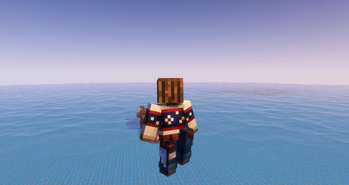
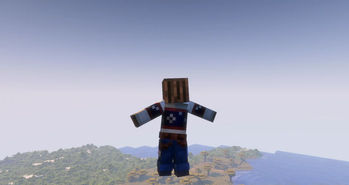
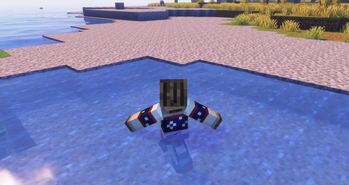
What you get
Why Detailed Animations?
Smoother Player Motion
Detailed Animations refines limb movement to create more natural walking and running cycles without changing core textures or colors.
Cape Physics Improvements
Capes and loose cloth gain motion that responds to movement and velocity, adding a little extra life to player models.
Distinct Action States
Climbing and swimming receive dedicated animations, so transitions feel clearer and more consistent during gameplay.
Lightweight Changes
The pack focuses on animation data only, so it has minimal impact on visuals and generally keeps performance costs low.
Vanilla Compatible
Designed for Minecraft Vanilla, it can be used without large mod loaders, which simplifies setup for many players.
Easy to Combine
Because it avoids texture overhauls, the pack can often be layered with visual resource packs that do not touch animations.
Downloads
Get Detailed Animations
The 10 most recent Detailed Animations builds, direct mirror links, no ad redirects.
Install
How to install Detailed Animations
Vanilla route
- 1Download the Detailed Animations pack from the author or a trusted mirror.
- 2Open Minecraft, go to Options then Resource Packs, and click Open Pack Folder.
- 3Place the downloaded pack zip into the resourcepacks folder without extracting it.
- 4Back in Minecraft select the pack and move it to the active list, then click Done.
- 5Restart the game if animations do not appear immediately to ensure files load correctly.
Modded route (Minecraft Vanilla)
- 1Install Fabric or Forge and launch once to create the configuration folders, Optifine optional.
- 2Place the Detailed Animations zip into the resourcepacks folder in your Minecraft instance.
- 3If using Optifine, enable Custom Entity Models or related settings as needed, retries after changes.
- 4Use the mod loader profile when launching, select the pack in Options then Resource Packs, then restart.
◎ Compatibility
✓ Tested and confirmed working on Minecraft 1.21.11
We ran Detailed Animations on Minecraft 1.21.11 even though the pack was not officially built for this version. Texture packs typically stay compatible across nearby Minecraft releases, and this one runs as expected.
Troubleshooting
Common problems
Animations not showing
Confirm the pack is in the active resource packs list and restart Minecraft to force a reload of animation files.
Conflicting poses with another pack
Disable other animation or model packs and re-enable Detailed Animations alone to identify conflicts, then layer selectively.
Stuttering after install
Lower animation related settings or restart the client; check for other heavy resource packs that may combine to raise load.
Capes behave oddly
Remove any cape-specific mods and test with only this pack, capes rely on client-side animation and may conflict with cape mods.
FAQ
Frequently asked questions
Which Minecraft versions does Detailed Animations support?+
The pack lists several recent Java releases as supported, but texture packs that modify animations often remain compatible with nearby Minecraft versions even when not officially built for a release. Check the pack page and try in a test world before committing.
Will Detailed Animations hurt my FPS?+
Because the pack changes animation files and not high resolution textures, performance impact is usually low, though individual setups vary based on mods and hardware.
Can I use this pack on Bedrock Edition?+
This pack is created for Minecraft Java Vanilla and is not made for Bedrock. Bedrock handles animations differently, so behavior would not match without a dedicated Bedrock conversion.
Do I need Optifine to run Detailed Animations?+
Optifine is not required for basic animation packs, but it can offer additional client-side tweaks. Texture packs that affect models typically work without Optifine.
Will using Detailed Animations get me banned on servers?+
Resource packs are client side and usually allowed, but server rules vary. Check the server policy, as some competitive or strict servers restrict animation or model-altering packs.
Animations look wrong after installing another pack, how do I fix it?+
Disable the other pack to confirm the interaction, then enable packs one by one to find the conflict. Prioritize the pack you want on top of the active list to resolve overrides.
Ready to install?