Texture pack review
Default HD 512x
Default HD 512x latest build for Minecraft 26.2
Default HD 512x enhances the standard game appearance by adding incredible detail and smoother shadows while keeping the core vanilla aesthetic intact.
- Style
- Simplistic
- Platform
- Java
- Author
- thebaum64
- First release
- Sep 23, 2024
- Latest version verified
- 26.2
Overview
In-depth
Default HD 512x refreshes the vanilla look with higher fidelity textures and more defined shading while keeping the original Minecraft style intact. This pack from thebaum64 focuses on preserving block identity and readability, so builds and landscapes remain familiar but with clearer detail. Textures feel sharper at close range, and the pack avoids heavy stylistic changes that would mask vanilla design choices.
The pack works well as a replacement for the default assets for players who want better visuals without changing the game's character. It is designed for Minecraft Vanilla and emphasizes clean edges, consistent color palettes, and smoother shadow gradients. For other texture packs and options you can browse more choices on our main texture packs page.
Default HD 512x is best experienced with a higher resolution monitor and modest performance overhead expectations, since the increased resolution uses more texture memory than stock assets. The author keeps the style conservative, so you will find most item and block icons recognizable, which helps when switching back and forth from official textures. For more packs in this style see our clean texture packs category for similar high resolution options.
Who should try this pack
Try Default HD 512x if you want a faithful upgrade to vanilla without stylistic reworks, and you have a system that can handle larger textures. It is suitable for builders who want clearer block detail in screenshots, and for players who prefer a direct, polished version of vanilla art. Expect a straightforward, no-frills enhancement that stays true to the game's original look.
Gallery
Screenshots
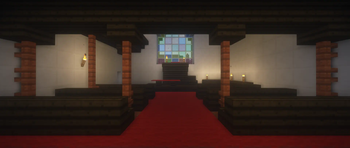
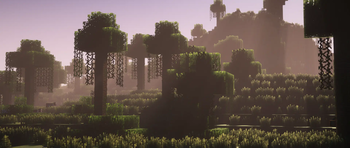
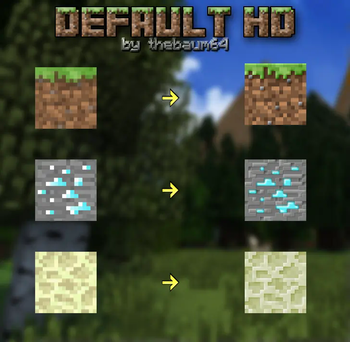
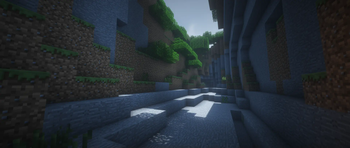
Default HD 512x in game, captured across biomes and lighting conditions.

What you get
Why Default HD 512x?
Faithful vanilla upgrade
Keeps the original Minecraft aesthetic while increasing texture clarity and detail, so everything still reads like vanilla.
High texture fidelity
512x resolution brings finer surface detail and cleaner edges, which helps screenshots and close inspection during builds.
Consistent color palette
Colors and tones are matched to vanilla, reducing jarring contrasts and maintaining a cohesive in-game look.
Improved shadowing
Smoother shading enhances depth perception on blocks without altering core lighting behavior.
Minimal redesign
Icons and block designs are preserved, so the pack is intuitive for players used to default textures.
Good for builders
Clearer textures make detailed builds and screenshots appear more refined without changing composition.
Downloads
Get Default HD 512x
The 10 most recent Default HD 512x builds, direct mirror links, no ad redirects.
Install
How to install Default HD 512x
Vanilla route
- 1Download the Default HD 512x zip file from the pack page.
- 2Open Minecraft launcher and start the version you want to use.
- 3Go to Options, then Resource Packs, and click Open Pack Folder.
- 4Move the downloaded zip into the resourcepacks folder and select it in-game.
- 5Restart Minecraft if textures do not load correctly after selection.
Modded route (Minecraft Vanilla)
- 1Install Fabric or Forge and launch Minecraft once to create the mods folder.
- 2Place the Default HD 512x zip into the resourcepacks folder as usual.
- 3Run the game with Fabric or Forge, Optifine is optional for extra settings.
- 4Use your mod launcher resource pack loader and select the pack in-game.
- 5Adjust performance settings in Fabric or Forge mods if you experience issues.
◎ Compatibility
✓ Tested and confirmed working on Minecraft 26.2 and 26.1.2
We ran Default HD 512x on Minecraft 26.2 and 26.1.2 even though the pack was not officially built for these versions. Texture packs typically stay compatible across nearby Minecraft releases, and this one runs as expected.
Troubleshooting
Common problems
Low frame rate after enabling pack
Lower your in-game render distance, close background apps, or use Optifine to adjust performance settings and anisotropic filtering.
Textures appear missing or pink/purple
Make sure the zip is in the resourcepacks folder and the pack is selected, then restart the game to force a reload.
Items look misaligned
This can happen across different Minecraft versions; try switching to a supported version listed by the author or use a nearby version as texture packs often remain compatible.
Game crashes on load with pack enabled
Temporarily remove the pack from the resourcepacks folder, update GPU drivers, and test with a bare game before re-adding the pack.
FAQ
Frequently asked questions
What Minecraft versions does Default HD 512x support?+
The pack lists a wide range of supported versions. Texture packs generally remain compatible with nearby Minecraft versions even when they were not officially built for that release.
Will this pack affect game performance?+
Yes, higher resolution textures use more video memory and can lower frame rates on weaker hardware. Try lowering render distance or using Optifine to improve performance.
Can I use Default HD 512x on Bedrock Edition?+
This pack is designed for Minecraft Java Vanilla, not Bedrock. Bedrock uses a different texture system, so the pack will not work there without conversion.
Do I need Optifine to run this pack?+
Optifine is not required, but it is recommended for extra performance options and smoother texture handling. The pack can still run without it.
Is using this pack risky on multiplayer servers?+
Using a client-side texture pack is generally safe; servers rarely restrict resource packs. Avoid using server resource pack links from untrusted sources to prevent security risks.
Textures look off after upgrading Minecraft+
Try reapplying the pack and clearing the resource pack cache, or use a nearby supported version since texture packs often remain compatible across adjacent releases.
Ready to install?