Texture pack review
Created Simple Storage Network
Created Simple Storage Network latest build for Minecraft 1.18
This resource pack redesigns Simple Storage Network textures to match the mechanical aesthetic of the Create mod.
- Style
- Mod Support
- Platform
- Java
- Author
- Makzzin
- First release
- Jan 23, 2023
- Latest version verified
- 1.18
Overview
In-depth
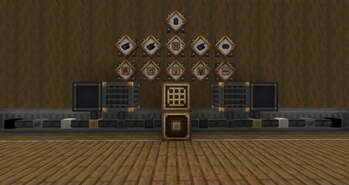
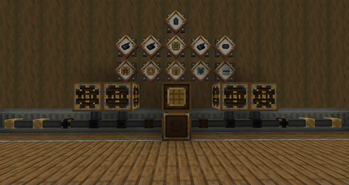
Created Simple Storage Network is a resource pack that reimagines Simple Storage Network textures to fit a mechanical, gear-driven aesthetic inspired by the Create mod. The pack focuses on reworking cables, drives, and interface panels with metal plates, bolts, and brushed finishes, giving your storage components a cohesive industrial look without changing block behavior. This is especially useful when you run Create alongside Simple Storage Network and want visuals that do not clash.
The author, Makzzin, keeps the changes targeted, so the pack modifies only the assets related to the storage system rather than every block in the game. That approach preserves vanilla visuals elsewhere, which helps maintain clarity in builds that mix decorative and technical elements. If you browse more texture packs you can compare styles and find complementary sets on our texture pack directory.
Textures have been edited to read clearly at typical play distances, with distinct icons for drives and terminals that make it easier to identify items in GUI screens. The color palette leans toward brass and gunmetal tones, which helps the storage components stand out against natural environments and industrial builds. Performance impact should be minimal because this pack replaces a focused subset of assets instead of applying a full high resolution overhaul.
Installation is straightforward for vanilla Minecraft players, and modded players using Create will find the look integrates visually without requiring additional configuration. Note that this pack is presented as a visual reskin, it does not add new blocks or alter network mechanics. For more packs in the mods category, see our curated list of mod-style texture packs.
Who this pack suits
Created Simple Storage Network is best for players who run Simple Storage Network and Create together and want a unified aesthetic for their automation builds. It also fits builders who prefer subtle, mechanical retextures over cartoonish or high fantasy styles. The pack is practical, with clear iconography and a small footprint, making it a reliable choice for both SSP and server environments where visual consistency matters.
Gallery
Screenshots
Created Simple Storage Network in game, captured across biomes and lighting conditions.
What you get
Why Created Simple Storage Network?
Consistent mod look
Recolors and remakes storage textures to match the Create mod, giving your modded machines a unified appearance.
Targeted changes only
The pack modifies only Simple Storage Network assets, keeping vanilla and other mod visuals intact for clarity in builds.
Clear GUI icons
Icons and terminal textures are redesigned for readability so you can identify drives and interfaces quickly during play.
Low performance cost
Because it focuses on a small subset of textures, the pack should not noticeably affect framerate or loading times.
Industrial palette
Brass, steel, and muted tones help the storage components blend into mechanical and factory-style builds.
Easy compatibility
Designed to work alongside Create and Simple Storage Network visuals without extra configuration or reshading.
Downloads
Get Created Simple Storage Network
The 2 most recent Created Simple Storage Network builds, direct mirror links, no ad redirects.
Install
How to install Created Simple Storage Network
Vanilla route
- 1Download the Created Simple Storage Network zip file from the pack page.
- 2Open Minecraft, go to Options, then Resource Packs, and click Open Pack Folder.
- 3Move the downloaded zip into the resourcepacks folder without extracting it.
- 4Return to Minecraft and click the pack icon to enable it, then click Done to apply.
Modded route (Minecraft Vanilla)
- 1Install Fabric or Forge for your Minecraft version, add Optifine optionally for extra settings.
- 2Place the Created Simple Storage Network zip into the resourcepacks folder in your Minecraft instance.
- 3If using mod loaders, launch with the Fabric or Forge profile so mods and pack load together.
- 4Disable conflicting resource packs that change the same Simple Storage Network assets and restart Minecraft.
◎ Compatibility
✓ Tested and confirmed working on Minecraft 1.18
We ran Created Simple Storage Network on Minecraft 1.18 even though the pack was not officially built for this version. Texture packs typically stay compatible across nearby Minecraft releases, and this one runs as expected.
Troubleshooting
Common problems
Textures not showing
Ensure the zip is placed in the resourcepacks folder and enabled in Options, then restart Minecraft to force a reload.
Icons look pixelated
Check your Minecraft GUI scale and texture filtering settings; older GUI scales can make small icons appear blocky.
Pack conflicts with another pack
Move Created Simple Storage Network above other packs in the Resource Packs list or disable the other pack to resolve overlaps.
Changes not visible on server
Resource packs are client side; confirm you have the pack enabled locally, and ask the server if it enforces its own pack.
FAQ
Frequently asked questions
Which Minecraft versions does this pack support?+
The pack is aimed at modern releases and lists supported versions around 1.18 through 1.21. Generally texture packs remain compatible with nearby Minecraft versions even when they were not officially built for that release.
Will this pack hurt my framerate?+
No, since it replaces a small set of assets the performance impact should be minimal. If you notice slowdowns, close background apps and check resource pack order.
Can I use this on Bedrock Edition?+
This pack is designed for Java resource packs and will not work on Bedrock without conversion tools. Converted packs may not be identical to the original.
Do I need Optifine to use this pack?+
Optifine is not required for the textures to work, but it can add extra graphical options. The pack functions without Optifine and may be used with Fabric or Forge.
Will using this pack get me banned on servers?+
Client-side texture packs are typically allowed, but some servers enforce specific resource packs. Check server rules, since bans are rare but possible when packs alter critical UI elements.
My storage network visuals look wrong, how do I fix it?+
Reload resource packs from the Options menu, ensure no other pack overrides the same assets, and restart Minecraft if problems persist.
Ready to install?