Texture pack review
Comforts Modernized
Comforts Modernized 16x, latest build for Minecraft 1.12
This pack updates the Comforts mod items to match the current look of modern Minecraft, fixing the outdated appearance of sleeping bags and hammocks.
Overview
In-depth
Comforts Modernized updates the look of sleeping bags, hammocks, and related items so they sit naturally alongside standard Minecraft textures. The pack keeps a 16x resolution and a vanilla plus approach, so items remain familiar while gaining cleaner edges and current color tones. It is a focused update rather than a full overhaul, so the original shapes and iconography remain recognizable.
The author, pedro9006, has aimed the changes at players who want those mod items to match the modern Minecraft palette and lighting. That means you will see adjustments in shading and saturation that reduce the appearance of older, blocky artwork, while preserving readability in inventories and world placement. If you prefer minimal changes that integrate with the base game, this pack fits that niche.
Installation is straightforward for vanilla users and compatible with common loaders used for modded setups. For a directory of other texture packs, visit our main texture pack browser to compare styles and find complementary packs.
What to expect
The pack does not add new animations or high resolution assets, it focuses on consistency and small refinements. Because it targets Comforts items specifically, you can combine it with broader resource packs without visual clashes. For more texture packs in the same vein, browse the vanilla plus category to find packs with similar intentions.
Note that this pack is provided under the GNU Lesser General Public License v3.0, and the author indicates the goal was to modernize the look of specific mod items while keeping gameplay unchanged. The pack is a good choice for players who run the Comforts mod and want the items to look like they belong in the current vanilla environment.
Gallery
Screenshots
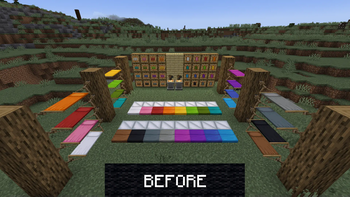
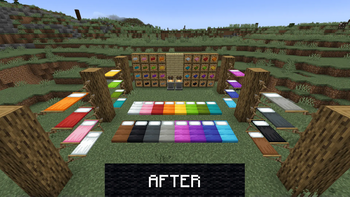
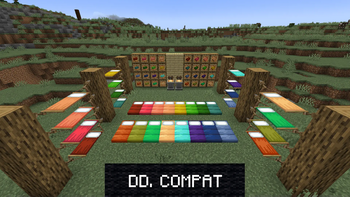
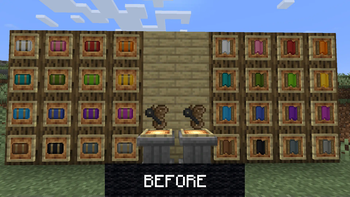
Comforts Modernized in game, captured across biomes and lighting conditions.
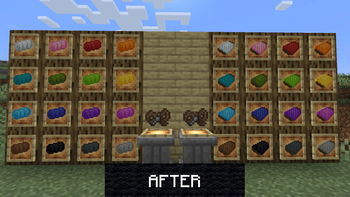
What you get
Why Comforts Modernized?
Modernized item look
Sleeping bags and hammocks are redrawn with updated shading and cleaner outlines, making them match recent Minecraft aesthetics.
Vanilla friendly
Designed at 16x resolution, the pack integrates smoothly with standard textures without drawing attention or clashing.
Focused scope
Changes are limited to Comforts items, so other assets remain untouched and compatible with broader packs.
Readable inventory icons
Icons retain clear silhouettes and color contrast so they remain easy to identify in chests and hotbars.
Easy to combine
Because modifications are subtle, the pack pairs well with larger resource packs that share a similar style.
Open license
Distributed under LGPL v3.0, the pack allows reuse and modification under standard open source terms.
Downloads
Get Comforts Modernized
The 2 most recent Comforts Modernized builds, direct mirror links, no ad redirects.
Install
How to install Comforts Modernized
Vanilla route
- 1Download the Comforts Modernized zip and do not unzip it.
- 2Open Minecraft, go to Options, then Resource Packs, and click Open Pack Folder.
- 3Move the downloaded zip into the resourcepacks folder.
- 4Back in Minecraft, enable Comforts Modernized from the Available list and click Done.
- 5Restart the game if textures do not appear immediately.
Modded route (Minecraft Vanilla)
- 1Install Fabric or Forge for your Minecraft version and optionally install Optifine if desired.
- 2Place the Comforts Modernized zip into the resourcepacks folder used by your launcher profile.
- 3Ensure the mod that adds the items, such as Comforts, is installed and enabled.
- 4Launch the game with Fabric or Forge, open Resource Packs, and enable the pack from Available.
- 5If textures appear incorrect, try disabling other packs or launching with Optifine disabled or enabled to test compatibility.
◎ Compatibility
✓ Tested and confirmed working on Minecraft 1.12
We ran Comforts Modernized on Minecraft 1.12 even though the pack was not officially built for this version. Texture packs typically stay compatible across nearby Minecraft releases, and this one runs as expected.
Troubleshooting
Common problems
Textures not showing
Ensure the zip is inside the resourcepacks folder and enabled in Minecraft, then restart the game to force a refresh.
Outdated item model
Confirm you are running the Comforts mod version that the pack was designed to target, and try combining with a compatible main resource pack.
Color mismatch with other packs
Load Comforts Modernized lower in the resource pack order or choose a main pack with similar saturation to reduce clashes.
Pack conflicts with mods
Temporarily disable other resource packs and test with only this pack and the mod, then re-enable packs one at a time to find conflicts.
FAQ
Frequently asked questions
Which Minecraft versions does Comforts Modernized support?+
The pack lists support across many 1.12 through 1.21.x versions. Texture packs generally remain compatible with nearby Minecraft versions even when they were not officially built for that release.
Will this affect performance?+
At 16x resolution this pack has negligible performance impact compared to vanilla assets, making it suitable for lower end systems.
Can I use this on Minecraft Bedrock?+
This pack is designed for Java edition resource packs, Bedrock uses a different format so conversion would be required and is not guaranteed to work.
Do I need Optifine to use this pack?+
Optifine is not required, though Optifine can change how textures are rendered. Texture packs for vanilla typically work without it, and may behave differently when Optifine is installed.
Will using this pack cause server issues?+
Client side texture packs do not usually cause server problems, servers do not require them. Only server resource packs that are forced can affect players, and this is a client side pack.
What if an item still looks wrong after installing?+
Try restarting the game, check pack order, and confirm the Comforts mod version. If problems persist, disable other packs to isolate the cause.
Ready to install?