Texture pack review
Combat Crosshair
Combat Crosshair latest build for Minecraft 26.2
Combat Crosshair swaps out the default target icon for a sharper design that helps with aiming during PvP and survival encounters.
Overview
In-depth
Combat Crosshair replaces the default Minecraft target icon with a sharper, higher-contrast design that aims to make aiming during PvP and survival encounters clearer. The pack focuses only on the crosshair asset, so it is small in scope and easy to test in any world without altering other textures. NitroRiced designed the crosshair with PvP timing and tracking in mind, favoring a centered, unobtrusive shape that stays visible against most block and sky colors.
The texture works well alongside many other PvP packs and does not attempt to change GUI elements beyond the aim reticle, keeping conflicts minimal. Because it modifies the single crosshair PNG, you can combine it with shader packs and resource packs that change blocks, mobs, or skies, as long as they do not replace the crosshair themselves. Try installing via the Minecraft resource packs menu, or drop it into your resourcepacks folder for quick testing.
On this page you will find guidance on installing Combat Crosshair in both vanilla and modded setups, troubleshooting tips for common display issues, and a short FAQ covering version support and performance. If you want to browse other texture packs in the same space, see our full listing at texture packs for more crosshair styles and PvP focused options.
Design notes
Combat Crosshair favors clarity over decoration, with a crisp shape and solid edges that remain readable at different FOVs. The pack can be adjusted alongside sensitivity changes and FOV tweaks to find a pairing that suits your aim. For more PvP-specific categories, check textures in the PvP section at PvP texture packs, where this pack is grouped with similar minimalist options.
Gallery
Screenshots
Combat Crosshair in game, captured across biomes and lighting conditions.
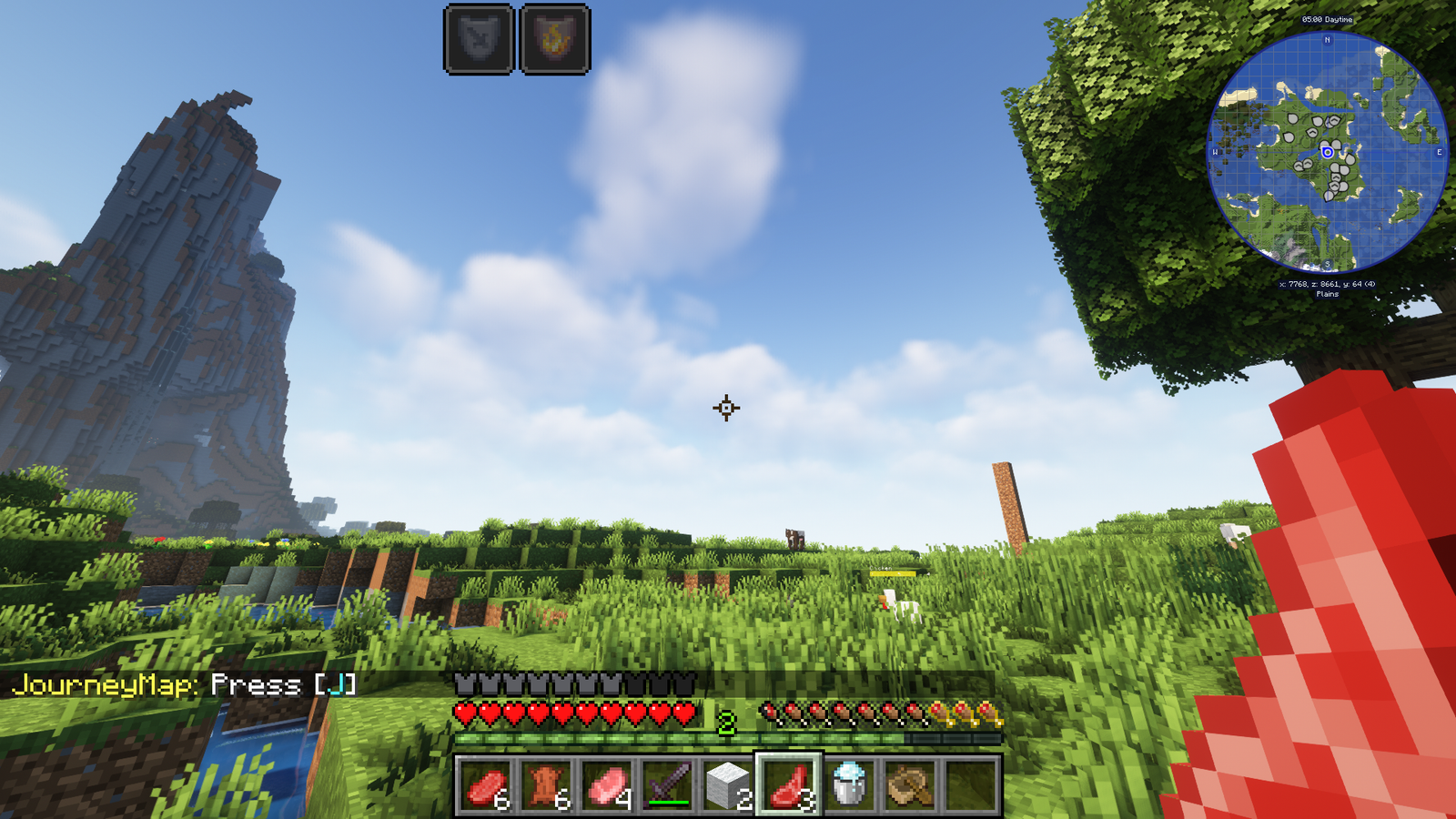
What you get
Why Combat Crosshair?
Clearer Aim Point
The crosshair uses a sharp, high-contrast shape that makes tracking targets and aligning hits easier during fast exchanges.
Minimal Conflict
Only the crosshair asset is replaced, so it usually combines cleanly with other resource packs and shaders without overwriting major files.
Low Overhead
Since it only changes a single texture, it has negligible impact on FPS and loading times, especially on older systems.
PvP Friendly
Design choices favor competitive play, with a centered reticle that remains visible against many backgrounds and lighting conditions.
Easy to Test
You can enable or disable the pack instantly from the resource packs menu, which makes comparison with the default crosshair straightforward.
Works with Shaders
The pack does not alter lighting or block textures, so it can be used alongside most shader packs without visual clashes.
Downloads
Get Combat Crosshair
The 1 most recent Combat Crosshair builds, direct mirror links, no ad redirects.
Install
How to install Combat Crosshair
Vanilla route
- 1Download the Combat Crosshair ZIP and do not extract the crosshair folder.
- 2Open Minecraft, go to Options, then Resource Packs, then Open Pack Folder.
- 3Move the downloaded ZIP into the resourcepacks folder and return to Minecraft.
- 4Select the pack from the Available list and click Done to apply the crosshair.
Modded route (Vanilla)
- 1With Fabric or Forge installed, place the Combat Crosshair ZIP into the resourcepacks folder.
- 2Launch Minecraft using your Fabric or Forge profile and check the Resource Packs menu.
- 3Optifine is optional, but it can improve GUI clarity if you use custom settings.
- 4Enable the pack and test in a singleplayer world before using it with mods or servers.
◎ Compatibility
✓ Tested and confirmed working on Minecraft 26.2 and 26.1.2
We ran Combat Crosshair on Minecraft 26.2 and 26.1.2 even though the pack was not officially built for these versions. Texture packs typically stay compatible across nearby Minecraft releases, and this one runs as expected.
Troubleshooting
Common problems
Crosshair not visible
Confirm the pack is enabled in Options, Resource Packs. If another pack is higher in the list replacing the crosshair, move Combat Crosshair above it or disable the conflicting pack.
Crosshair looks blurry
Check that you did not accidentally scale the GUI or use resource pack filtering in a shader. Use default GUI scale and disable texture filtering to restore crisp edges.
Conflicts with other packs
Open both packs and compare assets; place Combat Crosshair higher in the resource pack order or remove the crosshair PNG from the other pack to avoid duplication.
Invisible in certain lighting
Try switching to a different FOV or enable full-screen shaders only temporarily; the crosshair is high contrast but some shader lighting may reduce visibility.
FAQ
Frequently asked questions
What Minecraft versions does Combat Crosshair support?+
The pack lists many supported versions across 1.12 through 1.21 series. Texture packs generally remain compatible with nearby Minecraft versions even when they were not officially built for that release.
Will Combat Crosshair affect performance?+
No, because it only replaces a single GUI texture, performance impact is negligible and should not affect FPS.
Can I use this on Bedrock Edition?+
This pack is built for Java Edition assets, and Bedrock uses a different resource format, so it is not directly compatible without conversion.
Do I need Optifine to use it?+
Optifine is not required to use the crosshair, it is optional and can help with general GUI and performance tweaks if you already use it.
Is using this pack safe on servers?+
Yes, client-side texture packs only change your display and do not modify server files, so there is no added server risk from using Combat Crosshair.
What if the crosshair still looks wrong after installing?+
Reload the resource packs or restart Minecraft, and ensure no other pack above it replaces the crosshair; texture packs generally remain compatible with nearby Minecraft versions even when they were not officially built for that release.
Ready to install?