Texture pack review
Clayful 512x
Clayful 512x latest build for Minecraft 26.2
Clayful 512x transforms the game world into a handcrafted environment made entirely of clay and putty, offering a unique high-definition visual style.
Overview
In-depth
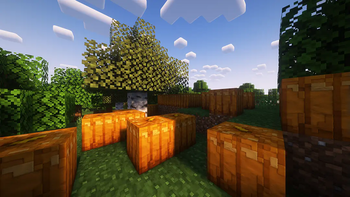
Clayful 512x reframes Minecraft as a handcrafted clay diorama, replacing crisp pixels with soft, tactile surfaces and saturated colors. The author, thebaum64, aims for a vanilla-plus approach, keeping block shapes and layouts familiar while giving every surface a modeled, sculpted finish. Textures are high definition and emphasize subtle shading and rounded edges, which helps common blocks read clearly at close range and from a distance.
The pack does not overhaul gameplay textures drastically, it enhances vanilla art with consistent, handcrafted materials that feel cohesive across biomes. That means stone, wood, wool, and foliage share a similar clay-like treatment, so builds with mixed materials retain a unified look. Lighting and normal maps appear tuned to preserve contrast, and the pack keeps item and GUI textures legible while matching the overall style.
Clayful 512x works best for players who want a polished, stylized look without abandoning the core Minecraft aesthetic. It tends to pair well with moderate shader packs that preserve color fidelity while adding gentle lighting and shadow. For texture pack browsing and to compare this pack with others, see the main texture packs collection at texturespack.com. If you prefer packs categorized under a similar visual approach, check the vanilla-plus listings for more options.
Performance will depend on hardware and settings because a 512 resolution increases GPU work compared with default textures. Players using large builds or extensive mods should consider lower resolution alternates or selective resource loading. The pack is presented as a visual reimagining rather than a functional modification, so it installs like a normal resource pack and does not require game code changes.
Who should try it
Try Clayful 512x if you enjoy handcrafted art styles, like highly detailed textures, and play on a system that can handle higher resolution assets. It is suited for creative mode builders, screenshots, cinematic recordings, and anyone who wants a distinctive, tactile visual identity for their world while maintaining vanilla block recognition.
Gallery
Screenshots
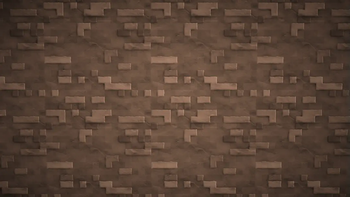
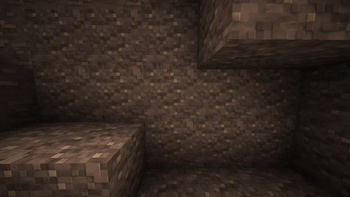
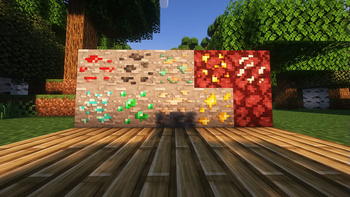
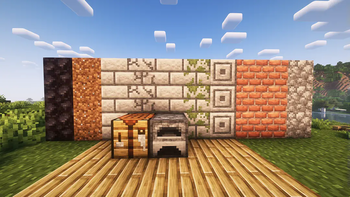
Clayful 512x in game, captured across biomes and lighting conditions.
What you get
Why Clayful 512x?
Handcrafted Clay Look
Surfaces read like modeled clay, giving builds a cohesive, hand-formed appearance that differs from photoreal textures.
Vanilla Familiarity
Block shapes and colors remain close to vanilla, so the pack feels familiar while delivering a fresh aesthetic.
High Detail Textures
512 resolution provides strong surface detail and shading, which improves close-up screenshots and cinematic shots.
Consistent Art Direction
Materials share a unified treatment, so mixed-material builds keep a harmonious, intentional look across biomes.
GUI and Items Polished
Inventory and item textures match the world style, maintaining legibility while fitting the overall visual theme.
Shader Friendly
Pairs well with moderate shaders that enhance lighting without overpowering the delicately shaped textures.
Downloads
Get Clayful 512x
The 10 most recent Clayful 512x builds, direct mirror links, no ad redirects.
Install
How to install Clayful 512x
Vanilla route
- 1Download the Clayful 512x zip from the pack page on texturespack.com.
- 2Open Minecraft, go to Options then Resource Packs and click Open Pack Folder.
- 3Move the downloaded zip into the resourcepacks folder, do not extract.
- 4Return to Minecraft and enable the Clayful 512x pack from Available Resource Packs.
- 5Restart the game if textures appear missing or to clear cached assets.
Modded route (Minecraft Vanilla)
- 1Install Fabric or Forge for your Minecraft version, Optifine is optional for extra settings.
- 2Place the Clayful 512x zip into the resourcepacks folder like in vanilla installs.
- 3If using Optifine, enable BetterGrass or connected textures as desired in Video Settings.
- 4Use a mod like Resource Loader or Resource Pack Organizer for selective loading if needed.
- 5Restart Minecraft after changing mods to ensure the pack and loader interact correctly.
◎ Compatibility
✓ Tested and confirmed working on Minecraft 26.2 and 26.1.2
We ran Clayful 512x on Minecraft 26.2 and 26.1.2 even though the pack was not officially built for these versions. Texture packs typically stay compatible across nearby Minecraft releases, and this one runs as expected.
Troubleshooting
Common problems
Low frame rate
Lower Minecraft render distance and graphics settings, or switch to a lower resolution alternative if stuttering persists.
Missing textures
Ensure the zip is in the resourcepacks folder and not extracted, then enable it and restart the game to refresh assets.
Incompatible shader highlights
Try a milder shader preset or disable specific shader effects like bloom and excess specular to restore intended colors.
Chunky or blocky item icons
Confirm you have the correct pack version enabled, and disable conflicting item resource packs or mods that override GUIs.
FAQ
Frequently asked questions
What Minecraft versions does Clayful 512x support?+
The pack lists support for many Java versions around 1.8 through modern releases. Texture packs generally remain compatible with nearby Minecraft versions even when they were not officially built for that release.
Will Clayful 512x cause performance issues?+
A 512 resolution will require more GPU memory and processing, so lower settings or a weaker GPU may see reduced frame rates. Texture packs generally remain compatible with nearby Minecraft versions even when they were not officially built for that release.
Can I use this on Minecraft Bedrock?+
This pack is provided for Java resource packs and may not work natively on Bedrock without conversion tools, which can introduce errors.
Do I need Optifine to run Clayful 512x?+
Optifine is not required, but it can improve performance and add texture-related options; it remains optional alongside Fabric or Forge.
Will using this pack get me banned on servers?+
Resource packs typically only change client-side visuals and are allowed on most servers, but always check server rules for required resource packs or prohibited modifications.
How do I fix texture glitches after updating Minecraft?+
Re-enable the pack from the Resource Packs menu, clear the game cache, and restart Minecraft; texture packs generally remain compatible with nearby Minecraft versions even when they were not officially built for that release.
Ready to install?