Texture pack review
Blinking Ender Eyes
Blinking Ender Eyes 16x, latest build for Minecraft 1.20.1
This simple vanilla plus resource pack adds a randomized blinking animation to Eye of Ender items and End Portal frames, making the journey to the stronghold much more unsettling.
Overview
In-depth
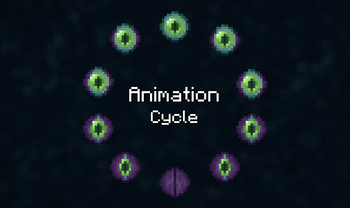
Blinking Ender Eyes reworks one of Minecrafts most iconic items, adding a subtle, randomized blink animation to Eye of Ender items and End Portal frames. The effect is small, but it changes encounters with strongholds and end portals from predictable to slightly uncanny, which is the pack's obvious charm. This is a vanilla-plus style 16x texture pack from Futureazoo that keeps everything else familiar while introducing this focused change.
The texture author keeps the rest of the game visually unchanged, so you can use Blinking Ender Eyes alongside most utility mods and shaders that do not alter item textures. Because the change is targeted, performance impact is negligible on modern systems. Players who prefer minimalism will appreciate that the pack does not attempt to overhaul mobs, blocks, or UI elements, it only tweaks the Eyes of Ender and the frames to include a randomized blink cycle that triggers at different intervals while in-world and in the inventory.
Installation is straightforward, and the pack works with the standard Minecraft resource pack loader. For more texture pack options try our main browse page at texturespack.com where you can compare similar minimal packs and see user ratings. If you want to browse other packs in this category, visit the vanilla-plus collection to find texture packs that make small, targeted visual changes without altering core aesthetics.
Who this pack is for
Blinking Ender Eyes suits players who like subtle visual surprises rather than full art direction changes. It is a good match for survival players who want a creepier atmosphere approaching endgame content, and for creators who need a tasteful, focused effect for screenshots or builds. Because it targets only a couple of assets, it blends well with most 16x packs and will not conflict with larger resource packs that leave item textures untouched.
Gallery
Screenshots
Blinking Ender Eyes in game, captured across biomes and lighting conditions.
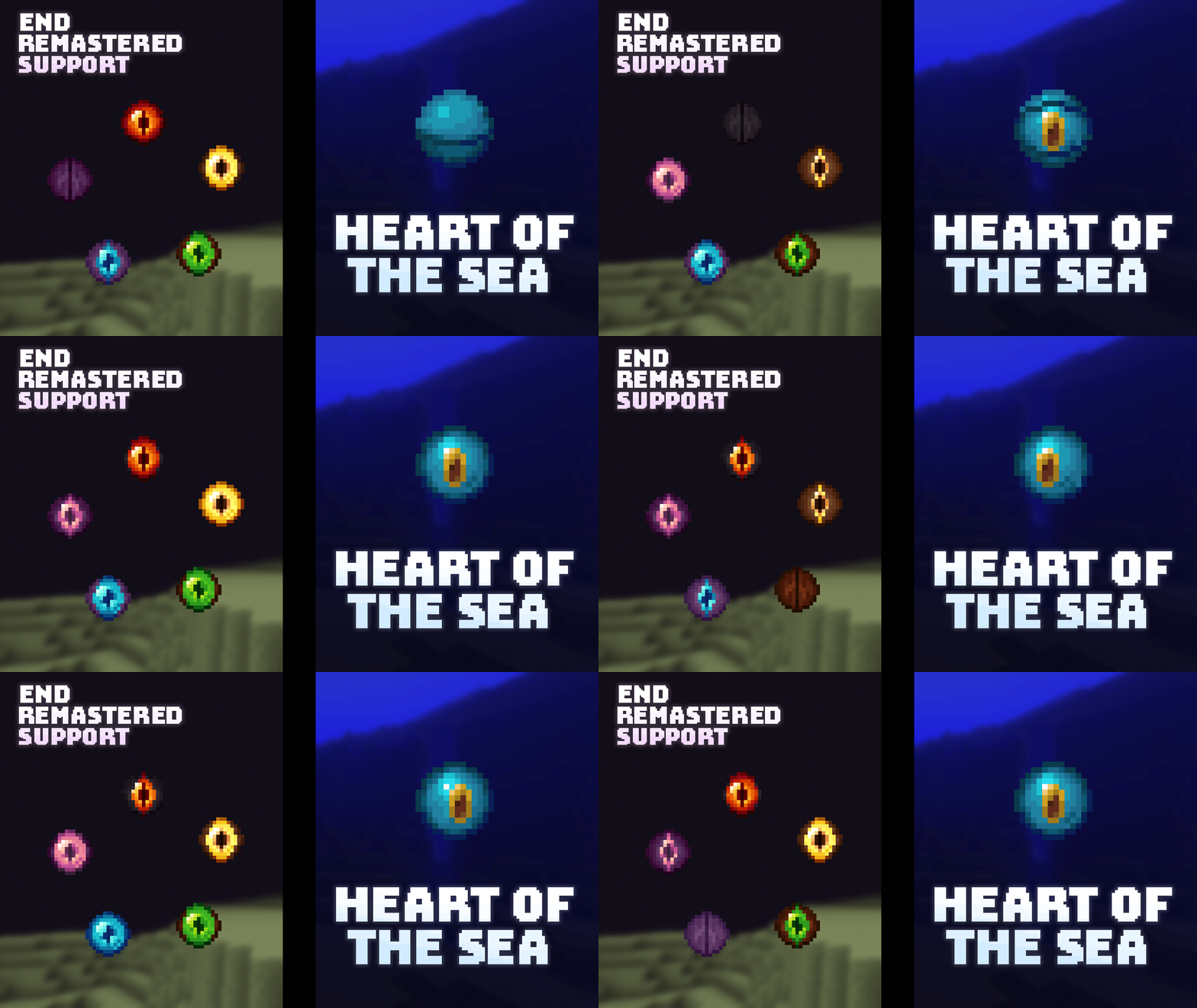
What you get
Why Blinking Ender Eyes?
Subtle atmospheric tweak
Adds a slight blink to Eyes of Ender and frames, creating a more tense approach to strongholds without changing core visuals.
Low performance impact
The change is limited to a few textures, so you should not see meaningful CPU or GPU load increases while playing.
Compatible with vanilla look
Maintains Minecrafts original aesthetic, making it simple to pair with other 16x packs or vanilla gameplay setups.
Easy to install
Standard resource pack format works with the vanilla launcher, so setup is quick for most players.
Ideal for screenshots
The subtle animation offers an interesting focal point for builds and screenshots without distracting overhaul.
Minimal conflicts
Because only a few assets are changed, this pack rarely conflicts with other mods or resource packs.
Downloads
Get Blinking Ender Eyes
The 10 most recent Blinking Ender Eyes builds, direct mirror links, no ad redirects.
Install
How to install Blinking Ender Eyes
Vanilla route
- 1Download the Blinking Ender Eyes zip and save it to your computer
- 2Open Minecraft, go to Options, then Resource Packs
- 3Click Open Resource Pack Folder and move the zip into that folder
- 4Select the pack in the resource packs list and click Done to apply
- 5Restart Minecraft if textures do not appear right away
Modded route (Minecraft Vanilla)
- 1Install Fabric or Forge and run Minecraft once to create a mods folder, Optifine is optional
- 2Place the Blinking Ender Eyes zip file into the resourcepacks folder
- 3Launch Minecraft with the chosen mod loader profile active
- 4Confirm the pack is enabled under Options, Resource Packs and remove conflicts
- 5Optifine users can enable connected textures or other tweaks if desired
◎ Compatibility
✓ Tested and confirmed working on Minecraft 1.20.1
We ran Blinking Ender Eyes on Minecraft 1.20.1 even though the pack was not officially built for this version. Texture packs typically stay compatible across nearby Minecraft releases, and this one runs as expected.
Troubleshooting
Common problems
Blink animation not visible
Ensure the pack is prioritized in the resource pack list and not overridden by another pack. Restart the game to force texture reloads if necessary.
Pack appears broken after update
Delete the pack from the resourcepacks folder and re-download the latest copy, then re-enable it to clear cached assets.
Eye of Ender looks wrong in inventory only
Check for other packs that change item textures and temporarily disable them, then re-enable Blinking Ender Eyes as the top pack.
Conflicts with a higher resolution pack
Run the 16x pack above the higher resolution pack in the list or use a resource pack combiner to keep these item textures intact.
FAQ
Frequently asked questions
Which Minecraft versions does Blinking Ender Eyes support?+
The author lists many supported versions across 1.11 through 1.21 series. Texture packs often remain compatible with nearby Minecraft versions even when not officially built for that release, so it may work on other close versions as well.
Will this pack affect game performance?+
No significant performance change is expected since only a few 16x textures are animated. Keeping other heavy mods or shaders disabled will ensure steady performance.
Can I use this on Bedrock Edition?+
This pack is made for Java resource packs and is not packaged for Bedrock. Porting to Bedrock requires conversion, which may not preserve the blink behavior.
Do I need Optifine to see the blink?+
Optifine is not required for the animation, the pack uses standard resource pack animations. Optifine can be used for other visual tweaks but is optional here.
Is it safe to use on a multiplayer server?+
Using client-side texture packs is generally safe and does not affect server rules, but always follow any server-specific restrictions. Texture packs do not change server behavior or gameplay mechanics.
What if the blink looks glitched for me?+
Try disabling other resource packs that modify item textures and restart Minecraft. Reinstalling the pack can also resolve corrupted downloads or cache issues.
Ready to install?