Texture pack review
Ray's Better Sugarcane
Ray's Better Sugarcane 16x, latest build for Minecraft 1.21
This tweak pack improves the default sugarcane by adding realistic 3D leaf geometry and updated textures while keeping the 16x Minecraft aesthetic.
Overview
In-depth
Ray's Better Sugarcane refreshes the vanilla sugarcane model and texture while keeping the classic 16x look. This pack replaces the flat cane textures with subtle 3D leaf geometry and updated pixel work, making close-up farming and riverside scenes feel more detailed without changing Minecraft's overall art direction. Colors remain faithful to the base game, so the change feels like a careful refinement rather than a redesign.
The pack is small and focused, aimed at players who want a specific visual upgrade instead of a full overhaul. The author, Restricted-Ray, concentrates on improving silhouette and depth, which helps sugarcane catch light and animate more naturally during wind or player movement. That restrained approach means it plays nicely with most other 16x packs and does not alter crop mechanics or block behavior.
Installation is straightforward for both vanilla players and those using mods. Use the standard resource pack menu to test it in a world, or try it alongside performance and shader mods if you want stronger lighting and shadow contrasts. For browsing more packs, see our main texture pack directory at TexturesPack browse.
Because Ray's Better Sugarcane focuses on a single block family, it is a low-risk addition to existing setups. It pairs well with tweaked or realism-forward 16x packs that keep default block shapes. For other tweak-style options, check the tweaks category page at tweaks to compare similar single-purpose packs.
Who should try this
Playtesters who enjoy subtle visual improvements, builders working on riverbanks or farms, and players who want a cleaner close-up appearance for sugarcane will find value here. As a targeted tweak, the pack gives an easy visual upgrade without demanding texture pack swaps or heavy performance headroom.
Gallery
Screenshots
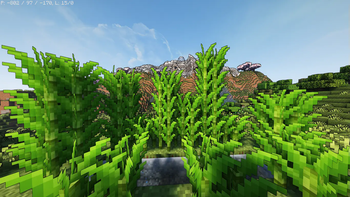
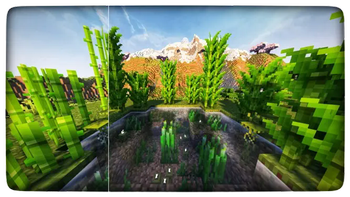
Ray's Better Sugarcane in game, captured across biomes and lighting conditions.
What you get
Why Ray's Better Sugarcane?
Improved Leaf Geometry
Adds subtle 3D leaf shapes to sugarcane, which improves silhouette and depth at close range during gameplay.
16x Faithful Look
Maintains the original pixel resolution and color palette so the pack integrates with most 16x resource packs.
Low Performance Cost
Focus on a single block family keeps resource usage minimal, avoiding broad GPU or CPU impact for most systems.
Compatibility Friendly
Stays limited in scope, reducing conflicts with larger packs and making it easy to mix with other tweaks.
Cleaner Closeups
Updated textures sharpen details when viewing farms or waterways, helping builds read better at short distances.
Easy Testing
Small install footprint and clear visual change make it simple to enable and evaluate in any world.
Downloads
Get Ray's Better Sugarcane
The 10 most recent Ray's Better Sugarcane builds, direct mirror links, no ad redirects.
Install
How to install Ray's Better Sugarcane
Vanilla route
- 1Download the pack and leave the zip file intact in your resourcepacks folder.
- 2Open Minecraft, go to Options, then Resource Packs, and click Open Pack Folder.
- 3Move the downloaded zip into the opened folder, then return to Minecraft.
- 4Enable Ray's Better Sugarcane from the Available list and move it to Selected.
- 5Click Done and reload a world to see the sugarcane updates in game.
Modded route (Minecraft Vanilla)
- 1Place the pack zip into the resourcepacks folder used by your modded profile.
- 2Launch Minecraft with Fabric or Forge, with Optifine optional for extra texture control.
- 3Open Options then Resource Packs and enable Ray's Better Sugarcane from Available.
- 4If using shaders or texture mods, adjust shader settings to avoid overexposure.
- 5Reload the world or use the resource reload shortcut to confirm visuals applied.
◎ Compatibility
✓ Tested and confirmed working on Minecraft 1.21
We ran Ray's Better Sugarcane on Minecraft 1.21 even though the pack was not officially built for this version. Texture packs typically stay compatible across nearby Minecraft releases, and this one runs as expected.
Troubleshooting
Common problems
No visual change visible
Ensure the pack is enabled in the resource packs menu and placed above conflicting packs; reload the world to refresh textures.
Textures look washed out
Check shader or gamma settings and disable any global packs that alter color balance, then re-enable this pack alone to compare.
Edges appear jagged
Verify you are using the default 16x resource scale and disable any texture upscalers or resource pack converters that may alter pixel cleanly.
Conflict with another pack
Move Ray's Better Sugarcane higher in the resource pack priority list, or temporarily disable the conflicting pack to identify overlapping files.
FAQ
Frequently asked questions
Which Minecraft versions does Ray's Better Sugarcane support?+
The pack lists support for a range of 1.20 and 1.21 releases. Texture packs generally remain compatible with nearby Minecraft versions even when they were not officially built for that release.
Will this pack affect performance?+
Because it targets a single block type and stays at 16x, performance impact is usually negligible on modern systems. Larger modded setups might show small changes when many instances of sugarcane render at once.
Can I use this on Bedrock Edition?+
This pack is designed for Java edition resource packs, and does not include Bedrock format files. Bedrock requires separate conversion and is not directly supported here.
Do I need Optifine to run it?+
Optifine is not required for the textures to work, though it can offer additional texture and performance options. Texture packs generally remain compatible with nearby Minecraft versions even when they were not officially built for that release.
Is there any risk to using it on a multiplayer server?+
Using this client-side texture pack poses no server risk, it only changes how blocks appear on your machine. Servers that enforce resource packs may require different files, so confirm server policies before joining.
What if a texture fails to load?+
Try reloading resource packs with the reload shortcut, check the game output log for missing file errors, and ensure the zip is not altered. Re-enable default packs to isolate the issue.
Ready to install?