Texture pack review
Motschen's Better Leaves
Motschen's Better Leaves latest build for Minecraft 26.2
This resource pack transforms flat Minecraft leaf blocks into bushy, multi-layered foliage for a lush and realistic appearance.
Overview
In-depth
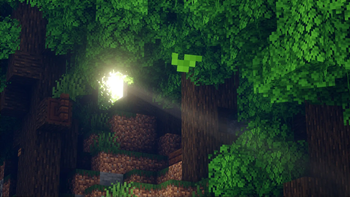
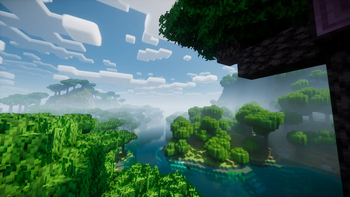
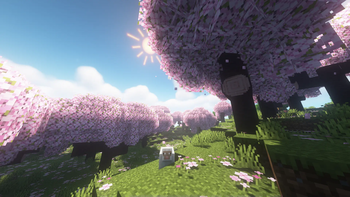
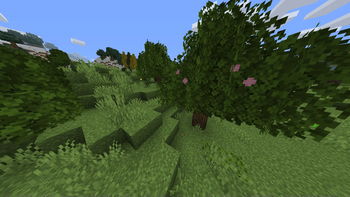
Motschen's Better Leaves reworks Minecraft foliage to read as fuller and more dimensional without changing gameplay. The pack replaces flat leaf textures with layered, subtly shaded variants that suggest depth and volume. Colors stay close to vanilla, but edges and inner details receive gentle refinements so trees look less blocky in close-up and still read naturally at distance.
The design leans toward realistic foliage, making it a good fit for builders who prefer natural looking woods, gardens, and forest biomes. Motschen's Better Leaves focuses strictly on leaves and related foliage, so it pairs cleanly with other texture packs that alter terrain, skies, or mobs. That makes it easy to combine with high resolution or performance oriented packs without visual conflict.
Installation is straightforward for vanilla players, and the pack works with most recent Minecraft Java releases. The pack author lists compatibility across many versions, and many texture packs remain usable across nearby Minecraft updates even when not explicitly rebuilt. Performance impact is minor because only leaf textures are changed, but dense forests can show more noticeable GPU work due to extra detail and alpha transparency.
For browsing similar options or looking for alternate styles, visit our main texture pack directory at TexturesPack browse. If you want more realistic choices specifically, check the realistic category for related foliage and nature oriented packs at realistic texture packs.
Quick impression
Motschen's Better Leaves is a focused change that improves atmosphere without overhauling Minecraft visuals. It is especially effective for screenshots, nature builds, and anyone who felt vanilla leaves looked too flat. Expect better visual variety among the same tree types, and an easy way to refresh your worlds while keeping all other textures familiar.
Gallery
Screenshots
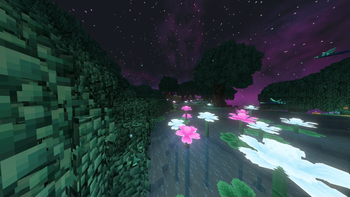
Motschen's Better Leaves in game, captured across biomes and lighting conditions.
What you get
Why Motschen's Better Leaves?
Fuller Foliage
Leaves gain layered detail and subtle shading, producing a bushier look that reduces flat, blocky appearance in close view.
Vanilla Friendly
The pack alters only leaf textures, so it combines smoothly with other packs that change terrain, mobs, or UI elements.
Low Performance Hit
Because the changes are limited to foliage, most systems see only minor performance impact compared with full res overhauls.
Consistent Colors
Color tuning stays close to vanilla, so biomes and seasons retain familiar palettes while gaining more texture depth.
Easy to Layer
Works well as a complementary pack, letting you mix realistic leaves with stylized or high definition terrain textures.
Focused Scope
A single purpose pack, it provides noticeable visual improvement without introducing broad style changes elsewhere.
Downloads
Get Motschen's Better Leaves
The 10 most recent Motschen's Better Leaves builds, direct mirror links, no ad redirects.
Install
How to install Motschen's Better Leaves
Vanilla route
- 1Download the Motschen's Better Leaves zip from the pack page.
- 2Open Minecraft, go to Options, then Resource Packs, and click Open Pack Folder.
- 3Move the downloaded zip into the resourcepacks folder, do not unzip unless instructed.
- 4Back in Minecraft, select the pack from Available Resource Packs and click Done.
Modded route (Minecraft Vanilla)
- 1Install Fabric or Forge for your target Minecraft version and launch once to generate folders.
- 2Place the pack zip into the resourcepacks folder, Optifine can be used but is optional.
- 3If using a shader mod, enable the pack before loading shaders to avoid texture conflicts.
- 4Launch Minecraft with Fabric or Forge and confirm the pack appears in Resource Packs, then activate it.
◎ Compatibility
✓ Tested and confirmed working on Minecraft 26.2 and 26.1.2
We ran Motschen's Better Leaves on Minecraft 26.2 and 26.1.2 even though the pack was not officially built for these versions. Texture packs typically stay compatible across nearby Minecraft releases, and this one runs as expected.
Troubleshooting
Common problems
Leaves appear translucent or blocky.
Ensure the pack is active in Resource Packs and that translucency settings are enabled in Video Settings, then restart Minecraft to refresh cached textures.
Performance drops in dense forests.
Lower render distance or turn off fancy leaves in Video Settings, and consider using a performance friendly shader or Optifine to tune settings.
Pack not visible in resourcepacks folder.
Confirm the file is a zip and not inside another folder, then move it to the resourcepacks directory and reopen Minecraft.
Color mismatch with other packs.
Load Motschen's Better Leaves last in the resource pack order or use a color correcting pack to harmonize tones between packs.
FAQ
Frequently asked questions
Which Minecraft versions does this pack support?+
The author lists many Java versions across 1.13 through recent 1.21 series. Texture packs generally remain compatible with nearby Minecraft versions even when they were not officially built for that release.
Will this pack affect game performance?+
It changes only leaf textures, so performance impact is usually small, though very dense foliage can add GPU load. Adjust render distance or fancy leaves to improve frame rate.
Can I use this on Bedrock Edition?+
This pack is built for Minecraft Java and is not provided for Bedrock. Bedrock uses a different resource format and conversion may be required.
Do I need Optifine to use it?+
Optifine is not required to use the pack, but it can provide additional graphical options and performance tuning if desired.
Is it safe to run on multiplayer servers?+
Using this texture pack client side does not alter server behavior and is safe, though some servers enforce client resource rules, so check server policies first.
What if textures look broken after updating Minecraft?+
Try reapplying the pack and clearing the resource cache by restarting Minecraft. Texture packs generally remain compatible with nearby Minecraft versions even when they were not officially built for that release.
Ready to install?