Texture pack review
Better Lanterns
Better Lanterns 16x, latest build for Minecraft 26.1
Better Lanterns updates the block geometry for lanterns and hanging chains to give them more depth, alongside support for copper variants and third-person model adjustments.
Overview
In-depth
Better Lanterns refines the look of lanterns and hanging chains in Minecraft without changing the core vanilla aesthetic. This pack focuses on subtle geometry tweaks to give lanterns more depth and presence, while keeping the classic 16x resolution and familiar textures. The author, Nico4play, concentrates on small model and orientation improvements so that lanterns read better at a glance, especially in builds that rely on hanging lighting or copper-themed accents.
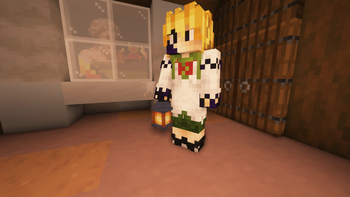
The pack updates both standing and hanging variants, and it also adds support for copper lantern variants where applicable. Those changes include third-person model adjustments so players see consistent shapes when holding a lantern or viewing other characters. Because it is a vanilla-plus style texture pack, Better Lanterns keeps the default visual language of Minecraft while introducing these focused enhancements.
Performance impact is minimal, since the pack keeps the standard 16x resolution and does not add heavy shaders or new textures. That makes it a low-friction option for players who want clearer lantern silhouettes without changing the rest of their visuals. If you prefer broader collections, browse more options on our main texture pack page to compare packs with a similar intent.
Installation is straightforward for vanilla Minecraft users, and the pack does not require mod loaders for its primary features. For people running modded setups, some adjustments may be necessary so the geometry changes align with other model-altering mods. You can also explore the vanilla-plus category to find other packs that follow the same conservative approach to visual updates.
Who should try this pack
Better Lanterns is aimed at players who want improved lantern readability and subtle model polish without disrupting the rest of the game's look. It works well for builders who place lots of hanging lights, role players who use copper accents, and anyone who prefers a tuned vanilla appearance over a full-scale visual overhaul.
Gallery
Screenshots
Better Lanterns in game, captured across biomes and lighting conditions.
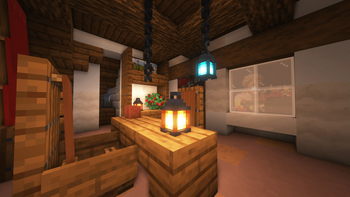
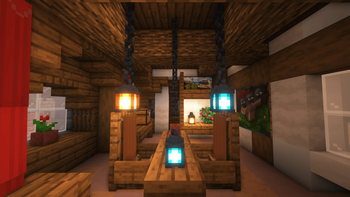
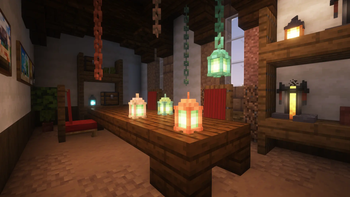
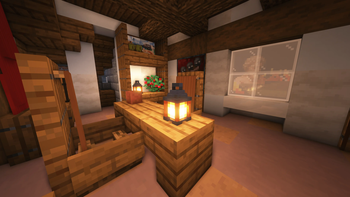
What you get
Why Better Lanterns?
Clearer Lantern Shapes
Tweaked geometry helps lanterns read well at a distance, improving navigation and visual clarity in builds with many lights.
Vanilla Friendly
Keeps the default 16x textures and overall style, so it integrates seamlessly with the base game and most other packs.
Copper Variant Support
Adds or refines copper lantern visuals, making copper-themed builds look more consistent and intentional.
Minimal Performance Impact
Model changes are lightweight and do not introduce high-resolution textures or shader requirements.
Third Person Consistency
Adjustments to third-person holding models create a more accurate appearance when characters carry lanterns.
Simple, Focused Scope
Concentrates on a few related assets, so you get targeted improvements without widespread visual changes.
Downloads
Get Better Lanterns
The 10 most recent Better Lanterns builds, direct mirror links, no ad redirects.
Install
How to install Better Lanterns
Vanilla route
- 1Download the Better Lanterns zip from the pack page on texturespack.com.
- 2Open Minecraft and go to Options, then Resource Packs, then Open Pack Folder.
- 3Move the downloaded Better Lanterns zip into the resourcepacks folder.
- 4Back in Minecraft select Better Lanterns from the Available Resource Packs list and click Done.
- 5Restart Minecraft if textures or models do not update immediately.
Modded route (Minecraft Vanilla)
- 1Install Fabric or Forge for your Minecraft version as preferred, Optifine optional for custom model features.
- 2Place the Better Lanterns zip into the resourcepacks folder like a normal pack.
- 3If using model mods, load resource packs after mods to prioritize models correctly.
- 4Use Optifine or other performance mods optional to tweak rendering settings for best visual fidelity.
- 5Restart the game and verify lanterns render correctly in both first and third person.
◎ Compatibility
✓ Tested and confirmed working on Minecraft 26.1
We ran Better Lanterns on Minecraft 26.1 even though the pack was not officially built for this version. Texture packs typically stay compatible across nearby Minecraft releases, and this one runs as expected.
Troubleshooting
Common problems
Lanterns appear unchanged
Ensure the pack is active in the Resource Packs menu and placed highest in your resource pack load order, then restart Minecraft.
Hanging chain alignment looks off
Check for conflicts with mods that alter block models, disable those mods or change pack priority to see if the issue resolves.
Third person model not matching first person
Confirm you are using the recommended Minecraft version and try toggling Optifine or model-related mods to see which setting restores consistency.
Texture flicker or visual glitches
Update your GPU drivers, lower fancy graphics settings, and restart the game; remove other packs temporarily to isolate the conflict.
FAQ
Frequently asked questions
Which Minecraft versions does Better Lanterns support?+
The author lists support for many 1.19 through 1.21 builds and recent snapshots, but playability can vary. Texture packs generally remain compatible with nearby Minecraft versions even when they were not officially built for that release.
Will Better Lanterns affect game performance?+
No significant performance hit is expected because it uses 16x textures and small model changes, though extremely large builds may show minor differences.
Can I use this pack on Bedrock edition?+
This pack is built for Java edition resource packs, and Bedrock uses a different format, so direct use is not supported without conversion tools.
Do I need Optifine to use Better Lanterns?+
Optifine is not required for the basic features, but it may help with custom model handling and performance tweaks if you notice model inconsistencies.
Will using Better Lanterns get me banned on multiplayer servers?+
Using a client-side texture pack is normally allowed and does not affect server integrity, but check server rules as some servers restrict certain visual mods or resource packs.
My lantern models look wrong after installing, how do I fix it?+
Try reordering resource packs so Better Lanterns is highest, disable other model altering packs temporarily, and restart Minecraft to force model reloads. If problems persist, test in a clean vanilla profile.
Ready to install?