Texture pack review
Bare Bones
Bare Bones 16x, latest build for Minecraft 26.2
Bare Bones is a simplistic 16x texture pack designed to make Minecraft look exactly like the vibrant, clean promotional trailers seen in official Mojang videos.
- Style
- Simplistic
- Platform
- Java
- Author
- RobotPants
- First release
- Nov 3, 2023
- Latest version verified
- 26.2
Overview
In-depth
Bare Bones is a clean 16x texture pack by RobotPants that captures the bright, flat look seen in official Mojang trailers. It simplifies Minecraft’s visuals to strong colors and clear silhouettes, keeping the spirit of vanilla while trimming visual noise. The result is a world that reads instantly at a glance, whether you are mining underground, scanning a biome from a hilltop, or decorating a cozy base.
The pack focuses on uniform shading and crisp color blocks, so materials are easy to tell apart even at a distance. Ores pop against stone, wood types stay distinct, and mobs gain readable faces that are friendly without losing their identity. Because it uses a classic 16x resolution, Bare Bones runs smoothly on most setups and pairs nicely with lightweight or cinematic shaders if you want extra lighting flair.
Why Bare Bones stands out
It keeps GUI elements clean and legible, which helps crafting and inventory management feel tidy. Builders will appreciate how palettes combine without unexpected texture clashes, making large walls, roads, and roofs look consistent. The pack has editions covering a wide range of Java versions, from early 1.6 releases through many 1.21.x updates, so it is easy to match your client. Installation is straightforward, and the pack works as a simple drop-in without special configuration.
Curious to compare with something different or heavier in detail, or to see how other art styles approach the same blocks? You can browse more texture packs in our main library to find a style that suits your world and hardware.
If this minimal, tidy aesthetic clicks with you, it sits comfortably alongside other clean texture packs too. Explore more clean texture packs to see how Bare Bones stacks up in terms of color choices, block clarity, and build friendliness, then pick the one that fits your playstyle best.
Gallery
Screenshots
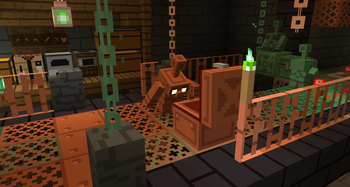
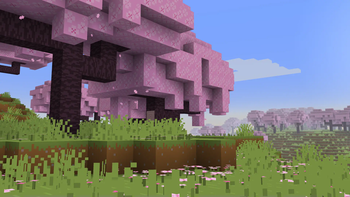
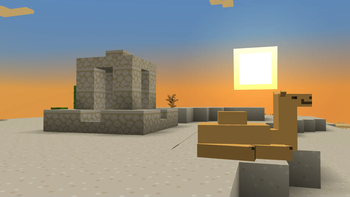
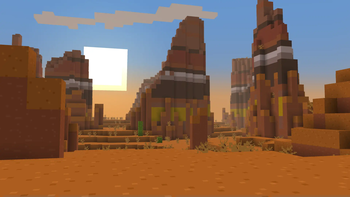
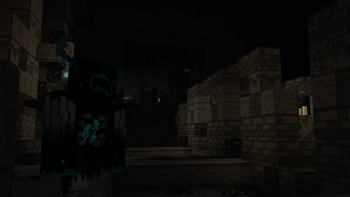
Bare Bones in game, captured across biomes and lighting conditions.
What you get
Why Bare Bones?
Trailer-like visual style
Flat colors and simple shading recreate the promotional trailer look with faithful block shapes. It reduces clutter while keeping Minecraft’s identity intact, so your builds, mobs, and landscapes feel familiar but far easier to read in motion.
Ultra readable blocks
Ores, woods, and stones are immediately distinguishable, which helps mining, exploring, and sorting storage. The reduced texture noise prevents pattern clashes on big builds and makes distant structures and terrain features pop without eye strain.
Faithful vanilla identity
Designs keep the original silhouettes and themes, so you never lose track of what each block or item is meant to be. It feels like default Minecraft refined, not a complete overhaul that changes the game’s vibe.
Performance friendly 16x
The 16x resolution is light on memory and GPU time, so older laptops and low-power desktops handle it well. It also leaves plenty of headroom if you decide to add shaders or higher render distances later.
Works great with shaders
Flat textures let lighting do the talking. Whether you prefer soft, cinematic illumination or a lightweight shader, the simplified surfaces avoid noisy patterns and produce clean shadows, highlights, and color grading across biomes and builds.
Clean GUI and items
Inventory icons and interface elements are tidy and readable, which helps crafting and enchanting sessions go faster. The streamlined look reduces visual fatigue during long play sessions and keeps focus on gameplay decisions.
Downloads
Get Bare Bones
The 10 most recent Bare Bones builds, direct mirror links, no ad redirects.
Install
How to install Bare Bones
Vanilla route
- 1Download the Bare Bones zip file for your Minecraft Java version.
- 2Launch Minecraft, open Options, then Resource Packs from the main menu.
- 3Click Open Pack Folder to reveal the resourcepacks directory.
- 4Move the Bare Bones zip into the resourcepacks folder without extracting.
- 5Back in game, select Bare Bones on the right and click Done.
Modded route (Minecraft Vanilla)
- 1Install Fabric or Forge for your version, then start the game once.
- 2Optionally add OptiFine or a shader loader, the pack works without it.
- 3Download the Bare Bones zip matching your modded Minecraft version.
- 4Open Options, Resource Packs, then click Open Pack Folder in game.
- 5Place the zip inside resourcepacks, enable it, and restart if prompted.
◎ Compatibility
✓ Tested and confirmed working on Minecraft 26.2 and 26.1.2
We ran Bare Bones on Minecraft 26.2 and 26.1.2 even though the pack was not officially built for these versions. Texture packs typically stay compatible across nearby Minecraft releases, and this one runs as expected.
Troubleshooting
Common problems
Textures not loading
Confirm the zip is in the resourcepacks folder and not extracted. Make sure you selected the pack on the right side in the Resource Packs menu.
Black or purple blocks
You are likely using the wrong Minecraft version. Download the Bare Bones edition that matches your client or try a nearby version that still works.
Z-fighting flicker on walls
Two blocks or entities are occupying the same space. Remove duplicates or slightly adjust the build, then reload textures with F3 plus T.
Pack sits below default
In the Resource Packs menu, drag Bare Bones above Default. If another pack overrides it, place Bare Bones higher or temporarily disable conflicting packs.
FAQ
Frequently asked questions
Which Minecraft versions does Bare Bones support?+
It has Java downloads covering a long range, from 1.6 releases through many 1.21.x builds. Texture packs generally remain compatible with nearby Minecraft versions even when they were not officially built for that release.
Will Bare Bones affect my FPS?+
It is a 16x pack, so it is typically light on performance compared to higher resolutions. Most players see equal or better frame rates than default, especially on modest hardware.
Is there a Bedrock or MCPE version?+
This review covers the Java Edition pack. Community ports may exist, but availability and quality vary, so verify the source and version before installing on Bedrock.
Do I need OptiFine for this pack?+
No. Bare Bones works on vanilla Java without OptiFine. You can add OptiFine or shaders if you want extra visual features, but the pack does not require them.
Is it safe to use on servers or Realms?+
Yes. Resource packs are client side and do not modify gameplay. They are safe for multiplayer as long as the server allows client resource packs.
What resolution is Bare Bones?+
It is a 16x texture pack. That resolution keeps textures crisp and readable while staying efficient on memory and GPU resources.
Ready to install?