Texture pack review
Ashen 16x
Ashen 16x 16x, latest build for Minecraft 26.2
Ashen 16x transforms Minecraft into a gritty, medieval fantasy world while keeping the 16x resolution. This complete overhaul replaces almost every vanilla asset with detailed textures and unique block models for a more serious aesthetic.
Overview
In-depth
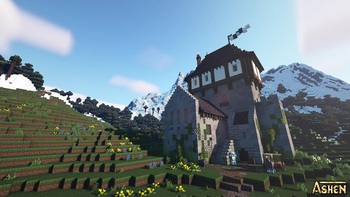
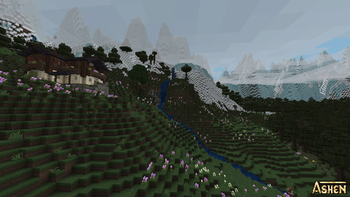
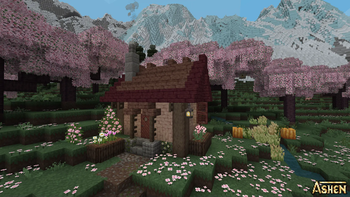
Ashen 16x is a 16x resolution texture pack that reimagines Minecraft with a gritty, medieval fantasy tone while preserving the familiar blocky look. The author Aim_Boot focuses on detailed surfaces, muted palettes, and weathered materials that suit survival builds, castles, and exploration. Textures are hand tuned to feel cohesive across biomes, so stone, wood, and foliage share a consistent wear and color language.
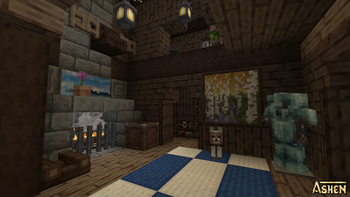
The pack replaces most vanilla assets and includes custom block models aimed at maintaining readability at 16x resolution. Item sprites and GUI elements are adjusted to match the darker aesthetic, which helps maintain immersion without sacrificing clarity during gameplay. Players who prefer a more serious atmosphere will notice stonework that feels rougher, planks that carry grain and age, and ores that sit naturally in worn rock faces.
Ashen 16x works with standard Minecraft Vanilla loaders and has been reported compatible across many modern releases. Texture packs are often usable across nearby Minecraft versions even when not explicitly updated for a specific release, though occasional texture misalignment can occur after major game updates. For downloads and browsing other packs, see the main textures list on our site and the realistic category for similar offerings.
Best uses and visual notes
This pack is well suited for medieval towns, roleplay servers, and single player builds that need a subdued palette. Performance impact is minimal because the resolution remains 16x, making it a good choice for lower end systems or players who prefer a more atmospheric look without adding heavy shader requirements.
Gallery
Screenshots
Ashen 16x in game, captured across biomes and lighting conditions.
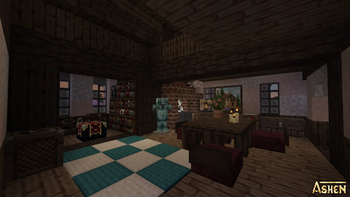
What you get
Why Ashen 16x?
Consistent Medieval Tone
Ashen 16x applies a unified, weathered look across blocks and items, helping builds and biomes feel part of the same world.
Readable At 16x
Textures retain clarity at native resolution, keeping important visual cues like ores and item icons easy to identify.
Low Performance Cost
Because it stays at 16x, the pack has minimal impact on performance compared to higher resolutions, useful for modest hardware.
Extensive Asset Replacement
Many vanilla textures and models are replaced for a cohesive overhaul, reducing visual mismatch between old and new assets.
Muted Color Palette
The subdued colors reduce visual noise and work well for moody builds such as castles, dungeons, and mountain forts.
Vanilla Loader Support
Designed for Minecraft Vanilla loaders, you can apply it through the standard resource pack menu without additional mods.
Downloads
Get Ashen 16x
The 10 most recent Ashen 16x builds, direct mirror links, no ad redirects.
Install
How to install Ashen 16x
Vanilla route
- 1Download the Ashen 16x pack file from the pack page.
- 2Open Minecraft, go to Options, then Resource Packs and click Open Pack Folder.
- 3Move the downloaded zip into the opened resourcepacks folder, do not extract it.
- 4Back in Minecraft, hover over Ashen 16x and click the arrow to move it into Selected.
- 5Click Done to apply the pack and wait for textures to load before entering a world.
Modded route (Minecraft Vanilla)
- 1Install Fabric or Forge and launch Minecraft once to create the mod folder, Optifine is optional.
- 2Place the Ashen 16x zip into the resourcepacks folder as with vanilla.
- 3Start Minecraft with Fabric or Forge profile and enable the pack in Options, Resource Packs.
- 4Use Optifine for extra texture options if desired, noting Optifine is optional for this pack.
◎ Compatibility
✓ Tested and confirmed working on Minecraft 26.2 and 26.1.2
We ran Ashen 16x on Minecraft 26.2 and 26.1.2 even though the pack was not officially built for these versions. Texture packs typically stay compatible across nearby Minecraft releases, and this one runs as expected.
Troubleshooting
Common problems
Missing or glitched textures after update
Delete the pack from the resourcepacks folder and re-download the latest copy, then re-enable it in-game to refresh assets.
Blurry items or GUI elements
Ensure the pack zip is not extracted and that no competing packs are higher in the resource pack list, then restart Minecraft.
Colors look too dark on some biomes
Adjust in-game brightness and remove any shader packs or post processing that may further darken the image.
Custom block models misaligned
Toggle Fancy Graphics or reload resource packs, and check that you are running a compatible Minecraft version near the supported releases.
FAQ
Frequently asked questions
What Minecraft versions does Ashen 16x support?+
The pack lists support for a range of recent 1.19 through 1.21 releases and some later numbers. Texture packs generally remain compatible with nearby Minecraft versions even when they were not officially built for that release.
Will Ashen 16x affect my FPS?+
At 16x resolution this pack has a modest impact on performance compared to high resolution packs, and most players should see little change.
Can I use Ashen 16x on Bedrock Edition?+
This pack is designed for Java resource packs and may not work on Bedrock without conversion tools, which can change how textures appear.
Do I need Optifine to run Ashen 16x?+
Optifine is not required, but it can provide additional graphical options and performance tweaks; the pack works in vanilla Minecraft without Optifine.
Will using this pack get me banned on servers?+
Resource packs are allowed on most servers, but some servers enforce custom pack usage or have restrictions, so check server rules before joining.
What if a texture looks wrong after Minecraft updates?+
Try re-downloading the pack and reloading resource packs. Texture packs generally remain compatible with nearby Minecraft versions even when they were not officially built for that release.
Ready to install?