Texture pack review
Animated Items
Animated Items latest build for Minecraft 26.2
This vanilla-plus pack adds subtle movement and glowing effects to many standard Minecraft items, making your inventory feel more dynamic without changing the game's core art style.
Overview
In-depth
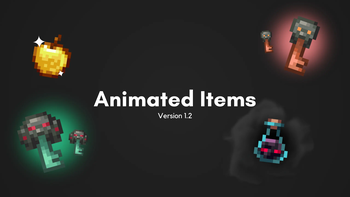
Animated Items is a vanilla-plus texture pack that adds subtle motion and glow to many standard Minecraft items, keeping the original art while making the inventory feel more lively. The author palettemc focused on small, readable animations rather than full retextures, so items maintain their familiar silhouettes and color palettes while gaining gentle pulses, shimmer, or tiny motion loops.
The pack works with plain Minecraft and does not change block models or world textures, making it a light-handed enhancement for players who prefer minimalism. It targets item textures like potions, tools, and some food, and applies modest animated frames and glow layers that look most noticeable when viewing stacks, hotbar items, or in the creative inventory. The result is decorative motion that draws attention without distracting from gameplay.
Performance impact is generally low because the pack uses standard animated PNG or texture animation metadata rather than complex shaders. That said, players on very old systems might notice a small FPS cost when many animated items are on-screen simultaneously. For installation help and alternatives, visit our texture pack directory at https://texturespack.com/browse/texture-packs to compare similar picks.
Compatibility covers a wide range of Java versions around 1.18 through 1.21 and a few loader versions listed by the author. Because Animated Items modifies only item textures, it tends to play well with other vanilla-style packs and with most resource pack loaders. For more packs in the same style, check the vanilla-plus category here: https://texturespack.com/browse/texture-packs?category=vanilla-plus.
Who should try this pack
Animated Items suits players who want a small visual upgrade without altering Minecrafts feel: builders who enjoy a livelier inventory, streamers who want subtle motion on-screen, and players pairing packs with minimal shaders. It is not meant for those seeking high resolution overhauls or complete reimaginations of the art style.
Gallery
Screenshots
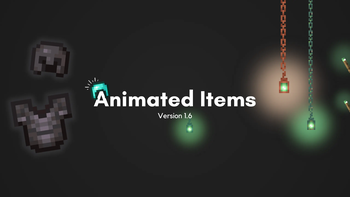
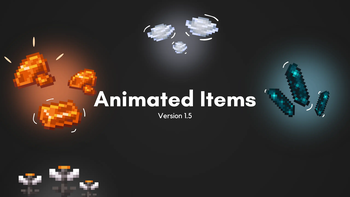
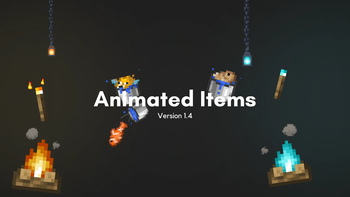
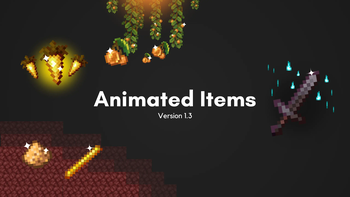
Animated Items in game, captured across biomes and lighting conditions.
What you get
Why Animated Items?
Subtle motion
Adds gentle animation to items, making the inventory feel alive without changing core art or shapes.
Low impact
Uses simple animated textures that usually add only a small performance cost on modern systems.
Vanilla friendly
Maintains the vanilla aesthetic, so items remain instantly recognizable and compatible with many packs.
Selective changes
Targets specific items like potions and tools, keeping most textures untouched for consistency.
Easy to combine
Plays well with other vanilla-plus or minimal packs, since it focuses only on item textures.
Author intent
Created by palettemc to enhance items subtly, showing care for readable animation and restraint.
Downloads
Get Animated Items
The 10 most recent Animated Items builds, direct mirror links, no ad redirects.
Install
How to install Animated Items
Vanilla route
- 1Download the Animated Items pack file from a trusted source on the pack page.
- 2Open Minecraft, go to Options, then Resource Packs, and click Open Pack Folder.
- 3Move the downloaded zip into the resourcepack folder, do not unzip it unless instructed.
- 4Return to Minecraft and enable the Animated Items pack from the resource packs list.
- 5Restart the game if textures do not appear animated immediately.
Modded route (Minecraft Vanilla)
- 1Install Fabric or Forge depending on your mod setup, Optifine is optional for extra control.
- 2Place the Animated Items zip in the resourcepack folder like a vanilla pack.
- 3If using a loader, ensure resource packs are enabled in the launcher or client mod settings.
- 4Use Optifine for additional animations control, but the pack does not require it to function.
- 5Restart Minecraft with your chosen loader to ensure the pack and mods initialize fully.
◎ Compatibility
✓ Tested and confirmed working on Minecraft 26.2 and 26.1.2
We ran Animated Items on Minecraft 26.2 and 26.1.2 even though the pack was not officially built for these versions. Texture packs typically stay compatible across nearby Minecraft releases, and this one runs as expected.
Troubleshooting
Common problems
No animations visible
Confirm the pack is active in the Resource Packs menu and restart Minecraft; some UI caches require a restart to show animated frames.
FPS drop when many items on screen
Reduce held stack sizes or disable the pack temporarily, or enable performance options in Optifine to limit animated texture updates.
Textures look different with other packs
Check load order in the Resource Packs menu and place Animated Items above or below conflicting packs depending on which textures you want prioritized.
Pack fails to load
Verify the zip structure matches Minecrafts resource pack format and redownload from the original source in case of corruption.
FAQ
Frequently asked questions
Which Minecraft versions does Animated Items support?+
The author lists support around 1.18 through 1.21 and some loader releases. Texture packs often remain compatible with nearby Minecraft versions even when not officially built for that release.
Will this pack affect game performance?+
It can add a small performance cost when many animated items are visible, though most modern systems will not notice a major impact.
Can I use Animated Items on Bedrock edition?+
This pack is made for Java resource packs and will not work natively on Bedrock without conversion tools, which may not reproduce animations exactly.
Do I need Optifine to use the pack?+
Optifine is not required, the pack uses standard Minecraft animation formats, though Optifine can provide extra performance or animation toggles.
Will using this pack get me banned on servers?+
Resource packs that only change client-side textures are generally allowed, but always follow server rules; servers may restrict custom packs in competitive settings.
What if textures appear corrupted or missing?+
Try re-enabling the pack, checking load order, or redownloading the pack; sometimes a corrupted download or wrong zip structure causes missing textures.
Ready to install?