Texture pack review
AL's Creepers Revamped
AL's Creepers Revamped 16x, latest build for Minecraft 1.21.8
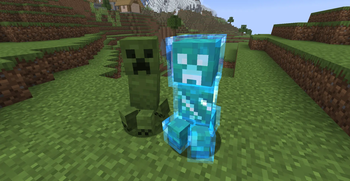
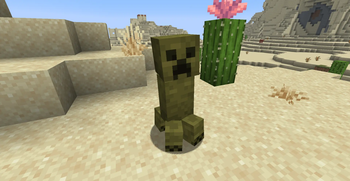
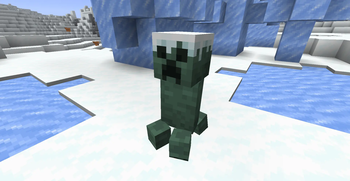
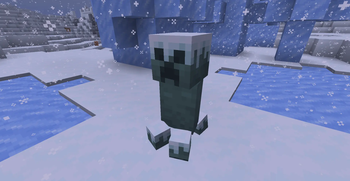
AL's Creepers Revamped refreshes the classic creeper appearance by adding 16 unique variants that change their texture based on the biome grass color.
- Style
- Simplistic
- Platform
- Java
- Author
- ALtheGatorMC
- First release
- Jun 21, 2024
- Latest version verified
- 1.21.8
Overview
In-depth
AL's Creepers Revamped takes the familiar creeper and gives it a tidy, consistent makeover while keeping Minecraft feeling familiar. The pack focuses on the creeper mob only, replacing the default face and body with cleaner pixel work and adding 16 distinct variants tied to biome grass color. That means creepers in different biomes show subtle palette changes rather than a radically different model, which keeps night encounters readable while adding visual variety.
The author ALtheGatorMC keeps things minimal, using a 16x resolution approach that fits into any low-resource setup. Players who want a low-effort way to freshen up hostile mobs will appreciate how the changes are noticeable at normal game distance but do not distract in crowded scenes. Because the pack targets vanilla Minecraft, installation is as simple as dropping the resource pack into the proper folder and selecting it from the options menu. For instructions and alternatives, see the main texture packs index on TexturesPack.
The presentation favors clarity over heavy detail, so the pack works well on both default and slightly modified worlds. The biome-driven variants are a neat touch for builders who like consistent color themes across their builds and surroundings, since creeper coloring now blends more naturally with the environment. This approach also reduces visual jarring when moving between meadow, taiga, and jungle areas.
Compatibility is listed for multiple 1.20 and 1.21 updates, but because this is a straightforward 16x texture change, many nearby Minecraft releases may also work without requiring changes. Note that the pack is strictly a texture replacement for the creeper, so other mobs and blocks remain unchanged unless combined with a more comprehensive pack. For other clean style options, check the clean category on TexturesPack for matching packs that maintain a similar aesthetic.
Who this suits
AL's Creepers Revamped is a good fit for players who want a subtle visual refresh of hostile mobs without changing game performance or overall art direction. It pairs well with simple UI packs and performance-focused configurations, and it is easy to layer with packs that only alter other mobs or environment textures.
Gallery
Screenshots
AL's Creepers Revamped in game, captured across biomes and lighting conditions.
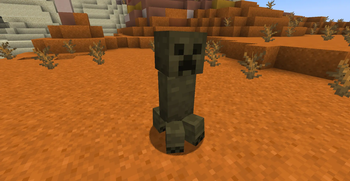
What you get
Why AL's Creepers Revamped?
Cleaner mob visuals
The pack simplifies the creeper pixel art, improving clarity at a distance and making encounters easier to read in busy scenes.
Biome color variants
Sixteen variants shift creeper tones based on local grass color, helping mobs blend with their surroundings without losing identity.
Low resource demand
At 16x resolution the textures run smoothly on most systems, preserving frame rates for players on older hardware.
Vanilla friendly
Designed for Minecraft Vanilla, the pack installs quickly and behaves predictably with stock game mechanics and lighting.
Easy to combine
Because it only changes creepers, the pack layers well with broader texture packs that modify blocks, UI, or other mobs.
Consistent art style
The clean style maintains the original look and feel while giving the creeper a more refined, cohesive appearance.
Downloads
Get AL's Creepers Revamped
The 6 most recent AL's Creepers Revamped builds, direct mirror links, no ad redirects.
Install
How to install AL's Creepers Revamped
Vanilla route
- 1Download the resource pack file from the creator or hosting page.
- 2Open Minecraft, go to Options, then Resource Packs, then Open Pack Folder.
- 3Drag or copy the downloaded pack file into the resourcepacks folder.
- 4Back in Minecraft, enable AL's Creepers Revamped in the Resource Packs menu.
- 5Move the pack to the top of the active list if you need it to override others.
Modded route (Minecraft Vanilla)
- 1Install Fabric or Forge depending on your mod setup and launch the game once.
- 2Optifine is optional, but can be used to tweak performance and visual settings.
- 3Place the resource pack file into the resourcepacks folder as with vanilla installs.
- 4Enable the pack from the in-game Resource Packs menu, ensuring mods do not override mob textures.
- 5Restart the game if textures do not appear immediately, especially after adding mods.
◎ Compatibility
✓ Tested and confirmed working on Minecraft 1.21.8
We ran AL's Creepers Revamped on Minecraft 1.21.8 even though the pack was not officially built for this version. Texture packs typically stay compatible across nearby Minecraft releases, and this one runs as expected.
Troubleshooting
Common problems
Textures not showing
Ensure the pack file is in the resourcepacks folder and activated in the Resource Packs menu, then move it above other packs that might replace creeper textures.
Colors look off in certain biomes
Check for other packs or shaders that modify grass color or lighting, temporarily disable them to confirm the issue, then adjust pack order or shader settings.
Pack causes lag spikes
At 16x this is unlikely, but try disabling other heavy resource packs or shaders, and use lower render distance to isolate whether another asset is responsible.
Pack conflicts with modded mobs
Some mods replace mob models or textures; move AL's Creepers Revamped above those packs in the resource list or use a patch that targets the modded mob names.
FAQ
Frequently asked questions
What Minecraft versions does AL's Creepers Revamped support?+
The pack lists support for multiple 1.20 and 1.21 updates. Texture packs generally remain compatible with nearby Minecraft versions even when they were not officially built for that release, but always test in a backup world.
Will this pack affect game performance?+
Because this is a 16x pack and only changes creeper textures, performance impact should be negligible on most systems.
Can I use this pack on Bedrock Edition?+
This pack targets Java edition resource pack structure, so it will not work on Bedrock without conversion tools and manual adjustments.
Do I need Optifine to run this pack?+
Optifine is not required for textures to work, it is optional and can be used to change shader and performance settings if desired.
Could using this pack get me banned on a server?+
Texture packs that only change client-side textures are normally allowed, but server rules vary, so check the server policy before joining to avoid issues.
What should I do if a texture looks broken?+
Verify the pack file integrity and pack order, disable other packs or shaders to isolate the problem, and redownload the pack from its official source if needed.
Ready to install?