Texture pack review
Alacrity
Alacrity 32x, latest build for Minecraft 1.16
Alacrity transforms Minecraft into a high-detail fantasy world, combining a 32x resolution with custom 3D models and a heavy medieval atmosphere inspired by classic magic universes.
Overview
In-depth
Alacrity reimagines Minecraft as a detailed, medieval fantasy realm, using a 32x resolution to add definition without overwhelming performance. Textures feel handcrafted, with weathered wood, ornate metalwork, and mossy stone that suit castle builds, village streets, and enchanted groves. The pack leans into a heavy fantasy mood, with palette and pattern choices that suggest a lived world rather than a cartoony rewrite. Small details, like embellished item icons and slightly aged block faces, help create atmosphere during exploration and building.
Alacrity includes custom 3D model touches for select blocks and items that reinforce the theme without radically changing gameplay. These models are subtle, they do not obstruct visibility, and they integrate well with standard Minecraft lighting. Performance is generally reasonable on modern machines thanks to the 32x resolution, but you should expect a modest increase in VRAM use compared to vanilla. For downloads and alternative packs browse the main collection on TexturesPack, where this and similar packs are listed.
The pack is best paired with builds that emphasize medieval or magical elements, such as keeps, libraries, and ritual sites. It does not attempt photorealism, instead favoring stylized realism that keeps block readability high for survival play. Alacrity supports a wide range of versions, though as with many texture packs, some very new features or blocks may not receive unique textures right away. For other themed options check the themed category on TexturesPack to compare styles and find complementary packs for layering or resource blending.
Who will like Alacrity
Players who favor atmosphere over stark novelty will find a lot to appreciate here. Builders working on fantasy towns or roleplay servers will gain a cohesive visual language that ties projects together. Survival players who want richer visuals without a huge performance hit will also appreciate the pack, as it preserves clarity while adding decorative detail.
Gallery
Screenshots
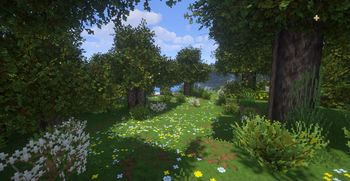
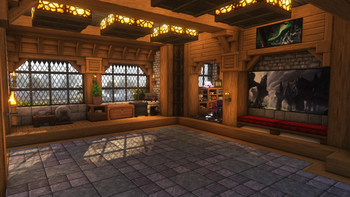
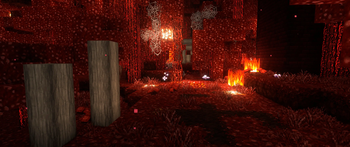
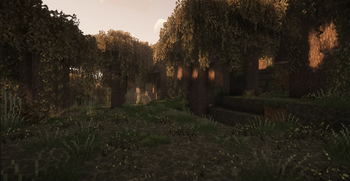
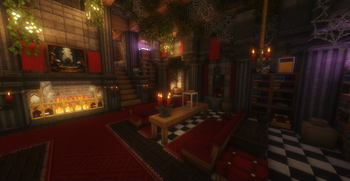
Alacrity in game, captured across biomes and lighting conditions.
What you get
Why Alacrity?
Medieval Aesthetic
Alacrity gives structures and items a cohesive medieval look, making castles and villages feel consistent and themed.
Readable 32x Detail
The 32x resolution improves texture clarity while keeping block shapes and gameplay readable for survival play.
Subtle 3D Models
Selective custom models add depth to key blocks and items without cluttering the visual field or changing mechanics.
Handcrafted Textures
Textures emphasize small worn details and ornamentation, which adds character to environments and builds.
Good Performance Balance
Designed to offer richer visuals with only a modest impact on framerate on most modern systems.
Wide Version Range
Supported across many releases, so players on different versions can usually use the same pack without trouble.
Downloads
Get Alacrity
The 10 most recent Alacrity builds, direct mirror links, no ad redirects.
Install
How to install Alacrity
Vanilla route
- 1Download the Alacrity pack zip from the texture pack page.
- 2Open Minecraft, go to Options then Resource Packs and click Open Pack Folder.
- 3Move the downloaded zip into the resourcepacks folder.
- 4Back in Minecraft, hover over Alacrity and click the arrow to enable it.
- 5Restart the game if textures appear missing or incorrect.
Modded route (Minecraft Vanilla)
- 1Install Fabric or Forge and launch Minecraft once to create mods folders, Optifine optional.
- 2Place Alacrity zip into the resourcepacks folder in your Minecraft directory.
- 3If using Optifine, enable it in video settings for connected textures and better performance.
- 4Launch with Fabric or Forge profile and confirm the pack is active in Resource Packs.
- 5Clear shader or mod conflicts by disabling other packs or mods if visual glitches appear.
◎ Compatibility
✓ Tested and confirmed working on Minecraft 1.16
We ran Alacrity on Minecraft 1.16 even though the pack was not officially built for this version. Texture packs typically stay compatible across nearby Minecraft releases, and this one runs as expected.
Troubleshooting
Common problems
Missing textures for very new blocks.
Check for an updated pack release or enable fallback to default textures while the author updates the pack.
Blurry or low resolution on some items.
Ensure the resource pack is enabled as a zip in the resourcepacks folder and restart Minecraft if necessary.
3D models causing odd clipping.
Disable the specific pack or lower model settings, and test with Optifine or without to isolate the issue.
Performance drop on older hardware.
Lower game render settings, reduce simulation distance, or use Optifine to regain framerate while keeping textures enabled.
FAQ
Frequently asked questions
Which Minecraft versions does Alacrity support?+
Alacrity lists compatibility across many 1.15 through 1.21 releases and later identifiers, but texture packs often remain usable on nearby Minecraft versions even when not officially built for that release.
Will Alacrity affect my framerate?+
The pack uses 32x textures so it adds some VRAM and CPU load compared to vanilla, but most modern systems handle it well; texture packs generally remain compatible with nearby Minecraft versions even when they were not officially built for that release.
Can I use Alacrity on Bedrock Edition?+
Alacrity is made for Java resource packs, and Bedrock requires a different format, so direct use is not supported; texture packs often remain compatible with nearby Minecraft versions even when they were not officially built for that release.
Do I need Optifine to run Alacrity?+
Optifine is not required to use the pack, but it can enable connected textures and performance options; texture packs generally remain compatible with nearby Minecraft versions even when they were not officially built for that release.
Is it safe to use on multiplayer servers?+
Using the pack client side poses no inherent server risk, but servers with strict resource pack policies may require their own packs; texture packs frequently remain compatible with nearby Minecraft versions even when they were not officially built for that release.
Textures appear wrong, how do I fix them?+
Try reloading resource packs with F3 T, disable other packs to check for conflicts, or reinstall the pack; texture packs generally remain compatible with nearby Minecraft versions even when they were not officially built for that release.
Ready to install?