Texture pack review
Aimz - PVP Crosshair
Aimz - PVP Crosshair latest build for Minecraft 1.21.8
Aimz replaces the default Minecraft crosshair with a cleaner, combat-focused design to help you hit your shots more consistently.
Overview
In-depth
Aimz - PVP Crosshair replaces the default Minecraft crosshair with a cleaner, combat-focused design to help you hit your shots more consistently. This pack centers on a minimalist crosshair that keeps the center of your screen uncluttered while providing clear visual feedback during fights. It is targeted at players who prioritize precision and visibility during player versus player encounters.
The crosshair style is uncluttered and slightly tweaked for modern PVP play, which makes tracking targets and timing hits easier without drawing attention away from enemy movement. Gamers who switch between different resolutions and windowed modes report that the design scales well, remaining sharp and readable at common HUD sizes. This pack does not change block or item textures, so it integrates seamlessly with other texture packs that focus on world or item visuals.
Installation is straightforward for vanilla Minecraft, and it is also compatible with popular mod loaders when used alongside utility mods. The pack was created by GamerPotion, and it emphasizes a practical approach rather than decorative elements. For more texture packs of a similar focus, browse our full catalog at https://texturespack.com/browse/texture-packs. If you want only PVP oriented options, check the PVP category here: https://texturespack.com/browse/texture-packs?category=pvp.
Quick notes
Because Aimz - PVP Crosshair only modifies the overlay element for aiming, it tends to have minimal impact on performance. Players who use shader mods or heavy resource packs alongside it should still confirm visual compatibility. The design is particularly handy for players who stream or record gameplay, since the clear crosshair remains visible in recorded footage without overwhelming the scene.
Gallery
Screenshots
Aimz - PVP Crosshair in game, captured across biomes and lighting conditions.
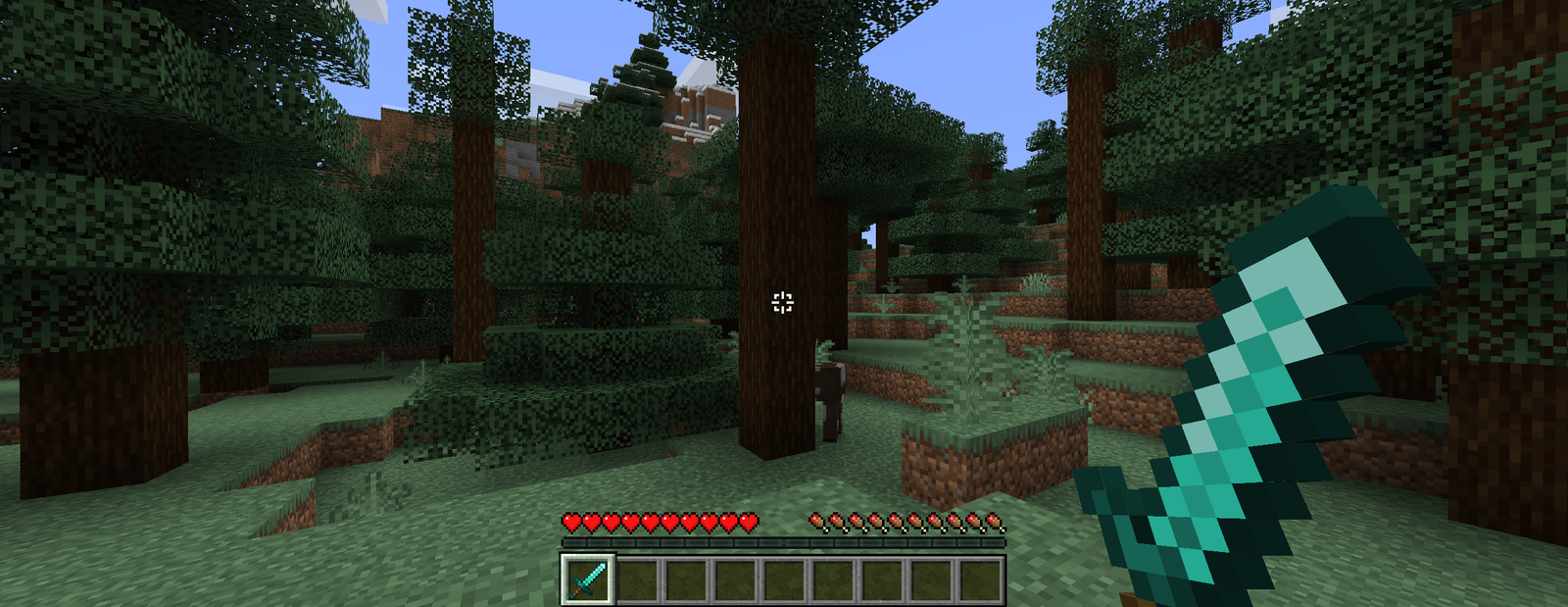
What you get
Why Aimz - PVP Crosshair?
Cleaner Aim Focus
The simplified crosshair reduces visual clutter, helping you maintain focus on enemy movement and hit timing during fights.
Readable at Any Scale
High contrast and sharp lines keep the crosshair visible across resolutions and HUD scales, improving consistency in different setups.
Minimal Performance Impact
Only the HUD is altered so performance remains essentially the same, even when used with larger world or shader packs.
Easy Compatibility
Because it only replaces the crosshair, you can pair it with most texture packs that change blocks or items without conflicts.
Author Credibility
Created by GamerPotion, the pack focuses on practical improvements favored by PVP players who value function over flair.
Streamer Friendly
The clear, unobtrusive design records well, keeping your crosshair visible to viewers without dominating the screen.
Downloads
Get Aimz - PVP Crosshair
The 4 most recent Aimz - PVP Crosshair builds, direct mirror links, no ad redirects.
Install
How to install Aimz - PVP Crosshair
Vanilla route
- 1Download the Aimz - PVP Crosshair pack from the site.
- 2Open Minecraft, go to Options, then Resource Packs, and click Open Pack Folder.
- 3Move the downloaded pack zip file into the resourcepacks folder.
- 4Return to Minecraft, select the pack from Available Resource Packs, then click Done.
- 5Adjust HUD scale in Video Settings if the crosshair appears too large or small.
Modded route (Vanilla)
- 1Install Fabric or Forge for your Minecraft version, Optifine is optional and may help scaling.
- 2Place the Aimz - PVP Crosshair zip into the resourcepacks folder as with vanilla.
- 3If using a mod resource loader, enable the pack through the mod's resource manager.
- 4Restart Minecraft with the chosen loader and select the pack in Resource Packs.
- 5Test with mods like HUD or shader packs and adjust settings for visibility.
◎ Compatibility
✓ Tested and confirmed working on Minecraft 1.21.8
We ran Aimz - PVP Crosshair on Minecraft 1.21.8 even though the pack was not officially built for this version. Texture packs typically stay compatible across nearby Minecraft releases, and this one runs as expected.
Troubleshooting
Common problems
Crosshair appears too large
Open Video Settings and lower GUI Scale or HUD scale, then reload the resource pack until the size feels right.
Crosshair misaligned on screen
Ensure no other mods alter the HUD position, disable HUD mods, then re-enable one at a time to find the conflict.
Crosshair invisible with shaders
Disable the shader or try a different shader profile; some shaders change overlay contrast and can hide thin HUD elements.
Pack not listed in Resource Packs
Confirm the file is placed in the resourcepacks folder and that the zip structure places assets at the root, not nested in another folder.
FAQ
Frequently asked questions
Which Minecraft versions does this pack support?+
The author lists support for many 1.17 to 1.21.x releases. Texture packs often remain compatible with nearby Minecraft versions even when not officially built for that release.
Will this pack affect my FPS?+
No, Aimz - PVP Crosshair only replaces the HUD crosshair, so it should not impact frame rate. Using it with heavy shaders or large resource packs may still change performance.
Can I use this on Bedrock Edition?+
This pack is designed for Java Edition, and Bedrock has a different resource format, so a direct install will not work without conversion.
Do I need Optifine to use this pack?+
Optifine is not required to use the crosshair, but it is optional and can help with HUD scaling and some visual tweaks.
Is there any server risk to using this pack?+
Using a client-side texture pack like this is generally safe, servers do not see your resource pack unless they offer it. It does not modify gameplay rules or give unfair advantages beyond visibility preferences.
What if the crosshair still looks wrong after install?+
Try reloading resource packs from the Options menu and double check for conflicting HUD mods. If issues persist, reinstall the pack to ensure the file structure is correct.
Ready to install?