Texture pack review
3D crops Revamped
3D crops Revamped latest build for Minecraft 1.7.7
3D crops Revamped is a vanilla-plus resource pack that replaces flat crop textures with detailed 3D models for wheat, potatoes, berries, and more.
Overview
In-depth
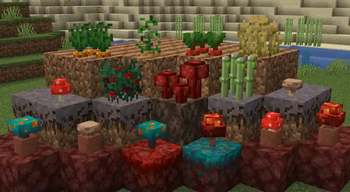
3D crops Revamped presents a focused visual change, replacing flat crop sprites with three dimensional models for wheat, potatoes, carrots, and berry bushes. The pack keeps the familiar vanilla look while adding depth to farmland visuals, making small details like stems, leaves, and fruit easier to read from different angles. That clarity helps both builders and farmers spot growth stages without breaking the game's original aesthetic.
The author, vexcenot, describes this as a vanilla-plus approach, and the results match that intent: nothing else in the world is altered dramatically, so the pack integrates smoothly with most other resource packs and mods that do not alter block models. Because the changes are limited to crop models and a few related items, performance impact is minimal on modern systems, though older machines may note a small frame drop when many crops render at once.
Installation is straightforward for vanilla Minecraft, and the pack is commonly used alongside Optifine or other optimization mods, though those are optional for basic functionality. If you need to browse alternatives or other texture packs, see the main texture pack listings on our site for comparisons and downloads. For more vanilla-plus selections, visit the vanilla-plus category to find related packs that tweak particular assets while preserving the base game style.
What to expect
Expect better readability in farms, improved visuals for harvestable blocks, and a subtle boost to immersion without a complete stylistic overhaul. The three dimensional crop shapes can reveal which blocks are ready to harvest from a distance, which is handy on large farms. This pack is best suited to players who want targeted visual improvements while keeping the classic Minecraft feel intact.
Gallery
Screenshots
3D crops Revamped in game, captured across biomes and lighting conditions.
What you get
Why 3D crops Revamped?
Clearer crop stages
Three dimensional models make growth stages easier to identify from distance, saving time while harvesting large fields.
Vanilla friendly
Design choices keep the original Minecraft look, so the pack works well with other vanilla style textures and builds.
Low performance cost
Changes are limited to crops and related items, which tends to cause only minor frame impact on most systems.
Easy to combine
Because it targets a small set of assets, the pack layers smoothly with many other resource packs and mods.
Useful for farms
Improved geometry helps you spot ready crops faster, helpful for automated or manual harvesting setups.
Subtle visual upgrade
It enhances detail without altering biome palettes or block styles, preserving build aesthetics.
Downloads
Get 3D crops Revamped
The 3 most recent 3D crops Revamped builds, direct mirror links, no ad redirects.
Install
How to install 3D crops Revamped
Vanilla route
- 1Download the 3D crops Revamped pack file from a trusted source.
- 2Open Minecraft, select Options then Resource Packs, and click Open Pack Folder.
- 3Move the downloaded zip file into the resourcepacks folder you opened.
- 4Back in Minecraft, enable the pack from the Available list and click Done.
- 5Restart the game if textures do not appear correctly after enabling the pack.
Modded route (Minecraft Vanilla)
- 1Install Fabric or Forge for your Minecraft version, Optifine is optional for extra settings.
- 2Place the 3D crops Revamped zip into the resourcepacks folder for your profile.
- 3If using Optifine, enable Custom Item Textures and connected textures as needed.
- 4Launch the modded profile, open Resource Packs, enable the pack, and apply changes.
- 5If models fail to load, check mod compatibility and reorder conflicting packs.
◎ Compatibility
✓ Tested and confirmed working on Minecraft 1.7.7
We ran 3D crops Revamped on Minecraft 1.7.7 even though the pack was not officially built for this version. Texture packs typically stay compatible across nearby Minecraft releases, and this one runs as expected.
Troubleshooting
Common problems
Crops look flat in game
Make sure the pack is enabled in Resource Packs and restart Minecraft. If using a modded client, ensure resoure pack loading for that profile is correct.
Frame drops on large farms
Lower render distance or use performance mods like Optifine, or reduce entity and block updates to improve framerate.
Model clipping with other packs
Temporarily disable other resource packs to identify conflicts, then reorder packs so 3D crops Revamped loads last for crop assets.
Textures do not match version
Try a nearby Minecraft version profile, as resource packs often remain compatible across adjacent releases; otherwise revert to a confirmed compatible version.
FAQ
Frequently asked questions
Which Minecraft versions does 3D crops Revamped support?+
The pack lists many supported versions across older and recent releases. Texture packs generally remain compatible with nearby Minecraft versions even when they were not officially built for that release.
Will this pack hurt my performance?+
Most players report only minor impact since the changes are limited to a few models. Using Optifine or lowering render distance reduces any noticeable slowdown.
Can I use this on Bedrock Edition?+
This pack is built for Java resource packs and will not work on Bedrock without conversion tools, which may not replicate the models accurately.
Do I need Optifine to use the pack?+
Optifine is not required for basic use, it is optional for additional performance and texture options. Texture packs generally remain compatible with nearby Minecraft versions even when they were not officially built for that release.
Is it safe to use on multiplayer servers?+
Using a client side resource pack like this is safe for servers, it only changes visuals. Server rules may restrict certain packs, so check server policies before connecting.
What if a crop model appears broken?+
First disable other packs to check for conflicts, then reload resource packs. If the issue persists, try a nearby Minecraft version profile, as resource packs often remain compatible across adjacent releases.
Ready to install?